
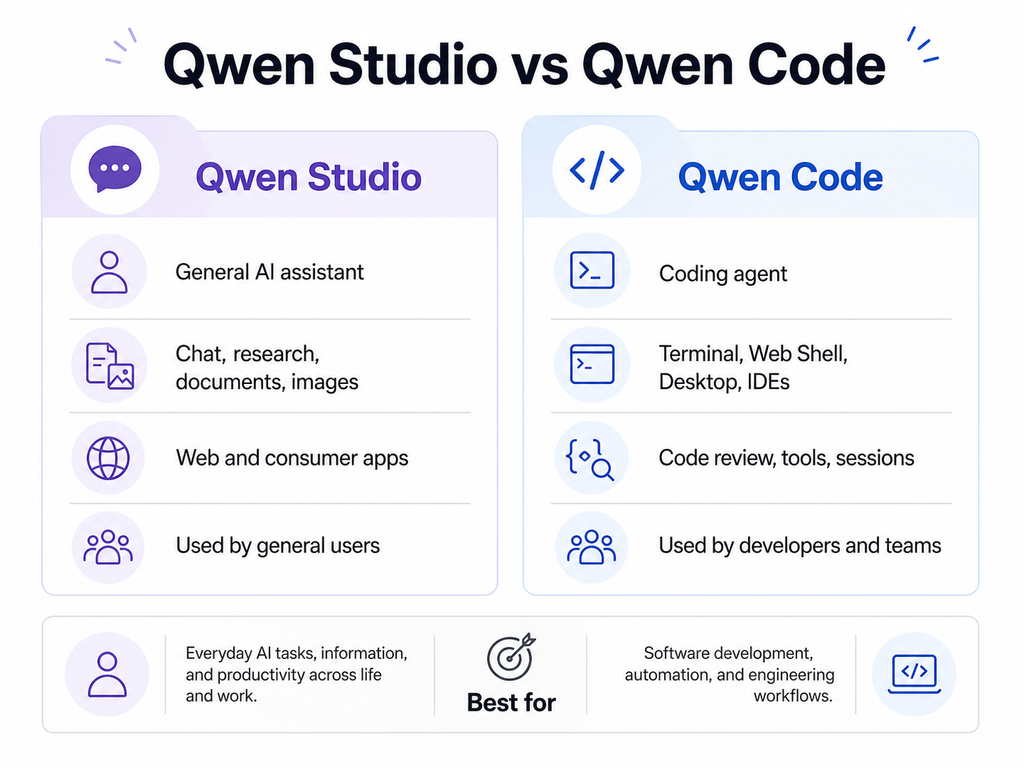
Qwen Studio and Qwen Code follow separate release cycles. Qwen Studio is the general-purpose AI assistant available through consumer-facing interfaces, while Qwen Code is an open-source coding agent with numbered releases, public release notes, terminal tools, a Web Shell, desktop applications, and IDE integrations.
This guide tracks the latest publicly verified Qwen Studio updates, Qwen Code updates, and important Qwen new features. It also explains which changes are confirmed, how to check your installed version, and why a feature may not appear for every user at the same time.
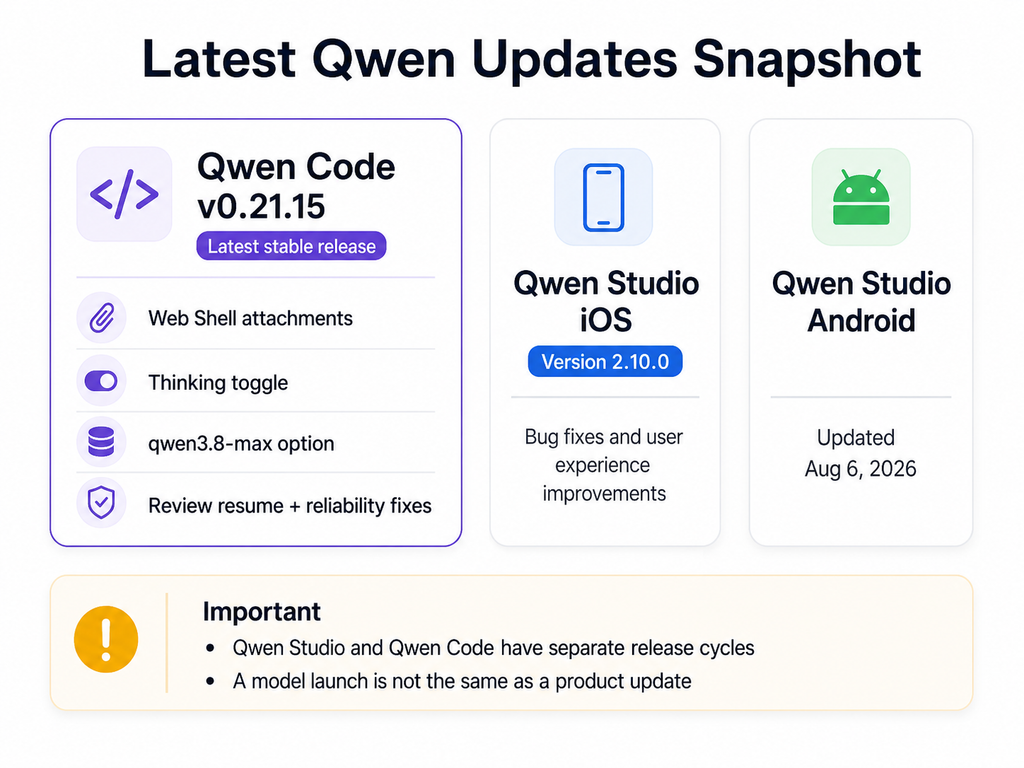
Quick answer: When this page was verified, the official Qwen Code GitHub repository listed v0.21.15, released on August 20, 2026, as the latest stable version. The Qwen Studio iOS listing showed v2.10.0, dated August 11, while the Android listing showed an update date of August 6. Qwen Studio’s public mobile notes were limited to general bug fixes and user-experience improvements, so they do not provide enough detail to connect a specific feature with a specific app version.
Independent verification note: This is an independent update tracker, not an official Qwen changelog. Time-sensitive claims are linked to Qwen, Qwen Code, GitHub, or official app-store listings. Feature availability may vary by platform, account, region, selected model, provider, or release channel.
Latest Qwen Update Snapshot
| Product or channel | Latest verified public signal | What it means |
|---|---|---|
| Qwen Studio web | No public web build number was shown in the sources reviewed | The web service can change without a manual installation. Verify capabilities from the live product and official product pages. |
| Qwen Studio for iOS | Version 2.10.0, dated August 11, 2026 | The public notes mention fixes and experience improvements, without naming individual new features. |
| Qwen Studio for Android | Google Play listed an update date of August 6, 2026 | The store listing did not provide a detailed chronological feature changelog in the source reviewed. |
| Qwen Code stable | Version 0.21.15, released August 20, 2026 | This was marked as the latest stable release on the official GitHub Releases page. |
| Qwen Code preview or nightly | Pre-release entries may appear above the stable version | A newer timestamp does not automatically make a nightly or preview build the recommended stable release. |
The snapshot above is intentionally platform-specific. A Qwen Studio mobile version, a Qwen Code CLI version, a Qwen Code Desktop version, and a Qwen model name are separate identifiers and should not be compared as though they belong to one version sequence.
Qwen Studio vs Qwen Code: What Is Being Updated?
Before reading any Qwen release note, identify which product it describes. The name “Qwen” covers models, consumer applications, developer services, and coding tools, but an update to one part of the ecosystem does not automatically update every other part.
| Area | Qwen Studio | Qwen Code |
|---|---|---|
| Primary audience | General users, students, writers, researchers, and professionals | Developers and software teams |
| Main interface | Web and consumer applications | Terminal, Web Shell, desktop app, IDEs, automation, and CI |
| Main purpose | Chat, research, document work, multimodal tasks, and content creation | Understand repositories, edit files, run commands, review code, and automate development work |
| Release tracking | Product pages, app stores, official announcements, and direct product observation | GitHub Releases, official weekly updates, documentation, and installed version |
| Manual update | Usually unnecessary for the web version; required for installed apps when automatic updates are disabled | Depends on whether it was installed through the standalone installer, npm, source, or a desktop package |
For a broader introduction to the consumer product, see our Qwen Studio guide. Developers looking for the coding agent itself should use the dedicated Qwen Code guide.
Latest Qwen Studio Updates
Qwen Studio does not have the same public changelog structure as Qwen Code
The most important limitation when researching Qwen Studio updates is that the public sources reviewed did not provide one detailed, chronological web-product changelog comparable to the Qwen Code GitHub Releases page.
The mobile listings provide version numbers and dates, but their notes are broad. For example, the iOS history for version 2.10.0 states that known issues were fixed and the user experience was optimized. That confirms a maintenance release, but it does not prove that a named tool, model, or interface feature launched in that version.
For this reason, a reliable Qwen Studio update tracker should separate three types of evidence:
- Version-verified: a version number and date are visible in an official app store.
- Documentation-verified: a capability appears on an official Qwen product page or announcement.
- Browser-observed: a feature is visible and usable in the live Qwen Studio interface during a documented test.
Current publicly documented Qwen Studio capabilities
The official Qwen Studio overview currently describes a broad product experience that includes chatbot functionality, image and video understanding, image generation, document processing, web search, and Artifacts.
Artifacts are designed for creating, referencing, and updating interactive content such as HTML and SVG material inside conversations. These capabilities describe the current product surface, but they should not all be labeled as newly launched in August 2026 unless an official dated source or a documented interface test confirms that timing.
Qwen3.8 access is a recent model-availability change
Official Qwen3.8 materials direct users to Qwen Studio to try Qwen3.8 and describe additional product-level experiences such as deep research, web development, and adaptive tool use. This is a meaningful availability update, but it is still important to distinguish the model release from a redesign of the Qwen Studio application.
A model can become available in the model selector while the surrounding interface remains largely unchanged. Likewise, Qwen Studio can add a workflow or interface control without releasing a new foundation model. For the full model timeline, use our separate Qwen release history rather than treating this page as a list of every Qwen model.
Latest verified Qwen Studio mobile status
- iOS: the official App Store listing showed version 2.10.0 dated August 11, 2026.
- Android: the official Google Play listing showed an update date of August 6, 2026.
- Public change details: the available notes were general maintenance statements rather than a feature-by-feature release log.
Users should therefore avoid assuming that every web capability is tied to the latest mobile version. Web, iOS, Android, and desktop builds may receive changes on different schedules.
Latest Qwen Code Update: Version 0.21.15
The official Qwen Code Releases page marked v0.21.15 as the latest stable release when this article was checked. It was released on August 20, 2026, and the official notes reported no known breaking changes.
This release combines user-facing Web Shell improvements with model controls, resumable review workflows, private-repository support, and reliability fixes.
| Update | What changed | Who benefits |
|---|---|---|
| Web Shell attachments | Files can be inserted through the composer or @ selection, with previews and queue management. | Users working through Qwen Code Web Shell rather than only the terminal. |
| Faster Web Shell streaming | Long, growing responses are handled more efficiently, with less expensive repeated Markdown processing. | Users running long coding or agent tasks. |
| Immediate sidebar synchronization | Session changes such as renaming or deleting are reflected more quickly. | Users managing multiple sessions and workspaces. |
| Thinking toggle | Supported Qwen hybrid models expose a simpler Thinking on-or-off control. | Users who want direct control over reasoning behavior without navigating several effort tiers. |
| Stable Qwen3.8-Max option | The stable qwen3.8-max entry was added to the Token Plan model list and can be selected through /model when the user’s plan and provider expose it. | Eligible Coding Plan or Token Plan users. |
| Resumable reviews | --resume is supported in review workflows and CI retries when the pull-request head has not changed. | Teams running long or interrupted code reviews. |
| Authenticated Git extension installs | Extensions can be installed from authenticated HTTPS Git sources with configurable credential persistence. | Teams using private repositories or private extension sources. |
| Approval interface | Tool approval and ask-user dialogs appear as in-flow sheets aligned with the conversation. | Web Shell users reviewing actions and answering agent questions. |
Important reliability fixes in v0.21.15
The release also fixed a history-retention problem in which /rewind could remove conversation history incorrectly after fast compression. It improved duplicate tool-call handling so that an ID collision is not automatically treated as a replay when the arguments are different.
These fixes may be less visible than a new command, but they matter for long-running agent sessions because reliable history and tool execution are essential when Qwen Code is editing a repository or operating through automation.
Qwen Code v0.21.14: Session Monitoring and Read-Only Advice
The immediately preceding stable release, v0.21.14, added several features that remain relevant after updating to v0.21.15:
qwen sessions ps: lists and monitors running interactive sessions, with an option for JSON output./advisor: requests an independent, read-only opinion without giving the advisor permission to modify the working tree.- Session-scoped media references: image previews can persist more reliably across refreshes.
- More resilient Web Shell sessions: prompts can be submitted during a disconnection and the interface is less likely to lose the session after a rendering error.
- Working-directory pinning: workflow agents can be assigned a specific
workingDirand remain active beyond the default lifecycle boundaries.
For teams running several agents or background tasks, session visibility and workspace isolation may be more valuable than a model-quality improvement because they make complex automation easier to inspect and control.
Recent Qwen Code Feature Timeline
Qwen Code has been releasing changes rapidly. The timeline below summarizes major product milestones rather than every merged pull request.
August 13, 2026: Local Control, longer Goal tasks, plugins, and agent teams
The official August 13 weekly update covered stable versions v0.21.7 through v0.21.11 and Qwen Code Desktop v0.2.1. Major changes included:
- Local Control: users can generate a QR code and control a computer session from a phone on the same local network.
- Goal without the fixed 50-round cutoff: long tasks can continue according to task state rather than stopping at a fixed round count.
- Evidence archiving: long Goal runs can compress and verify accumulated evidence before continuing.
- Plugin compatibility: Agent Plugins v1 and Qoder plugin packages can be installed with less conversion work.
- Repository-specific review rules: teams can define review context in
.qwen/review-context.json. /coordinate: an experimental agent-team workflow can assign read-only investigators and a single writer working in a separate worktree.
The agent-team feature was described as experimental, so production users should verify the current flag, permissions, and limitations before depending on it.
August 6, 2026: Qwen Code Desktop and visible agent workflows
The August 6 weekly update covered v0.21.2 through v0.21.6 and announced Qwen Code Desktop v0.1.0 for macOS, Windows, and Linux.
- Qwen Code Desktop: a native desktop experience built from the evolving Web Shell.
- Session Workflow: an experimental flowchart can show plans, steps, subtasks, execution state, and approval points.
display_image: supported terminals can display generated images and visual outputs directly.- Per-task sub-agent permissions: read-only work can be restricted to read-only tools, and reusable permission profiles can be stored in a project.
- Cheaper compaction: a separate lower-cost model can be selected for conversation compaction.
- Channel expansion: the ecosystem added or improved GitLab, DingTalk, and GitHub-related workflows.
Qwen Code Desktop should not be confused with a Qwen Studio desktop application. Qwen Code Desktop is a developer tool built around coding-agent sessions, repository operations, tools, and approvals.
July 30, 2026: past-session references and reusable video skills
Versions v0.21.0 and v0.21.1 expanded session reuse, skills, observability, and integrations:
- Typing
@can reference a summary of a past project session without replacing the active conversation. - Completed background agents can remain available for follow-up messages instead of being destroyed immediately.
/learncan turn supported video material into a reusable skill./statsgained measurements such as time to first token, generation duration, and tokens per second.- A GitHub Channel adapter can respond when the bot is mentioned in issues or pull requests.
- The Web Shell gained broader Git, file-preview, session, voice-input, and channel-management functionality.
July 16 and July 9, 2026: skills, fallback models, and nested sub-agents
The July 16 update introduced a broader /learn workflow that can organize knowledge from sources such as text, directories, URLs, or conversations into reusable skill files. It also improved code-review verification and substantially expanded the Web Shell.
The July 9 update added automatic model fallback chains for certain provider errors, project-level model configuration, nested sub-agent spawning, and more advanced Web Shell session organization. Together, these updates show Qwen Code moving from a simple terminal assistant toward a multi-session agent platform.
A New Qwen Model Is Not Automatically a Product Update
The phrase “Qwen new features” can refer to four different types of change:
| Change type | Example | What must be verified |
|---|---|---|
| Qwen Studio product update | A new tool, interface control, workflow, upload option, or Artifact capability | Whether it is visible in the product and on which platform or account |
| Qwen Code release | A new command, desktop feature, Web Shell change, or review workflow | The stable release number and official release notes |
| Qwen model release | Qwen3.8, a new vision model, or a new image model | Whether it is available in Studio, through an API, as open weights, or through a specific provider |
| Alibaba Cloud API update | A new model ID, endpoint, region, price, or parameter | The applicable region, API protocol, model ID, and effective date |
A model announcement should not be rewritten as “Qwen Studio added this feature” unless the source explicitly confirms Studio availability or the feature is observed in the product. Similarly, a Qwen Code release does not update the underlying model weights installed by a separate local inference system.
How to Update Qwen Studio
Qwen Studio web
The web version is delivered as an online service, so users do not install a numbered web package manually. Reload the page, start a new conversation, and inspect the available model and tool controls when an official announcement says a feature is available.
If an announced feature is missing, do not immediately assume that the announcement is incorrect. The feature may be limited to a selected model, platform, account type, region, language, experimental flag, or staged rollout.
Qwen Studio mobile and desktop applications
For installed applications, check the official application store or the official Qwen download page. Compare the installed version with the current listing and read the available notes before updating.
- Use the official Qwen Studio App Store listing for iPhone and iPad version information.
- Use the official Qwen Studio Google Play listing for Android update information.
- Use our Qwen download guide to distinguish official downloads from unrelated third-party applications using Qwen in their names.
How to Check and Update Qwen Code
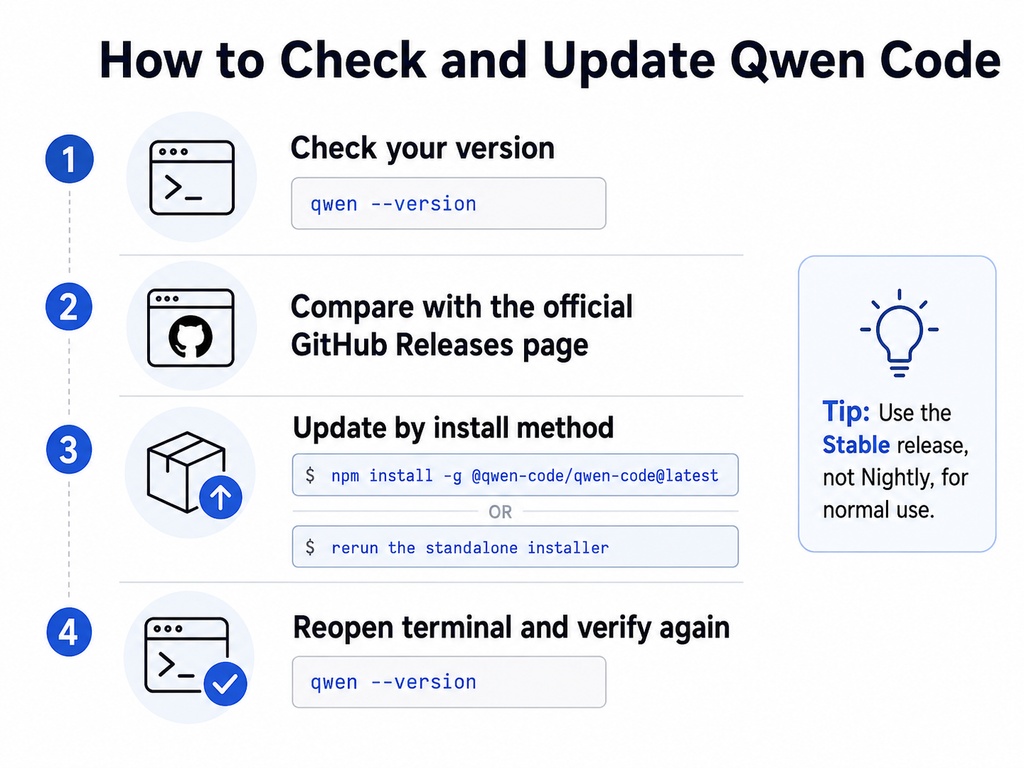
First, check the version available in your terminal:
qwen --versionThen compare it with the version marked Latest on the official GitHub Releases page. Do not select a nightly or preview entry merely because it appears above the stable release.
Update a standalone installation
The official troubleshooting documentation recommends rerunning the standalone installer when Qwen Code was installed through the standalone method.
Linux or macOS:
curl -fsSL https://qwen-code-assets.oss-cn-hangzhou.aliyuncs.com/installation/install-qwen-standalone.sh | bashWindows PowerShell:
irm https://qwen-code-assets.oss-cn-hangzhou.aliyuncs.com/installation/install-qwen-standalone.ps1 | iexRestart the terminal after the installation if the updated qwen command is not immediately available through the system path.
Update an npm installation
For a global npm installation, the current official package name and update command are:
npm install -g @qwen-code/qwen-code@latestThe current quickstart documentation requires Node.js 22 or later for the manual npm installation path.
Older articles may show npm install -g qwen-code or instruct users to authenticate with Qwen OAuth. Those instructions should not be treated as current. The official quickstart states that Qwen OAuth was discontinued on April 15, 2026, and directs users to supported Model Studio or plan-based authentication methods.
Update a source installation
If Qwen Code was built from source, pull the current source from the official repository and rebuild it with the project’s documented build command. Review dependency and configuration changes before replacing a version used in production automation.
For a complete first-time setup, use our Qwen Code installation guide. For failures after an update, use the separate Qwen Code troubleshooting guide.
Stable vs Preview vs Nightly Qwen Code Releases
| Channel | Purpose | Recommended use |
|---|---|---|
| Stable | Reviewed release intended for general use and normally marked Latest | Default choice for most users, teams, and repeatable workflows |
| Preview | Pre-release build for validating features before or around a stable release | Testing, evaluation, and compatibility checks |
| Nightly | Frequently generated build containing very recent changes | Development testing and early bug discovery, not unreviewed production adoption |
| Model preview | An early version of a Qwen model available through a provider or model selector | Model evaluation; it is separate from the Qwen Code software release channel |
A nightly build may have a recent timestamp but still use a version label that looks lower or unusual compared with the current stable release. Use the Stable or Latest designation, not page position alone, to identify the recommended public release.
Why You May Not See a New Qwen Feature
- Different product: the announcement may describe Qwen Code, while you are checking Qwen Studio.
- Different platform: the web, iOS, Android, desktop, terminal, Web Shell, and IDE experiences can differ.
- Selected model: a tool or Thinking control may only work with supported models.
- Plan or provider: a model may appear only for eligible Coding Plan, Token Plan, API, or provider configurations.
- Region or account: access may be restricted or rolled out gradually.
- Experimental setting: features such as Session Workflow or agent-team behavior may require an explicit flag.
- Outdated build: the installed CLI, desktop app, mobile app, or IDE integration may not be current.
- Old model configuration: Qwen Code may prompt eligible users to update versioned Coding Plan model templates separately from updating the CLI itself.
When reporting feature availability, record the date, platform, application version, Qwen Code version, model, provider, region, and account type. Without that context, two users can give apparently conflicting reports while both are accurately describing their own environments.
What Teams Should Do Before Updating Qwen Code
- Read the stable release’s Highlights and Breaking Changes sections.
- Record the currently installed version before updating.
- Back up user and project configuration files, especially customized model providers, hooks, extensions, skills, MCP servers, permission rules, and sub-agents.
- Test the update in a non-critical repository before changing a CI or review workflow.
- Confirm that authentication and provider settings still work.
- Recheck the selected model after accepting a model-configuration update.
- Pin a known version in controlled environments when reproducibility is more important than receiving every feature immediately.
Although v0.21.15 reported no known breaking changes, “no known breaking changes” does not guarantee that every third-party extension, provider, hook, or organization-specific workflow will behave identically.
How to Follow Future Qwen Updates
Use different sources for different update types:
- Qwen Studio product status: official Qwen Studio pages, official app listings, and documented interface tests.
- Qwen Code stable releases: the official GitHub Releases page.
- Major Qwen Code feature explanations: official Qwen Code weekly product updates.
- Installation and configuration behavior: current Qwen Code documentation.
- Qwen model launches: official Qwen blog posts, model repositories, model cards, and API documentation.
This page should be updated whenever the latest stable Qwen Code version changes, a major Qwen Studio capability is officially announced, or the public app versions change in a meaningful way. Minor nightly entries should not replace the stable-version snapshot.
Frequently Asked Questions
What is the latest Qwen Code version?
As of August 21, 2026, the official GitHub Releases page marked Qwen Code v0.21.15, released on August 20, as the latest stable version. Check the official release page before installing because Qwen Code is updated frequently.
What is the latest Qwen Studio version?
Qwen Studio does not have one version number covering every platform. When this page was verified, the iOS listing showed version 2.10.0 dated August 11, 2026, while Google Play showed an Android update date of August 6. The public web service did not expose a comparable build number in the sources reviewed.
How do I update Qwen Code?
Use the method matching the original installation. Rerun the official standalone installer for a standalone installation, or run npm install -g @qwen-code/qwen-code@latest for a global npm installation. Source installations must be pulled and rebuilt.
Does Qwen Studio update automatically?
The Qwen Studio web service can be updated server-side without a manual installation. Mobile and desktop applications depend on the platform’s update settings and may require an app-store or installer update.
Why do I not see a feature announced by Qwen?
The announcement may refer to a different product, model, platform, region, provider, plan, or experimental setting. Confirm the exact environment described by the source before treating the missing feature as an error.
Are Qwen Code nightly releases stable?
Nightly builds are pre-release builds intended for early testing. Use the release marked Latest or Stable for normal use unless you specifically need to test an unreleased change.
Is Qwen Code Desktop the same as Qwen Studio?
No. Qwen Code Desktop is a developer-facing coding-agent application built around repositories, sessions, tools, commands, and approvals. Qwen Studio is the broader consumer-facing AI assistant.
Does a new Qwen model automatically become available in Qwen Studio and Qwen Code?
No. Model release, API availability, Qwen Studio availability, Qwen Code provider configuration, and open-weight availability are separate states. Check the official announcement for each access method.
Official Sources Used
- Qwen Studio overview
- Official Qwen3.8 announcement
- Official Qwen Code GitHub Releases
- Qwen Code overview
- Qwen Code Quickstart
- Qwen Code troubleshooting and update instructions
- Qwen Code product update — August 13, 2026
- Qwen Code product update — August 6, 2026
- Qwen Code product update — July 30, 2026
- Official Qwen Studio App Store listing
- Official Qwen Studio Google Play listing
Verification status: Documentation-verified from official product pages, documentation, GitHub releases, and official app listings. No hands-on availability claim is made for a feature that was not directly tested in a logged-in Qwen Studio or Qwen Code environment.
Last verified: August 21, 2026.