
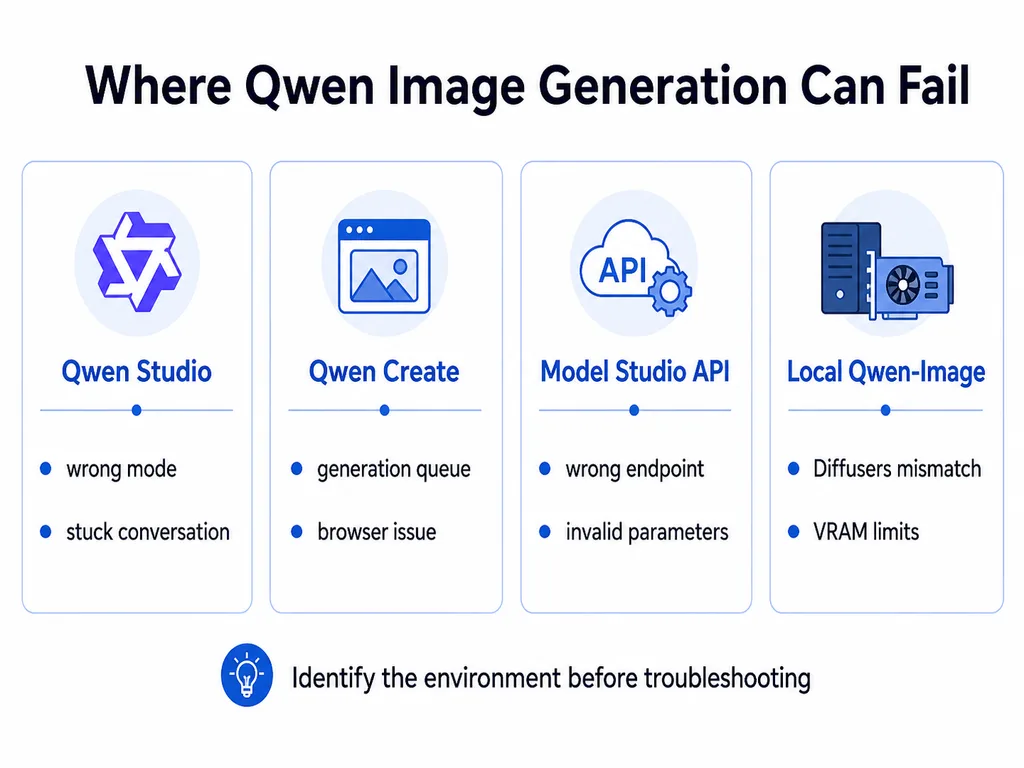
If Qwen image generation is not working, first identify whether you are using Qwen Studio, Qwen Create, the Alibaba Cloud Model Studio API, a third-party provider, or a locally hosted Qwen-Image model. Each environment has different failure causes and fixes.
Quick answer: Start a new image task, use a short English text-only prompt, remove reference images and advanced settings, and generate one standard-size image. If that succeeds, the original conversation, prompt, file, or parameter caused the problem. API users must also confirm the exact Model ID, DashScope-native endpoint, region-specific API key, synchronous or asynchronous method, and task status.
Qwen image generation can fail before a task starts, while it is processing, or after an image is generated. A missing Image Generation button, an AccessDenied response, a task stuck in PENDING, and a black image produced locally are separate problems.
Independent verification note: Try-Qwen-AI.com is an independent resource. It does not operate Qwen Studio, Qwen Create, Alibaba Cloud Model Studio, or third-party Qwen hosts. Availability and supported models can vary by product, account, region, platform, and provider.
Identify Where Qwen Image Generation Is Failing
| Environment | How it works | Common failure causes |
|---|---|---|
| Qwen Studio | Consumer AI assistant with image generation inside conversations | Wrong mode, broken conversation, account rollout, browser state, service load, or prompt moderation |
| Qwen Create | Official creative interface with separate AI Image and AI Video areas | Session, asset, generation queue, account, browser, network, or availability problem |
| Alibaba Cloud Model Studio | Hosted Qwen-Image models called through the DashScope-native API | Wrong endpoint, region, key, Model ID, access permission, parameters, rate limit, or task handling |
| Third-party API or website | A separate provider hosts or routes a Qwen image model | The provider’s own quota, queue, implementation, model version, or outage |
| Local Qwen-Image | Weights run through Diffusers, ComfyUI, SGLang, vLLM-Omni, KoboldCpp, or another runtime | Dependency mismatch, insufficient memory, wrong VAE or encoder, precision problem, workflow error, or unsupported quantization |
The official Qwen Studio overview lists image generation as a supported capability. Qwen Create Studio is a separate official creative interface with AI Image and AI Video sections.
Do not assume that both interfaces expose the same model, account limits, controls, or rollout state. The visible product label may also differ from the exact Model ID available through an API.
60-Second Qwen Image Diagnosis
- Save your prompt. Copy it before refreshing or starting another task.
- Open a new image task or conversation. Do not continue testing inside a conversation that is already stuck.
- Select the image-generation tool explicitly. Do not rely on a general text model to infer that an image tool should be called.
- Use a short English test prompt. For example:
A red apple on a plain white table, soft daylight, no text. - Remove reference images, files, text overlays, and complex instructions.
- Request one image at a standard square resolution.
- Try another browser, device, or network.
- For the API, record the HTTP status, error code, request ID, task ID, Model ID, endpoint, and region.
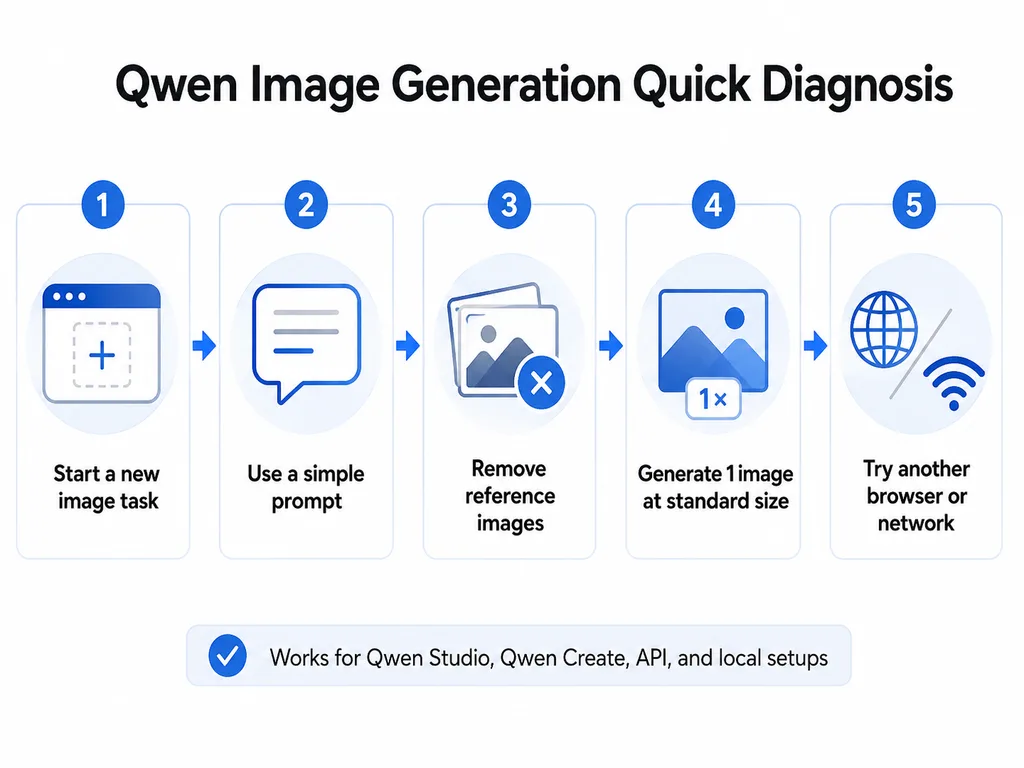
If the basic prompt works in a new task, Qwen image generation is available for that route. The original prompt, conversation, reference image, size, account state, or tool configuration is the likely cause.
Is Qwen Image Generation Down?
One failed image does not prove that all Qwen image services are down. Qwen Studio, Qwen Create, Model Studio, third-party hosts, and local runtimes are separate systems.
A wider service problem is more likely when:
- New image tasks fail with multiple simple prompts.
- The same problem occurs on multiple devices and networks.
- Several users begin reporting the same symptom at the same time.
- Model Studio returns repeated valid-request
500or503errors. - Alibaba Cloud Health Status or an official Qwen announcement reports an incident.
A local or account-specific problem is more likely when:
- A new task works but the old conversation does not.
- Text-to-image works, but one reference image fails.
- Qwen works in a private browser window.
- Another account, browser, or device works.
- Only one Model ID or third-party provider fails.
- The local runtime reports CUDA, VRAM, VAE, NaN, or dependency errors.
For Model Studio availability, check the official Alibaba Cloud Health Status. It does not necessarily represent every Qwen Studio or third-party interface.
Qwen Studio and Qwen Create Fixes
Start a new image task
A conversation can retain its selected mode, uploaded assets, and previous tool state. If Qwen is locked into image generation, repeatedly returns the same error, or cannot return to text mode, save the important context and begin a new conversation.
Do not use a long-running text conversation as the only place where an important image task exists. Keep the final prompt and source assets separately.
Select the correct creative mode
If Qwen explains what an image would look like but does not create one, the request may have been sent to a normal chat model instead of the image-generation tool.
- In Qwen Studio, select the available Image Generation option or creative tool.
- In Qwen Create, open the AI Image area rather than AI Video or Assets.
- Start a new task after changing modes.
- Use an explicit instruction such as:
Generate an image, not a text description.
Use a minimal test prompt
Test with one subject, one environment, one style, and no embedded text:
A small blue ceramic cup on a white desk, soft window light, realistic product photograph, no text.If the simple prompt works, add complexity gradually. This isolates whether the failure is caused by the service or by one part of the prompt.
Test in English
The current Model Studio Qwen-Image API documentation explicitly supports Chinese and English prompts. Other languages may work through a product interface, but English is the safest diagnostic language when troubleshooting an unexplained generation failure.
After the test succeeds, translate or rebuild the production prompt carefully. Avoid sending an automatically translated prompt containing malformed punctuation, hidden formatting, or conflicting instructions.
Remove reference images
Text-to-image and image editing use different request paths and validation rules. Test pure text-to-image first. Then add one reference image that:
- Opens normally on your device.
- Uses a common format such as JPG, PNG, or WebP.
- Is not corrupted or password-protected.
- Has a reasonable resolution and file size.
- Does not depend on a private or expired URL.
Use the dedicated Qwen file upload troubleshooting guide when the problem begins during upload rather than generation.
Test the browser and network
- Reload the page once.
- Open Qwen in a private browser window.
- Disable script blockers or privacy extensions temporarily.
- Try another supported browser.
- Try another trusted network, such as a mobile hotspot.
- Update the installed Qwen application when using mobile or desktop.
If the result works in a private window, investigate browser extensions or stored site data before deleting all cookies or resetting the entire browser.
Image Generation Option Missing
The Image Generation option can be missing because of:
- The selected product or conversation mode.
- A platform difference between web, mobile, and desktop.
- A staged feature rollout.
- Account, age, region, or policy restrictions.
- An outdated application.
- A temporary interface or account-state problem.
Compare the same account in both Qwen Studio and Qwen Create. Do not assume a missing feature in one interface means that all official Qwen image generation is unavailable.
Qwen Returns Text Instead of an Image
This usually means the request reached a text model or the image-generation tool was not invoked.
- Open the dedicated AI Image or Image Generation interface.
- Start a new task after switching modes.
- Use a direct prompt beginning with
Generate an image of... - Do not ask the model to “write a prompt” when you want the image itself.
- In an agent integration, register image generation as a tool rather than using the image model as a normal chat model.
Alibaba Cloud documents that Qwen image-generation models use the DashScope-native API and cannot be used directly as an OpenAI-compatible reasoning model. In an agent, image generation should be wrapped as a callable tool.
Qwen Image Generation Stuck or Taking Too Long
Image generation normally takes longer than a short text response. A task can also wait in a queue before inference begins.
Possible causes
- Temporary model or service load.
- Multiple high-resolution outputs.
- A long or highly complex prompt.
- Prompt rewriting through
prompt_extend. - Several input images or a complex edit.
- Repeated polling or repeated task creation.
- A browser or proxy timeout.
- A third-party provider queue.
Recommended response
- Wait for the current task instead of submitting duplicates.
- Test one image at a lower or standard resolution.
- Shorten the prompt.
- Disable prompt extension when your prompt is already detailed or latency-sensitive.
- For asynchronous API calls, poll the existing task ID instead of creating a new task.
- Set a final client-side timeout and log the unresolved task for investigation.
The official API documentation recommends a reasonable polling interval and warns against creating duplicate asynchronous tasks.
Generation Failed or Blank Image
| Symptom | Likely cause | First action |
|---|---|---|
| Generation Failed with no image | Moderation, invalid parameter, capacity, account, or internal model error | Record the full error and retry one simple compliant prompt. |
| Blank preview | Browser rendering, expired URL, blocked storage domain, or incomplete response | Open the image URL directly and test another browser or network. |
| Black image from a local model | Precision, runtime, VAE, encoder, quantization, or kernel problem | Run the official workflow with matching components and current dependencies. |
| Task says SUCCEEDED but no visible image | Application failed to read or display the returned URL | Inspect the raw response and download the returned URL immediately. |
| Task says FAILED | The task response should include a code and message | Use the task-level error rather than resubmitting blindly. |
| Image existed and later disappeared | Temporary output URL expired | Save generated images to permanent storage as soon as they are returned. |
Common Qwen Image Symptoms and Causes
| Message or behavior | Meaning | Fix |
|---|---|---|
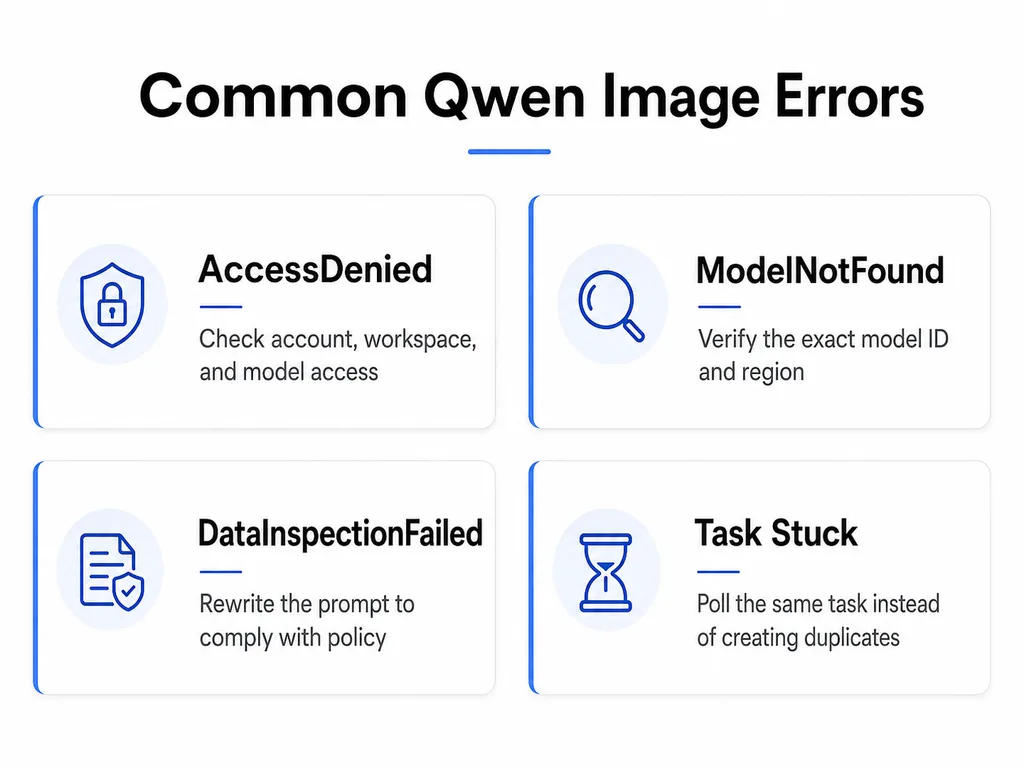
DataInspectionFailed | Input or output triggered content moderation | Remove or rewrite potentially non-compliant content and retry. |
AccessDenied | No permission, wrong workspace, unavailable model, or preview access not granted | Verify account, workspace, region, and model activation. |
ModelNotFound | Wrong Model ID, unsupported region, or service not activated | Copy the exact Model ID from the regional Model List. |
Unsupported model for OpenAI compatibility mode | Image model was sent to an OpenAI-compatible endpoint | Use the DashScope-native multimodal-generation or image-synthesis endpoint. |
current user api does not support synchronous calls | An async-only route was called without the async header | Use X-DashScope-Async: enable. |
Current user api does not support asynchronous calls | The selected model supports only synchronous calls | Remove the async header and use the synchronous endpoint. |
num_images_per_prompt must be 1 | The selected model allows only one output image | Set n to 1. |
messages length only support 1 | Too many message objects were sent | Send one user message in the required structure. |
image format error | Reference image was not supplied as a valid URL or Base64 value | Correct the image input format. |
download image failed | The service cannot retrieve the reference image URL | Use a public, unexpired URL or Base64 input. |
429 | Rate or burst limit | Reduce concurrency and retry with backoff. |
500 or 503 | Temporary server, inference, or model-availability problem | Retry a limited number of times and keep the request ID. |
Qwen Image API Troubleshooting
Before debugging parameters, confirm which Qwen image model and access method you are using.
| Model family | Call type | Important restrictions |
|---|---|---|
qwen-image-2.0-pro | Synchronous | Recommended higher-quality generation and editing; supports 1–6 outputs. |
qwen-image-2.0 | Synchronous | Accelerated generation and editing; supports 1–6 outputs. |
qwen-image-max | Synchronous | Text-to-image; fixed preset sizes; one output. |
qwen-image-plus | Synchronous or asynchronous | Preset sizes; one output; asynchronous workflow supported. |
qwen-image | Synchronous or asynchronous | Base Qwen-Image route; asynchronous workflow supported. |
qwen-image-3.0-pro | DashScope-native synchronous API | Currently limited preview; access must be approved. |
Use the current official Qwen-Image API reference and Qwen Image 3.0 API reference. Model availability differs by region.
Use the Correct API Protocol and Endpoint
Qwen image-generation models are not normal chat-completion models. Alibaba Cloud states that Qwen-Image models use the DashScope-native API and do not support direct OpenAI-compatible access.
This request path is wrong for Qwen-Image:
https://example.maas.aliyuncs.com/compatible-mode/v1/chat/completionsUse the image model’s documented DashScope-native route, such as the workspace-specific multimodal-generation endpoint for synchronous calls.
If an OpenAI Agents SDK workflow must create images, use a compatible text model as the reasoning model and expose Qwen image generation as a function tool.
Synchronous vs Asynchronous Calls
A common Qwen image generation error comes from using the wrong processing mode.
Synchronous models
Current qwen-image-2.0, qwen-image-2.0-pro, and qwen-image-max workflows use synchronous calls. Remove the X-DashScope-Async header when the selected model does not support async.
Asynchronous models
Only qwen-image-plus and qwen-image currently support the documented Qwen-Image asynchronous workflow.
An async HTTP request must include:
X-DashScope-Async: enableThe first request returns a task_id. Poll that task until its state changes from:
PENDING → RUNNING → SUCCEEDED or FAILEDDo not create another image task every time the polling response remains PENDING.
Region, Workspace, and API Key Errors
Alibaba Cloud’s China (Beijing) and Singapore deployments use different API keys and endpoints. They cannot be mixed.
- Confirm the account is using the intended Alibaba Cloud site.
- Confirm the API key belongs to the same region as the endpoint.
- Confirm the correct Workspace ID is present in the domain.
- Confirm the account or RAM user belongs to the workspace.
- Confirm the model is supported in that region.
- Do not reuse a Coding Plan or unrelated service Base URL.
A wrong region can produce authentication, workspace, model-not-found, or service errors that appear unrelated to geography.
Qwen Image 3.0 AccessDenied
The current Model Studio API documentation lists qwen-image-3.0-pro as a limited-preview model. You must apply for access through the Model Gallery before calling it.
If qwen-image-3.0-pro returns Access Denied or appears unavailable:
- Confirm that preview access has been approved.
- Confirm the approval applies to the same account and workspace.
- Confirm the model is available in the selected region.
- Use the exact
qwen-image-3.0-proModel ID. - Test a generally available model such as
qwen-image-2.0-proto verify the rest of the integration.
Do not assume that access to Qwen Studio or Qwen Create automatically grants API preview access.
ModelNotFound and Unsupported Model Errors
A ModelNotFound response can mean:
- The Model ID is misspelled.
- The model is not offered in the selected region.
- Model Studio is not activated for the account.
- The model requires separate approval.
- The request uses an unsupported API protocol.
- A dated model or alias has changed lifecycle status.
Copy the Model ID from the official regional Model List rather than guessing from a product label shown in Qwen Studio.
Invalid size, n, messages, and Prompt Parameters
Invalid size
The qwen-image-2.0 series supports custom dimensions whose total pixel count falls within the documented range between 512×512 and 2048×2048 total pixels.
The older Max and Plus families support only preset sizes such as:
1664*9281472*11041328*13281104*1472928*1664
Use 1024*1024 or another documented size for a diagnostic request rather than testing an unusual resolution first.
Invalid n
The qwen-image-2.0 series can return one to six images. The Qwen Image Max and Plus text-to-image models are documented with n fixed at 1.
When you receive:
num_images_per_prompt must be 1set:
"n": 1Invalid messages
The synchronous Qwen-Image text-to-image request supports a single-turn message structure. Use exactly one user message containing one text object.
Do not send a full chat history to the image-generation endpoint.
Prompt length
The current API documentation lists a prompt limit of up to approximately 1,300 tokens for the Qwen Image 2.0 series and approximately 800 tokens for the other Qwen-Image models. Excess prompt tokens may be truncated.
A truncated prompt may still produce an image, but important instructions near the end can disappear. Keep the most important subject, composition, text, and exclusions near the beginning.
Reference Image Download and Format Errors
When editing an image, the API must be able to read every reference image.
| Error | Cause | Fix |
|---|---|---|
image format error | Image was not supplied as a valid URL or Base64 value | Use a supported public URL or a correctly formatted data URI. |
Invalid image format or corrupted file | Unsupported or damaged file | Open and re-export the image as JPG, PNG, or WebP. |
download image failed | The service cannot retrieve the URL | Use a public HTTPS URL without login, expiring cookies, or IP restrictions. |
Failed to download input files | Network or storage access failure | Test the URL from an unauthenticated browser and another network. |
| Invalid resolution | Image dimensions fall outside the model’s limits | Resize the image while preserving a reasonable aspect ratio. |
| Missing image or text | The editing request does not contain the required input type | Send both the reference image and editing instruction. |
A URL that works in your logged-in browser may still be inaccessible to Model Studio. Use a genuinely public link or Base64 when appropriate.
DataInspectionFailed and Content Moderation
DataInspectionFailed means that the input or generated output triggered a content-moderation rule.
To troubleshoot it:
- Remove sexual, violent, illegal, deceptive, or otherwise restricted details.
- Remove unnecessary names of real people, brands, or copyrighted characters.
- Review both
promptandnegative_prompt. - Replace ambiguous phrases with neutral, literal descriptions.
- Test a harmless baseline prompt to confirm that the account and model work.
Do not attempt to evade safety filters. Rewrite the task so that it complies with the applicable product policies and laws.
Async Task Pending, Running, or Failed
For models that support asynchronous generation, task creation and result retrieval are separate operations.
| Task status | Meaning | Action |
|---|---|---|
PENDING | Task is queued | Continue polling the same task ID at a reasonable interval. |
RUNNING | Model is processing the image | Wait and avoid duplicate submissions. |
SUCCEEDED | Generation completed | Read the result URL and save the image immediately. |
FAILED | Generation ended with an error | Read the task-level code and message before retrying. |
| Unknown or not found | Wrong task ID, region, workspace, or expired task data | Verify the original task response and endpoint. |
The official documentation recommends polling at a reasonable interval, such as approximately every 10 seconds. Aggressive polling can trigger additional rate limiting.
Store the following data when creating a task:
- Task ID.
- Request ID.
- Model ID.
- Region and workspace.
- Submission time.
- A hash or internal ID for the prompt and assets.
Expired Generated Image URLs
Qwen-Image API result URLs are temporary. Alibaba Cloud states that generated image URLs and async task data are retained for approximately 24 hours.
Do not store the temporary URL as the permanent image record. Your application should:
- Download the image immediately after the task succeeds.
- Validate the HTTP status and file content.
- Store it in your own persistent object storage.
- Save the permanent URL in your database.
- Retain the task and request metadata for debugging.
If an old result link stops working after a day, that is expected expiration behavior rather than a new generation failure.
429, 500, and 503 Errors
| Status | Meaning | Recommended response |
|---|---|---|
429 | Request frequency, sudden burst, or account-level capacity limit | Reduce concurrency and retry with exponential backoff and jitter. |
500 | Internal model or algorithm error | Retry a limited number of times and retain the request ID. |
503 | Model temporarily unavailable or serving resources saturated | Retry later or use a tested supported fallback. |
| Repeated timeout | High complexity, large image, slow service, or client timeout | Lower resolution, simplify the task, extend a reasonable timeout, or retry later. |
Rate limits are applied at the account and model level. Multiple API keys or workspaces under the same root account may share the same limit.
Use the dedicated Qwen API rate-limits guide for queueing, concurrency, and quota planning.
Python Diagnostic Example
This example tests a simple synchronous qwen-image-2.0-pro request, prints useful error data, and downloads the generated image immediately.
import os
from pathlib import Path

import dashscope
import requests
from dashscope import MultiModalConversation

api_key = os.getenv("DASHSCOPE_API_KEY")
base_url = os.getenv("QWEN_IMAGE_BASE_URL")
model = os.getenv("QWEN_IMAGE_MODEL", "qwen-image-2.0-pro")

if not api_key or not base_url:
    raise RuntimeError(
        "DASHSCOPE_API_KEY and QWEN_IMAGE_BASE_URL must be configured."
    )

# Use the workspace-specific DashScope native endpoint for your region.
dashscope.base_http_api_url = base_url.rstrip("/")

messages = [
    {
        "role": "user",
        "content": [
            {
                "text": (
                    "A small blue ceramic cup on a plain white desk, "
                    "soft window light, realistic product photograph, no text."
                )
            }
        ],
    }
]

response = MultiModalConversation.call(
    api_key=api_key,
    model=model,
    messages=messages,
    result_format="message",
    stream=False,
    n=1,
    size="1024*1024",
    prompt_extend=False,
    watermark=False,
)

request_id = getattr(response, "request_id", None)
status_code = getattr(response, "status_code", None)
error_code = getattr(response, "code", None)
error_message = getattr(response, "message", None)

if status_code != 200:
    raise RuntimeError(
        "Qwen image generation failed. "
        f"status={status_code}, code={error_code}, "
        f"message={error_message}, request_id={request_id}"
    )

content = response.output.choices[0].message.content
image_url = content[0]["image"]

output_path = Path("qwen-image-test.png")

download = requests.get(image_url, timeout=60)
download.raise_for_status()
output_path.write_bytes(download.content)

print(
    {
        "request_id": request_id,
        "model": model,
        "image_url": image_url,
        "saved_to": str(output_path.resolve()),
    }
)
If this test fails, use the returned status, code, message, and request_id to diagnose the exact problem.
Do not replace the DashScope-native endpoint with an OpenAI-compatible Chat Completions URL. Install the current DashScope SDK before testing.
Local Qwen-Image Troubleshooting
Local Qwen-Image failures are usually runtime or hardware problems rather than an outage of Qwen Studio.
The official Qwen-Image repository currently recommends:
transformers>=4.51.3.- A current version of Diffusers.
- Matching model, VAE, text encoder, and pipeline components.
- The correct pipeline class for generation or editing.
The repository’s current text-to-image quick start uses Qwen/Qwen-Image-2512. Hosted API names such as qwen-image-2.0-pro are not automatically downloadable repository IDs.
QwenImagePipeline and Diffusers Errors
An error such as:
AttributeError: module diffusers has no attribute QwenImagePipelinenormally indicates that the installed Diffusers package predates Qwen-Image support or that incompatible environments are being mixed.
- Activate the intended Python environment.
- Print the installed Python, Torch, Transformers, and Diffusers versions.
- Upgrade using the method currently recommended in the official repository.
- Restart the Python process or notebook kernel.
- Run the official minimal example before loading custom LoRAs or nodes.
python -c "import torch, transformers, diffusers; print(torch.__version__, transformers.__version__, diffusers.__version__)"A package upgrade inside one environment does not fix an application that runs from another Python installation.
Black Images, NaN, VRAM, and ComfyUI
Community reports of black images, NaN values, or unexplained local failures have been associated with runtime-specific precision, kernel, memory, and component problems. These reports should not be treated as one universal Qwen-Image bug.
Use an isolation sequence
- Use the official or runtime-provided Qwen-Image workflow.
- Disable custom nodes and experimental attention extensions.
- Generate one standard-resolution image.
- Use the recommended VAE and text encoder for the exact model.
- Check whether the GPU supports the selected precision.
- Monitor GPU VRAM, system RAM, and swap during model loading and generation.
- Reduce resolution, batch size, and simultaneous jobs.
- Test without LoRAs, ControlNet-style additions, or third-party quantizations.
- Inspect the console log rather than relying only on a UI message such as FAILED.
Insufficient VRAM does not always produce a clear out-of-memory message. A runtime may offload, stall, terminate, or return an incomplete image. Conversely, some optimized runtimes can run Qwen-Image with aggressive layer-by-layer offloading, so one universal VRAM minimum would be misleading.
Use the dedicated local Qwen troubleshooting guide for ComfyUI, Diffusers, vLLM-Omni, SGLang, and hardware-specific configuration.
When Generation Works but the Result Is Wrong
An inaccurate image is not the same as a failed generation. The model may successfully return an image that contains:
- Misspelled text.
- Missing objects.
- Incorrect colors or layout.
- Inconsistent faces or characters.
- Unwanted extra details.
- Changes outside the requested editing area.
Improve the result by:
- Using one clear subject and composition.
- Putting exact visible text inside quotation marks.
- Reducing the number of text blocks.
- Specifying layout and hierarchy explicitly.
- Using a suitable aspect ratio.
- Disabling
prompt_extendwhen precise control is more important than creative expansion. - Using image editing to correct one region instead of regenerating the full image.
Use the separate Qwen image generator guide for prompting and quality optimization. This page focuses on technical failure and unavailable generation.
What Not to Do
- Do not repeatedly submit the same image task. You may create duplicate jobs or trigger rate limits.
- Do not declare Qwen down from one third-party website failure.
- Do not send Qwen image models to a Chat Completions endpoint.
- Do not mix Beijing and Singapore API keys or endpoints.
- Do not assume preview access is included with a normal account.
- Do not poll async tasks several times per second.
- Do not store temporary output URLs as permanent assets.
- Do not retry a moderation error without changing the prompt.
- Do not install random model, VAE, and text-encoder files from different releases.
- Do not publish API keys, private images, or sensitive prompts in issue reports.
How to Report the Problem
Include enough information to reproduce the issue without exposing secrets.
- Date, time, and time zone.
- Qwen Studio, Qwen Create, Model Studio, third-party provider, or local runtime.
- Exact model label or Model ID.
- Region, Workspace ID, and endpoint type without revealing credentials.
- HTTP status, error code, error message, and request ID.
- Task ID and task status for asynchronous calls.
- Whether a simple text-to-image request works.
- Whether the error requires a particular reference image.
- Browser, app, SDK, Diffusers, Transformers, ComfyUI, or runtime version.
- GPU, VRAM, system RAM, operating system, and precision for local generation.
- A minimal compliant prompt that reproduces the problem.
Remove API keys, personal data, private image URLs, and confidential prompts before sharing logs.
Frequently Asked Questions
Why is Qwen image generation not working?
The cause can be the wrong Qwen mode, a broken conversation, unavailable account feature, prompt moderation, service load, an invalid API configuration, an inaccessible reference image, or a local runtime problem. Start a new text-to-image task with a short prompt and no reference image.
Is Qwen image generation down?
A single failed request cannot confirm a global outage. Test Qwen Studio and Qwen Create separately, try another device or network, and check Alibaba Cloud Health Status when using Model Studio.
Why does Qwen describe an image instead of creating it?
The request probably reached a normal text model rather than the image-generation tool. Open the dedicated Image Generation or AI Image interface and explicitly ask Qwen to generate the image rather than write a prompt or description.
Why is the Qwen Image Generation option missing?
The option may differ by product, account, region, platform, app version, or rollout. Compare Qwen Studio with Qwen Create and update the installed application.
Why is Qwen image generation stuck?
The task may be queued, processing a complex prompt, generating multiple high-resolution images, or waiting on an input image. API users should poll the existing task ID at a reasonable interval instead of creating duplicate jobs.
What does DataInspectionFailed mean?
It means that the prompt, negative prompt, input image, or generated output triggered a content-moderation rule. Rewrite the request so that it complies with the applicable policies.
Why does qwen-image-3.0-pro return Access Denied?
Qwen Image 3.0 Pro is currently documented as a limited-preview Model Studio model. Confirm that access was approved for the same account, workspace, and region.
Why does Qwen Image not work with the OpenAI-compatible API?
Alibaba Cloud documents Qwen image-generation models as DashScope-native models. Use the documented multimodal-generation or image-synthesis endpoints rather than OpenAI-compatible Chat Completions.
Why does the API say synchronous calls are not supported?
You are calling an asynchronous-only route without the required X-DashScope-Async: enable header. Confirm that the selected model supports asynchronous generation.
Why does the API say asynchronous calls are not supported?
The selected model supports only synchronous generation. Remove the async header and use the synchronous DashScope-native endpoint.
Why does my Qwen image task stay Pending?
The task may still be queued. Continue polling the same task ID at a reasonable interval. Do not submit a duplicate task unless the original reaches FAILED or your final operational timeout is exceeded.
Why did the generated Qwen image URL stop working?
Model Studio image result URLs expire after approximately 24 hours. Download the image immediately and save it to your own persistent storage.
Are failed Qwen image API calls billed?
Alibaba Cloud states that failed calls and processing errors are not billed and do not consume the new-user free quota. Successfully generated images are billed according to the selected model.
Can I use Arabic prompts with the Qwen Image API?
The current official API documentation explicitly lists Chinese and English as supported prompt languages. Other languages may produce results, but use English for troubleshooting and for the most predictable documented behavior.
Why does local Qwen Image produce a black image?
Black output can result from precision, GPU kernel, VAE, encoder, quantization, memory, or runtime incompatibility. Test the official workflow with matching components, current dependencies, one image, and no custom nodes or LoRAs.
How do I fix QwenImagePipeline not found?
Upgrade Diffusers using the installation method currently recommended in the official Qwen-Image repository, restart the Python process, and confirm that the application runs from the environment you upgraded.
How many images can Qwen Image generate per request?
It depends on the Model ID. The current Qwen Image 2.0 series supports one to six outputs, while Qwen Image Max and Plus text-to-image models are documented with one output per request.
Official Sources Used
- Official Qwen Studio overview
- Official Qwen Create Studio
- Qwen-Image API reference
- Qwen Image Generation and Editing 3.0 API reference
- Model Studio text-to-image guide
- Qwen image editing guide
- Model Studio error codes
- Model Studio rate-limiting documentation
- Model Studio image-generation billing information
- Official Qwen-Image repository and local quick start
- Alibaba Cloud Health Status
Verification status: Qwen Studio and Qwen Create availability, current API models, sync and async behavior, parameter restrictions, preview access, error meanings, rate limits, output URL lifetime, and billing rules were checked against official Qwen and Alibaba Cloud sources. Local runtime troubleshooting also uses the official Qwen-Image repository; black-image, NaN, and integration symptoms can remain runtime-specific.
Try-Qwen-AI.com is an independent Qwen resource. It is not affiliated with, endorsed by, or operated by Alibaba Group, Alibaba Cloud, Qwen Create, or the Qwen team.
Last verified: August 22, 2026.