
A slow Qwen response, a Server Busy message, and a response that stops halfway do not necessarily have the same cause. The problem may be a temporary Qwen service issue, a long conversation, a rate limit, a browser or network problem, an interrupted stream, an output limit, Qwen Code configuration, or the provider hosting a local or third-party Qwen model.
Quick answer: Save your prompt, open a new text-only conversation, and send a short test message. If the new chat works, the original conversation, attachment, or tool workflow is likely the problem. If Qwen fails across new chats, models, devices, and networks, a service or provider problem becomes more likely. API users should inspect the HTTP status, error code, request ID, and
finish_reasoninstead of relying only on the visible message.
This guide separates Qwen Studio, Alibaba Cloud Model Studio, Qwen Code, third-party APIs, and locally hosted Qwen models. A failure in one of these environments does not prove that every Qwen service is down.
Independent verification note: Try-Qwen-AI.com is an independent Qwen resource. It does not operate Qwen Studio, Alibaba Cloud Model Studio, Qwen Code, or third-party Qwen infrastructure. Status and availability can vary by model, region, platform, account, and provider.
Is Qwen Down Right Now?
At the time this page was verified on August 22, 2026, independent monitoring pages did not indicate a broad Qwen outage. That observation is not a guarantee that every Qwen product, feature, model, or region was working normally.
A third-party status monitor can report that Qwen is operational while an individual user still experiences:
- A model-specific capacity problem.
- A regional API issue.
- A broken conversation or attachment.
- A Qwen Studio feature that is temporarily unavailable.
- A third-party provider outage.
- A browser, app, account, or network problem.
You can use the independent StatusGator Qwen monitor as one secondary signal. Do not use it as the only test, because it cannot necessarily distinguish Qwen Studio from Model Studio, Qwen Code, individual model IDs, or third-party hosts.
The most reliable question is not only “Is Qwen down?” but:
Which Qwen product, model, provider, region, account, and conversation are failing?
60-Second Qwen Diagnosis
- Copy and save your current prompt. Do not keep pressing Regenerate without preserving the input.
- Open a new conversation. Send a short text-only prompt such as:
Reply with the word OK. - Try another available model. This helps distinguish a model-specific problem from a wider service problem.
- Remove files, images, web search, and other tools. Test the basic chat path first.
- Reload Qwen once. If the problem remains, test in a private browser window or another device.
- Try another network. A mobile hotspot can help identify a DNS, proxy, firewall, or local connection problem.
- For API calls, record the HTTP status and provider error code. A
429requires a different response from a400or503.
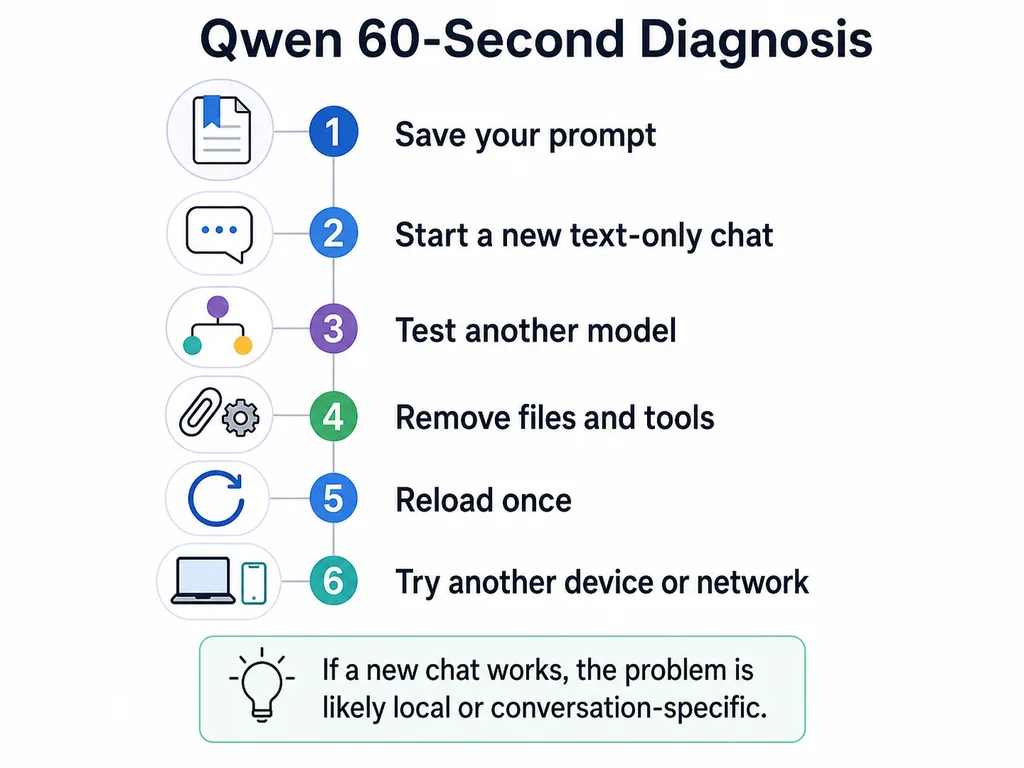
If a short prompt works in a new chat, Qwen is not completely down for your account. Focus on the old conversation, context length, attachments, selected model, or tool workflow.
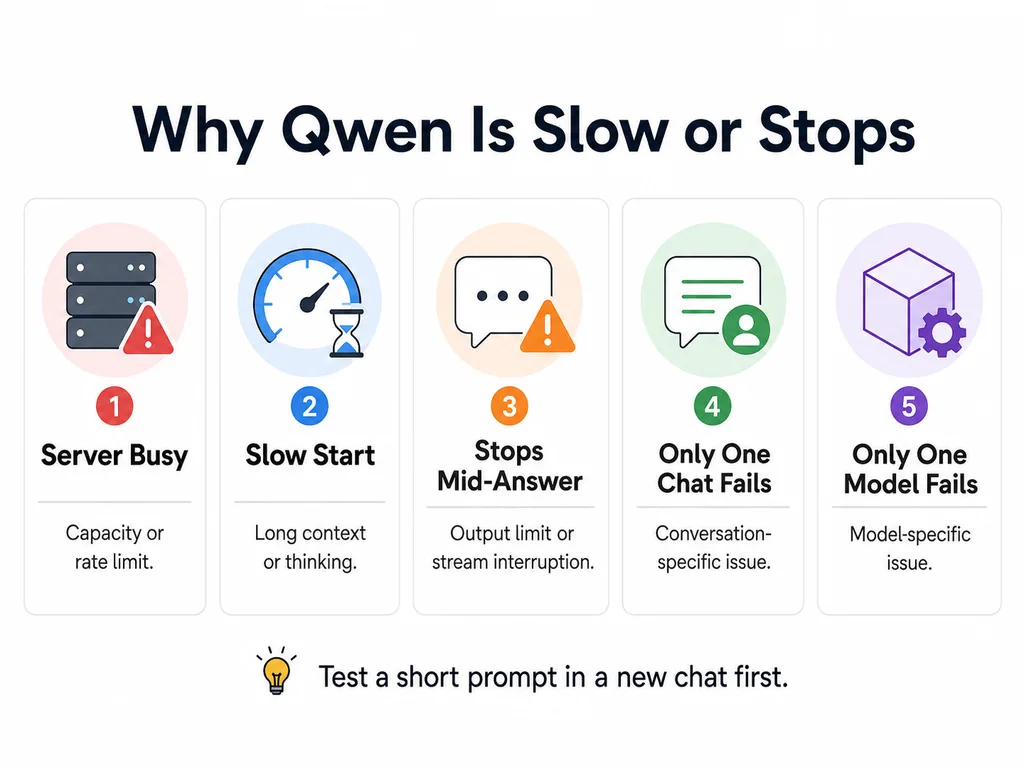
What Each Qwen Symptom Usually Means
| Symptom | Common scope | Best first test |
|---|---|---|
| Server Busy or Too Many Requests | Model capacity, account quota, API rate limit, or overloaded third-party host | Wait briefly, reduce request frequency, and test another model or provider path. |
| Long delay before any text appears | Service load, long input, thinking mode, tool execution, file processing, or slow local inference | Start a new text-only chat and compare time to first token. |
| Text begins, then freezes | Interrupted streaming connection, proxy buffering, client timeout, or network instability | Reload once, test another network, and inspect whether the stream completed. |
| Answer ends in the middle of a sentence | Output-token limit, a stop sequence, client truncation, or stream interruption | Ask Qwen to continue and inspect finish_reason when using the API. |
| Blank or empty response | Client integration problem, invalid message format, unsupported modality, moderation, or provider bug | Send a plain-text request directly to the selected model. |
| Old chat is slow but a new chat is fast | Long conversation history, large context, repeated files, or accumulated tool results | Continue in a summarized new conversation. |
| Only one model fails | Model-specific capacity, availability, region, configuration, or feature support | Test another model through the same product and account. |
| Only one browser or device fails | Extension, stored site data, app version, firewall, proxy, or local network | Use a private window or another device. |
| Local Qwen is slow | Hardware, quantization, context, runtime, offloading, concurrency, or thinking configuration | Measure first-token latency and tokens per second with a short prompt. |
How to Tell a Global Qwen Outage from a Local Problem
A wider outage is more likely when:
- New and old conversations both fail.
- Several Qwen models fail in the same way.
- The problem occurs on multiple devices and networks.
- Other users begin reporting the same symptom at the same time.
- The API returns repeated
500,503, or capacity errors across otherwise valid requests. - An official Qwen channel acknowledges a service issue.
A local or session-specific issue is more likely when:
- A new chat works normally.
- Only one uploaded file or tool workflow fails.
- Qwen works in a private window but not your normal browser profile.
- Another device works on the same account.
- The problem disappears on a different network.
- Only a third-party provider or free demo is busy.
A Hugging Face Space, OpenRouter route, QwenCloud endpoint, Alibaba Cloud region, and local Ollama server are separate serving environments. Always identify the provider before declaring that “Qwen is down.”
Quick Fixes for Qwen Studio
1. Start a clean text-only conversation
This is the most informative first test. It removes conversation history, uploaded files, tool state, and previous errors from the request.
Use a short prompt:
Reply with exactly: Qwen test passedIf that works immediately, the main service and account are available. Return to the original task using a summarized prompt rather than copying the full chat history.
2. Temporarily remove tools and attachments
Disable or avoid:
- Web search.
- Deep research.
- Code execution.
- Large PDF or spreadsheet uploads.
- Image and video analysis.
- Image or video generation.
These workflows can include file transfer, parsing, search, external tools, or asynchronous generation. A basic chat may work while one of those stages is delayed.
3. Switch models once
If another available Qwen model responds normally, the original model may be under heavier load or temporarily unavailable. Do not assume the replacement has identical vision, tool, output, or reasoning capabilities.
4. Reload without repeatedly resending the prompt
Repeatedly clicking Regenerate can create additional queued requests and make it harder to determine which request succeeded. Save the prompt, reload once, and submit one clean request.
5. Test a private browser window
A private window temporarily removes most stored site state and many extensions from the test. If Qwen works there, investigate:
- Ad blockers or script blockers.
- Privacy extensions.
- Antivirus web inspection.
- Corporate proxy or TLS inspection.
- Corrupted site data.
Do not delete every browser cookie as the first step. A private-window comparison is safer and more diagnostic.
6. Test another network
Use a mobile hotspot or another trusted connection. If Qwen works there, inspect the original network’s DNS, firewall, proxy, VPN, packet loss, or content filtering.
A VPN is not a universal Qwen fix. It can sometimes route around a network problem, but it can also add latency, trigger account-security checks, or use a region where a feature is unavailable.
7. Update the application
If you use an installed Qwen application, compare your version with the current official store or download listing. Web, Android, iOS, and desktop builds can receive changes on different schedules.
Use the dedicated Qwen download guide to verify the official application source.
Why Qwen Becomes Slow
Service load and request concurrency
Alibaba Cloud states that Qwen generation speed is not fixed. It can vary with the overall service load and the concurrency of requests. A model can therefore be noticeably slower at one time without being completely unavailable.
Long conversation history
Each new turn may include previous messages, system instructions, attachments, and tool results. A long chat requires more input to be processed before the next answer begins.
Official Model Studio error guidance recommends starting a new conversation when continuous conversation history exceeds a model’s input limit. Even before the hard limit is reached, a new chat is a useful performance comparison.
Thinking and reasoning
A thinking-capable model may spend time generating reasoning before or alongside the final answer. Difficult prompts, high reasoning settings, and long agent tasks can increase the delay before completion.
For simple tasks, use the lowest reasoning level that still produces acceptable results, or disable thinking when the selected model and interface support it.
Tool execution
Web search, file parsing, code execution, retrieval, image analysis, and external tools add steps beyond text generation. A response can appear to pause while Qwen waits for one of those steps.
Large files and multimodal input
Large documents, images, and videos require upload, validation, parsing, or media preprocessing. Test a smaller file or a text-only prompt to determine whether the slowdown is specific to the attachment.
The provider serving the model
The same Qwen model can be served by multiple providers with different hardware, queues, quotas, regions, and traffic. Slow performance on a free community demo does not prove that the official API or a dedicated deployment has the same problem.
How to Fix Qwen Server Busy
A Server Busy message usually means the requested serving route cannot process the request at that moment. The correct response depends on where the message appears.
In Qwen Studio
- Wait briefly before submitting again.
- Submit only one request rather than repeatedly pressing Regenerate.
- Try a new text-only chat.
- Try another available model.
- Remove optional files, search, or generation tools.
- Check whether the same problem occurs on another device or network.
In a free demo or third-party provider
The busy message may refer only to that provider’s queue or concurrency limit. Check the provider’s status and quota before changing your Qwen prompt or account.
For example, a community demo can limit the number of concurrent requests even while the underlying Qwen model remains available through other routes.
In the Qwen API
Record the exact HTTP status and error code:
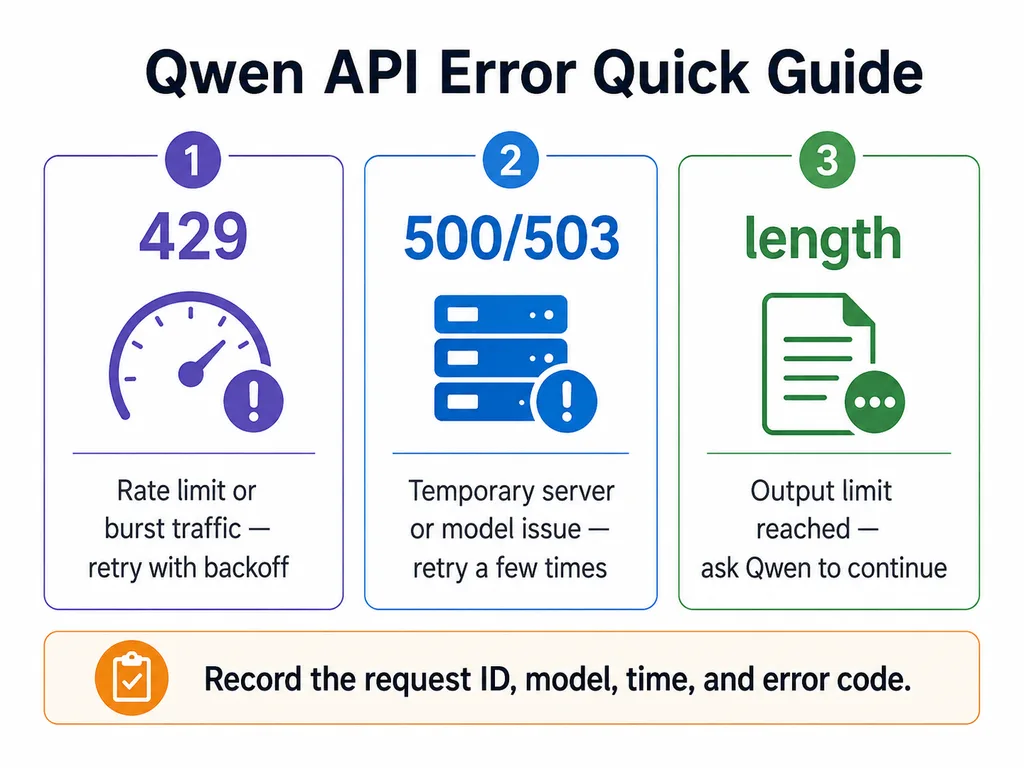
429-Throttling.RateQuota: request frequency exceeded RPS or RPM.429-Throttling.BurstRate: request rate increased too quickly.429-Throttling.AllocationQuota: token throughput exceeded TPS or TPM.500/503-ModelServingError: serving capacity or network resources are temporarily saturated.503-ModelUnavailable: the selected model is temporarily unavailable.
For API workloads, use controlled retry, traffic smoothing, concurrency limits, and a tested fallback rather than immediate repeated requests.
How to Fix a Qwen Response That Stops
If the answer stops in Qwen Studio
- Copy the completed part before reloading.
- Send:
Continue from the last complete sentence without repeating earlier text. - If it stops again, request a shorter answer or split the task into sections.
- Start a new chat with a concise summary if the conversation is long.
- Remove attachments or tools and reproduce the problem with plain text.
If it stops at the same point every time
A repeated stopping point can indicate:
- An output-token limit.
- A configured stop sequence.
- A content or moderation boundary.
- A client parser failing on a particular output structure.
- A tool call that is waiting for a tool result.
If the stream starts and then freezes
This pattern is different from an output limit. Possible causes include:
- A network interruption.
- A reverse proxy buffering or terminating SSE.
- A client-side idle timeout.
- A browser extension interfering with the connection.
- A tool or upstream service that stopped sending progress.
API clients should verify that the stream reaches its final chunk and completion marker rather than assuming that the connection closing means the model finished normally.
Why a New Chat Can Be Faster
A new conversation removes accumulated history and tool state. This can reduce:
- Input-token processing.
- Repeated attachment references.
- Old multimodal content.
- Conflicting instructions.
- Large tool outputs.
- The risk of exceeding the model’s context limit.
Do not discard valuable context blindly. Ask Qwen to produce a compact handoff summary, then begin a new chat with:
Continue this task using the following verified context:

[Paste a concise summary]

Current objective:
[Describe the next step]

Do not repeat completed work.
Browser, App, and Network Checks
| Check | What it tests | Interpretation |
|---|---|---|
| Private browser window | Extensions and stored site state | If it works, inspect extensions or site data. |
| Another browser | Browser-specific rendering or connection behavior | If it works, update or reset the original browser profile. |
| Another device | Device or application problem | If it works, the wider Qwen service is probably available. |
| Mobile hotspot | DNS, ISP, firewall, VPN, or proxy | If it works, investigate the original network. |
| Short text-only chat | Basic model route | If it works, the problem is likely context, tools, or files. |
| Different model | Model-specific capacity or support | If it works, the original model route may be affected. |
Use the dedicated Qwen app not opening or crashing guide when the application itself cannot launch. This page focuses on a loaded Qwen interface that is slow, busy, or stops responding.
Files, Web Search, Vision, and Thinking Mode
Uploaded files
When the problem begins after a file upload:
- Confirm the file is not corrupted.
- Try a smaller file.
- Upload one file instead of several.
- Remove unusually large images from PDFs.
- Wait for parsing to finish before resubmitting.
Use the dedicated Qwen file upload troubleshooting guide for format and size-specific errors.
Web search and research
Search-enabled tasks depend on retrieval and external pages in addition to the model. Compare the same prompt with search disabled. If the plain answer works, the delay may be in the search or extraction stage.
Image and video analysis
Large media files can take longer to download, decode, inspect, and tokenize. Test a lower-resolution image or shorter video before assuming that the language model is down.
Thinking mode
Thinking can improve difficult reasoning but may add substantial processing time. For routine rewriting, extraction, classification, or short answers, compare thinking and non-thinking modes when the model supports both.
Qwen API Error Diagnosis
| Status | Typical meaning | Recommended action | Retry? |
|---|---|---|---|
400 | Invalid request, context too long, unsupported parameter, wrong modality, or malformed messages | Correct the request. Reduce history or use a compatible model. | No blind retry |
401 | Missing or invalid authentication | Check the API key and authentication method. | No |
403 | No access, billing restriction, deprecated endpoint, or exhausted restricted quota | Check activation, billing, region, model lifecycle, and account permissions. | No blind retry |
404 | Wrong Model ID, endpoint, workspace, or unsupported API protocol | Verify the exact regional Model ID and Base URL. | No |
429 | RPM, RPS, TPM, burst, allocation, or shared capacity limit | Back off, smooth traffic, reduce concurrency, or use a tested fallback. | Yes, after delay |
500 | Internal service, inference, or processing error | Retry a limited number of times and preserve the request ID. | Usually |
503 | Model temporarily unavailable or serving capacity saturated | Retry later or use a validated fallback model. | Yes |
| Client timeout | The client or proxy stopped waiting before the response completed | Use streaming, inspect timeout settings, and reduce input complexity. | Only when safe |
For the complete error catalog, use the separate Qwen API errors and troubleshooting guide.
Qwen 429 Rate Limits and Capacity Errors
A 429 does not always mean the same quota was exceeded.
| Error family | What triggered it | Fix |
|---|---|---|
Throttling.RateQuota | Too many requests per second or minute | Space requests more evenly and reduce RPM or RPS. |
Throttling.BurstRate | Traffic increased too quickly | Use queueing, smoothing, and gradual concurrency increases. |
Throttling.AllocationQuota | Token throughput exceeded TPS or TPM | Reduce input/output tokens, lower concurrency, or request more quota. |
| All models temporarily rate-limited | Every model available to a plan or client reached a limit | Wait several minutes, reduce concurrency, and verify plan capacity. |
| Batch capacity throttling | Too many batch requests for current capacity | Reschedule or reduce simultaneous batch submissions. |
Do not retry a throttled request immediately in a tight loop. Immediate retries create more traffic and can extend the period of failure.
Use the dedicated Qwen API rate limits guide for RPM, TPM, concurrency, and quota-planning details.
Qwen 500 and 503 Errors
Official Model Studio error documentation describes several temporary server-side conditions:
500-InternalError: an internal error occurred.500-ModelServiceFailed: the model service call failed.500/503-ModelServingError: serving resources are temporarily saturated.503-ModelUnavailable: the selected model is temporarily unavailable.
For these errors:
- Record the request ID, time, model, endpoint, and region.
- Retry with exponential backoff and jitter.
- Stop after a small number of attempts.
- Use a pretested fallback only when the application can tolerate its behavioral differences.
- Alert the operator when failures continue beyond the retry window.
Timeout and Streaming Problems
Alibaba Cloud documents a request timeout after approximately 300 seconds for certain large-model calls. Its recommended mitigation includes using streaming output rather than waiting for one complete non-streaming response.
Streaming improves perceived responsiveness because the client receives generated chunks as they become available. It does not guarantee that the connection cannot fail.
A reliable streaming client should:
- Handle Server-Sent Events incrementally.
- Distinguish a temporary empty chunk from an empty final answer.
- Wait for the final completion event.
- Record the final
finish_reason. - Detect idle timeout separately from total request lifetime.
- Preserve partial text when the connection ends unexpectedly.
- Avoid automatically repeating non-idempotent tool actions.
If Nginx or another reverse proxy sits between the browser and Qwen, verify that proxy buffering does not delay SSE chunks. Alibaba Cloud’s streaming guidance recommends disabling Nginx proxy_buffering for real-time streamed output.
location /api/qwen/ {
    proxy_pass https://your-qwen-upstream;
    proxy_buffering off;
    proxy_cache off;
    proxy_read_timeout 600s;
}
Adapt the configuration to your own infrastructure and security requirements. Do not copy a proxy block without reviewing headers, TLS, authentication, and path handling.
finish_reason, max_tokens, and stop
API users can often identify why a response ended by reading choices[0].finish_reason.
| finish_reason | Meaning | What to do |
|---|---|---|
null | The streamed generation is still in progress. | Continue reading chunks. |
stop | The model finished or reached a configured stop sequence. | Check whether a custom stop value ended output earlier than intended. |
length | The output limit was reached. | Increase the valid output limit, request a shorter answer, or continue in another turn. |
A response with finish_reason: "length" is not a server outage. The model reached the configured or supported output limit.
For newer thinking models, distinguish between:
max_tokens, which may limit the answer portion depending on the API.max_completion_tokens, which can include reasoning and final-answer output for supported models.
Do not set a small output limit for long JSON or structured responses. Truncation can leave invalid JSON even when the API request itself succeeded.
Safe Retry and Fallback Strategy
Retry these conditions carefully
429after an appropriate delay.500,502,503, or504.- Temporary network connection errors.
- Client timeout when repeating the request is safe.
Do not blindly retry
400invalid requests.401authentication failures.403access, billing, or deprecated-model errors.404wrong endpoint or Model ID.- Tool calls that may already have created, purchased, deleted, or modified something.
Alibaba Cloud recommends triggering model fallback for capacity or rate-limit conditions rather than for every exception. Switching models will not correct an invalid request, wrong API key, or broken network route.
A fallback model must be tested in advance for:
- Function calling.
- Structured output.
- Image or video input.
- Context and output limits.
- Thinking behavior.
- Safety and refusal behavior.
- Latency and pricing.
Python Retry Example
The following example disables the SDK’s automatic retries so the application can apply a visible, bounded policy:
import os
import random
import time
from typing import Any

from openai import (
    APIConnectionError,
    APIStatusError,
    APITimeoutError,
    OpenAI,
    RateLimitError,
)

api_key = os.getenv("DASHSCOPE_API_KEY")
base_url = os.getenv("QWEN_BASE_URL")
model = os.getenv("QWEN_MODEL", "qwen3.7-plus")

if not api_key or not base_url:
    raise RuntimeError(
        "DASHSCOPE_API_KEY and QWEN_BASE_URL must be configured."
    )

client = OpenAI(
    api_key=api_key,
    base_url=base_url,
    timeout=300.0,
    max_retries=0,
)

RETRYABLE_STATUS_CODES = {429, 500, 502, 503, 504}


def backoff_seconds(attempt: int) -> float:
    return min(30.0, (2 ** attempt) + random.uniform(0.0, 1.0))


def call_qwen(messages: list[dict[str, str]]) -> dict[str, Any]:
    last_error: Exception | None = None

    for attempt in range(5):
        try:
            response = client.chat.completions.create(
                model=model,
                messages=messages,
                stream=False,
                extra_body={
                    "enable_thinking": False,
                },
            )

            choice = response.choices[0]

            return {
                "request_id": response.id,
                "model": response.model,
                "text": choice.message.content or "",
                "finish_reason": choice.finish_reason,
                "usage": response.usage,
            }

        except RateLimitError as error:
            last_error = error

        except APIStatusError as error:
            last_error = error
            if error.status_code not in RETRYABLE_STATUS_CODES:
                raise

        except (APITimeoutError, APIConnectionError) as error:
            last_error = error

        if attempt == 4:
            break

        time.sleep(backoff_seconds(attempt))

    raise RuntimeError(
        f"Qwen request failed after bounded retries: {last_error}"
    )


result = call_qwen(
    [{"role": "user", "content": "Reply with exactly: API test passed"}]
)

print(result)

if result["finish_reason"] == "length":
    print("The answer reached an output limit; this is not an outage.")
Do not automatically replay a request that may have triggered an external tool or irreversible action. Add application-level idempotency and action tracking before retrying agent workflows.
Node.js Retry Example
import OpenAI from "openai";

const apiKey = process.env.DASHSCOPE_API_KEY;
const baseURL = process.env.QWEN_BASE_URL;
const model = process.env.QWEN_MODEL ?? "qwen3.7-plus";

if (!apiKey || !baseURL) {
  throw new Error(
    "DASHSCOPE_API_KEY and QWEN_BASE_URL must be configured."
  );
}

const client = new OpenAI({
  apiKey,
  baseURL,
  timeout: 300_000,
  maxRetries: 0,
});

const retryableStatuses = new Set([429, 500, 502, 503, 504]);

const sleep = (milliseconds) =>
  new Promise((resolve) => setTimeout(resolve, milliseconds));

function backoffMilliseconds(attempt) {
  const exponential = 1_000 * (2 ** attempt);
  const jitter = Math.floor(Math.random() * 1_000);
  return Math.min(30_000, exponential + jitter);
}

async function callQwen(messages) {
  let lastError;

  for (let attempt = 0; attempt < 5; attempt += 1) {
    try {
      const response = await client.chat.completions.create({
        model,
        messages,
        stream: false,
        enable_thinking: false,
      });

      const choice = response.choices[0];

      return {
        requestId: response.id,
        model: response.model,
        text: choice?.message?.content ?? "",
        finishReason: choice?.finish_reason ?? null,
        usage: response.usage ?? null,
      };
    } catch (error) {
      lastError = error;

      const status = error?.status;
      const isConnectionOrTimeout =
        error?.name === "APIConnectionError" ||
        error?.name === "APITimeoutError";

      if (
        !retryableStatuses.has(status) &&
        !isConnectionOrTimeout
      ) {
        throw error;
      }

      if (attempt === 4) {
        break;
      }

      await sleep(backoffMilliseconds(attempt));
    }
  }

  throw new Error(
    `Qwen request failed after bounded retries: ${lastError}`
  );
}

const result = await callQwen([
  {
    role: "user",
    content: "Reply with exactly: API test passed",
  },
]);

console.log(result);

if (result.finishReason === "length") {
  console.warn(
    "The response reached an output limit; Qwen is not necessarily down."
  );
}
Alibaba Cloud documents non-standard parameters such as enable_thinking as top-level fields in the Node.js OpenAI-compatible client and through extra_body in the Python client.
Qwen Code Stopping or Timing Out
Qwen Code adds another layer between the user and the model: the terminal or desktop client, provider configuration, session history, tools, MCP servers, shell commands, and stream timeouts.
Run basic checks
- Run
/aboutand record the Qwen Code version, model, authentication type, and session ID. - Update Qwen Code to the current stable version.
- Start a new session with a short request.
- Test the configured provider outside Qwen Code.
- Disable nonessential MCP servers and tools temporarily.
- Check whether the selected model supports the requested tools and modalities.
- Inspect verbose output and logs.
Current Qwen Code timeout controls
Current Qwen Code documentation describes three separate timing controls for OpenAI-compatible providers:
model.generationConfig.timeout: per-request timeout, with a documented default of 120,000 milliseconds.QWEN_STREAM_IDLE_TIMEOUT_MS: maximum inactivity between streamed chunks, with a documented default of 240,000 milliseconds.QWEN_STREAM_MAX_LIFETIME_MS: total upstream stream lifetime, with a documented default of 900,000 milliseconds.
A cautious settings example is:
{
  "model": {
    "generationConfig": {
      "timeout": 300000
    },
    "enableOpenAILogging": true,
    "openAILogRetentionDays": 3
  }
}
Environment variables can control the streaming guards:
QWEN_CODE_API_TIMEOUT_MS=300000
QWEN_STREAM_IDLE_TIMEOUT_MS=300000
QWEN_STREAM_MAX_LIFETIME_MS=1200000
Do not permanently disable all timeouts by setting them to zero unless you understand the operational risk. An unlimited timeout can leave dead sessions hanging indefinitely.
Configure a fallback only for capacity errors
Qwen Code supports an ordered fallback list for model-capacity errors such as 429, 503, or 529:
{
  "model": {
    "modelFallbacks": "qwen3.7-plus,qwen3.6-flash"
  }
}
Use actual models available through your configured provider. Test function calling, permissions, context, multimodal input, and output format before activating fallback in production.
Update Qwen Code
For a global npm installation:
npm install -g @qwen-code/qwen-code@latestUse the dedicated Qwen Code troubleshooting guide for authentication, provider, IDE, MCP, sandbox, and version-specific failures.
Local Qwen Model Performance
If you run Qwen through Ollama, LM Studio, llama.cpp, vLLM, SGLang, MLX, or another local runtime, a Qwen Studio outage does not control your local inference process.
Measure two different performance metrics:
- Time to first token: how long the model takes before output begins.
- Tokens per second: how fast it generates after starting.
| Local symptom | Possible cause | Test |
|---|---|---|
| Very slow first token | Long prompt, model loading, cache initialization, or excessive context | Use a short prompt in a fresh session. |
| Slow generation | Insufficient GPU offload, memory bandwidth, quantization, or thermal limits | Check runtime logs, GPU use, RAM, swap, and tokens per second. |
| Stops after several minutes | Client timeout, runtime crash, out-of-memory condition, or stream idle guard | Inspect both client and model-server logs. |
| Slows as chat grows | Context reprocessing and larger KV cache | Start a new summarized session and reduce context. |
| Agent stops after a tool call | Tool protocol, chat template, missing tool result, or harness incompatibility | Test plain chat, then one simple tool call. |
| Thinking takes too long | High reasoning effort or excessive reasoning budget | Lower or disable reasoning when supported. |
Do not compare a local quantized checkpoint directly with a managed Qwen API without recording model ID, quantization, context size, hardware, runtime, and reasoning settings.
Use the local Qwen troubleshooting guide for runtime-specific configuration.
What Not to Do
- Do not spam Regenerate. This can create more queued work and additional rate-limit pressure.
- Do not declare a global outage from one failed chat. Test another chat, model, device, and network.
- Do not retry every API error. Invalid requests and authentication failures require correction.
- Do not switch providers without reviewing privacy and pricing. The provider processes the request even when the model is Qwen.
- Do not increase timeouts indefinitely. A longer timeout hides a dead request when the real cause is a broken stream or server.
- Do not set an untested fallback model. It may lack required tools, modalities, or structured output.
- Do not retry irreversible tool actions without idempotency. The first request may have completed even if the response was lost.
- Do not publish API keys or full sensitive prompts in bug reports.
When and How to Report the Problem
Report the issue when it is reproducible after the basic tests or continues beyond a short transient period.
Include:
- Exact date and time, including time zone.
- Product: Qwen Studio, Model Studio API, Qwen Code, third-party provider, or local runtime.
- Exact model label or Model ID.
- Provider and region.
- Browser, app, SDK, Qwen Code, or runtime version.
- HTTP status and provider error code.
- Request ID or session ID.
- Whether a new text-only chat works.
- Whether another model, device, and network work.
- A minimal prompt that reproduces the issue.
- Relevant logs with secrets and personal data removed.
For Qwen Code, run /about and include its output after removing sensitive information. Search the official issue tracker before opening a new report.
Frequently Asked Questions
Is Qwen down right now?
At the time this page was verified on August 22, 2026, independent monitoring did not indicate a broad Qwen outage. That does not rule out a regional, model-specific, account-specific, or feature-specific issue. Test a new text-only chat on another device or network before concluding that Qwen is globally down.
Why does Qwen say Server Busy?
The selected model or serving route may be at capacity, your account may have reached a rate or token quota, traffic may have increased too quickly, or the third-party provider may have a limited queue. Wait briefly, reduce repeated requests, and identify the exact provider and error code.
How long should I wait after a Qwen Server Busy error?
There is no universal waiting time. It depends on whether the limit is per second, minute, token throughput, shared capacity, or a wider service issue. API clients should apply exponential backoff with jitter rather than a fixed aggressive retry loop.
Why does Qwen become slow after several messages?
The conversation may be sending more history, files, and tool results with every turn. Start a summarized new chat and compare its speed. Service load and reasoning settings can also contribute.
Why did my Qwen response stop halfway?
The response may have reached an output limit, matched a stop sequence, lost its streaming connection, hit a client timeout, or paused while waiting for a tool. API users should inspect finish_reason and the final stream event.
How do I continue a stopped Qwen answer?
Send: “Continue from the last complete sentence without repeating previous text.” If it stops repeatedly, request a shorter section or begin a new chat with a concise summary.
Why does Qwen return a blank response?
A blank response can result from an interrupted client stream, unsupported message content, a text-only model receiving multimodal history, moderation, a tool integration problem, or a provider bug. Reproduce the issue with one plain-text user message sent directly to the selected model.
Does starting a new chat make Qwen faster?
It can. A new chat removes accumulated history and tool state, reducing the context that must be processed. It is also one of the best tests for distinguishing a broken session from a wider outage.
Should I use a VPN when Qwen is slow?
Only as a diagnostic comparison, not as a universal fix. A VPN may bypass a local route problem, but it can also add latency, change apparent region, or trigger access and security issues.
Will switching Qwen models fix Server Busy?
It may help when the problem is model-specific capacity or quota. It will not fix a malformed request, invalid key, broken network, or incompatible tool configuration. Validate the replacement model’s features before using it.
What does Qwen API error 429 mean?
It indicates throttling or quota pressure. The exact cause may be request frequency, a sudden traffic burst, token throughput, batch capacity, or all models in a plan reaching their limits. Read the provider error code rather than relying only on the HTTP status.
Should I retry Qwen 500 and 503 errors?
Usually, but only a limited number of times with exponential backoff and jitter. Preserve the request ID, and do not automatically repeat irreversible tool actions.
Why does Qwen Code stop in the middle of a task?
The provider may be slow, a stream timeout may have fired, a tool may be waiting, the session context may be large, or the selected model may not follow the expected tool protocol. Check /about, update Qwen Code, test the provider directly, and inspect timeout and logging settings.
Is a locally hosted Qwen model affected when Qwen Studio is down?
Not directly. Local inference uses your own runtime and hardware. It may still depend on external tools, model downloads, licenses, or remote services, but Qwen Studio availability does not control the local model process.
Official Sources Used
- Alibaba Cloud Model Studio error codes
- Best practices for handling Model Studio rate limiting
- Qwen streaming output documentation
- Model Studio monitoring and telemetry
- Alibaba Cloud Model Studio FAQ
- OpenAI-compatible Qwen chat API reference
- Qwen Code settings and timeout controls
- Official Qwen Code troubleshooting guide
- Official Qwen website and Qwen Studio access
- Independent Qwen status monitor used as a secondary signal
Verification status: API error meanings, timeouts, rate-limit behavior, streaming guidance, monitoring metrics, finish reasons, and Qwen Code timeout settings were checked against official documentation. The current-status statement uses an independent monitor and should not be interpreted as an official Qwen uptime guarantee. Browser and local-inference troubleshooting steps are independent diagnostic recommendations.
Try-Qwen-AI.com is an independent Qwen resource. It is not affiliated with, endorsed by, or operated by Alibaba Group, Alibaba Cloud, QwenCloud, or the Qwen team.
Last verified: August 22, 2026.