
A Qwen API request can fail at several different layers. An HTTP error means the request itself failed. A provider error code explains the specific cause. A successful HTTP response can still contain an incomplete result, which is why applications must also inspect finish_reason, output fields, token usage, and tool calls.
Quick answer: In the current Qwen OpenAI-compatible Chat Completions API, the terminal
finish_reasonvalues arestop,length, andtool_calls. During streaming,finish_reasonis normallynulluntil the final completion chunk. Do not mark a response as successful based only on HTTP 200: reject truncatedlengthoutput, execute and validatetool_calls, and treat a stream that ends without a terminal reason as incomplete.
This guide focuses on text-generation requests made through QwenCloud or Alibaba Cloud Model Studio using OpenAI-compatible Chat Completions or the DashScope chat interface. The Responses API, image generation, video generation, speech, realtime WebSocket, and third-party or self-hosted Qwen endpoints use additional status and error structures.
Independent verification note: Try-Qwen-AI.com is an independent resource. Exact errors can vary by region, billing plan, API protocol, model, SDK version, and provider. Always preserve the raw status, provider code, message, and request ID before changing the request.
Scope: Which Qwen API Does This Guide Cover?
| Interface | Primary completion indicator | Error structure |
|---|---|---|
| OpenAI-compatible Chat Completions | choices[0].finish_reason | HTTP status plus an OpenAI-style error object |
| DashScope chat or text generation | output.choices[].finish_reason or output.finish_reason | status_code, request_id, code, and message |
| OpenAI-compatible Responses API | response.status and output-item statuses | Response-level error plus HTTP errors |
| Asynchronous image or video API | task_status and per-output result state | Task-level and individual-output error codes |
| Self-hosted Qwen through vLLM or SGLang | Runtime-specific OpenAI-compatible response | Depends on the server, model template, and runtime version |
Do not apply the Chat Completions finish_reason rules blindly to the Responses API or an asynchronous media endpoint.
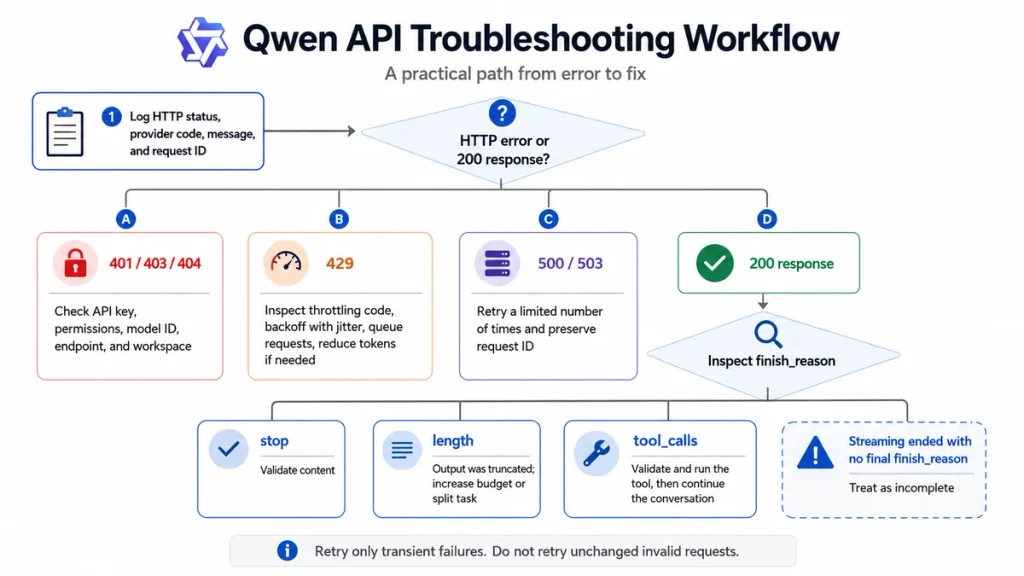
60-Second Qwen API Diagnosis
- Call Qwen directly. Temporarily bypass the agent framework, proxy, router, or no-code tool.
- Verify the API key and Base URL as one pair. Pay-as-you-go, Token Plan, Coding Plan, regions, and protocols can use different endpoints.
- Copy the exact Model ID from the current model catalog.
- Send one short text message with optional features disabled.
- Log the HTTP status, provider code, message, and request ID.
- For HTTP 200, inspect
finish_reason,content,reasoning_content, andtool_calls. - If streaming, confirm that a final terminal chunk arrived.
- Retry only transient failures. Do not retry an unchanged invalid request.
A minimal direct call separates provider problems from errors introduced by a framework that converts messages, strips fields, buffers SSE, changes the model name, or retries automatically.
HTTP Status, Provider Code, and finish_reason Are Different
| Signal | What it tells you | Example |
|---|---|---|
| HTTP status | Whether the API request succeeded at the transport and service level | 400, 401, 429, or 503 |
| Provider error code | The specific cause inside that HTTP category | Throttling.BurstRate or ModelNotFound |
| Error message | Human-readable explanation and often the invalid parameter | Range of input length should be [1, ...] |
| Request ID | The unique identifier used for logs and support investigation | A provider-generated UUID |
finish_reason | Why a successful Chat Completion stopped generating | stop, length, or tool_calls |
A response can return HTTP 200 and still be unusable. For example:
finish_reason="length"means the output is incomplete.finish_reason="tool_calls"means the application must execute a tool before a final answer exists.finish_reason="stop"can result from a custom stop sequence that ended the answer earlier than expected.- A stream can disconnect before its terminal chunk, leaving partial text despite the initial HTTP 200.
OpenAI-Compatible vs DashScope Error Responses
OpenAI-compatible error
{
  "error": {
    "message": "Incorrect API key provided.",
    "type": "invalid_request_error",
    "param": null,
    "code": "invalid_api_key"
  }
}
Your SDK normally raises an exception for a non-2xx response. Inspect the exception’s HTTP status, provider body, and request ID rather than matching only the text of the message.
DashScope-native error
{
  "status_code": 400,
  "request_id": "request-uuid",
  "code": "InvalidParameter",
  "message": "The request parameter is invalid."
}
DashScope SDK behavior also varies by language. The Python SDK exposes fields such as status_code, request_id, code, and message, while another SDK may throw an exception instead.
Normalize both formats inside your application so that every failure produces the same internal diagnostic record.
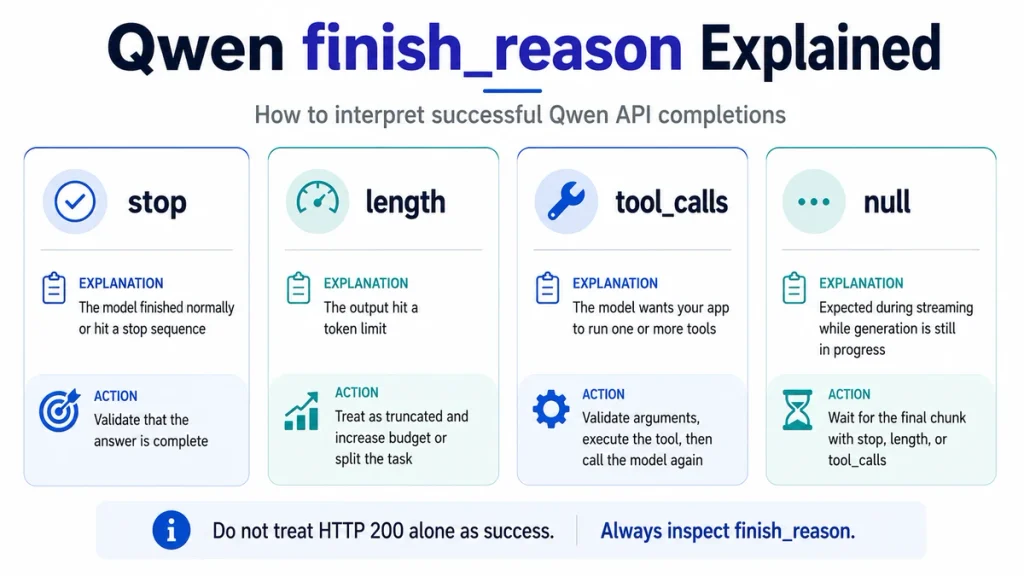
Qwen finish_reason Values Explained
| Value | Meaning | Application action |
|---|---|---|
stop | The model ended naturally or matched a configured stop sequence | Accept only after validating that the expected content is present. |
length | The response reached the configured or model-supported output limit | Mark as truncated; do not parse or publish it as complete. |
tool_calls | The model stopped to request one or more tools | Validate and execute the calls, append tool results, then call the model again. |
null | Generation is still in progress in a streaming response | Continue consuming chunks until a terminal value arrives. |
The currently published QwenCloud Chat Completions values are stop, length, and tool_calls. Content moderation is reported through an API error such as DataInspectionFailed, not a documented Qwen Chat content_filter finish reason.
finish_reason stop
stop is the normal terminal value, but it does not automatically prove that the response satisfies your business task.
It can mean:
- The model finished its answer naturally.
- The model produced an end-of-sequence token.
- The generated text matched a string supplied through the
stopparameter.
When stop returns an unexpectedly short answer:
- Remove custom stop sequences and retry the diagnostic request.
- Check whether your framework adds hidden stop tokens.
- Inspect
message.tool_callseven when using a third-party or self-hosted endpoint. - Check whether the client discarded content during streaming assembly.
- Validate the response against the required schema or minimum content.
An application should never interpret stop as “all business requirements passed.” It means generation stopped normally, not that an invoice was complete, JSON was valid, or every requested field was present.
finish_reason length
length means the generated output reached a limit before finishing.
Possible limits include:
- Your configured
max_tokens. - Your configured
max_completion_tokens. - The model’s maximum output limit.
- A reasoning budget that consumed part of the total completion allowance.
For current supported Qwen reasoning models:
max_tokenslimits the visible answer and is being deprecated for new integrations.max_completion_tokenslimits the complete generated output, including reasoning and the final answer.max_completion_tokensis the safer choice when you need one total budget for a thinking model.
When you receive length:
- Mark the result as incomplete.
- Do not accept truncated JSON or code.
- Check the model’s documented maximum output.
- Reduce the requested scope or split the task into sections.
- Increase the limit only when the model and budget support it.
- Reduce unnecessary reasoning for a simple task.
- For prose, continue in another turn using the last complete sentence as a boundary.
Use the dedicated Qwen context and output limits guide for model-specific limits.
finish_reason tool_calls
tool_calls means the response is an instruction to your application, not the final answer.
The assistant message can contain an empty content field while providing one or more objects in tool_calls. The application must:
- Validate that every requested tool is allowlisted.
- Parse the arguments as JSON.
- Validate the arguments against the tool schema.
- Apply authorization and business rules.
- Execute the tool safely.
- Append the complete assistant message containing
tool_callsto conversation history. - Append one
toolmessage for each call using the matchingtool_call_id. - Call Qwen again to obtain the final answer.
Tool arguments are model-generated and non-deterministic. Never execute them without validation, especially for payments, email, database writes, cloud infrastructure, file deletion, or shell commands.
finish_reason null During Streaming
null is expected in intermediate streaming chunks. It means the model has not reached a terminal condition yet.
data: {
  "choices": [
    {
      "delta": {"content": "Partial text"},
      "finish_reason": null
    }
  ]
}
The final completion chunk should carry stop, length, or tool_calls. When stream_options.include_usage is enabled, an additional final chunk can contain usage data with an empty choices array. Do not assume that every streaming chunk has choices[0].
Raw OpenAI-compatible SSE normally ends with:
data: [DONE]The OpenAI SDK handles that marker internally, but your application still needs to verify that it saw a terminal finish reason before accepting the accumulated content.
Stream Ended Without a Final finish_reason
A stream that ends after partial text but never returns a terminal finish_reason should be treated as interrupted.
Possible causes include:
- Client or browser connection loss.
- Proxy idle timeout.
- Nginx response buffering.
- A load balancer closing a long-lived connection.
- SDK or parser failure.
- Provider-side stream termination.
- A third-party or self-hosted server returning a non-standard stream.
Do not label the partial text as a successful answer. Save it for diagnostics, record the last event time, and retry only when repeating the operation is safe.
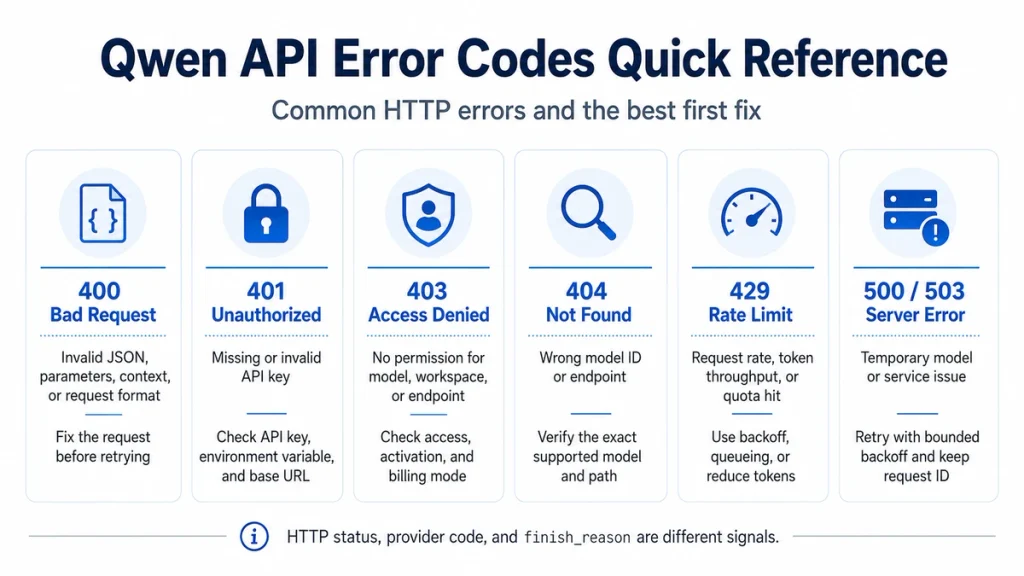
Qwen API Error-Code Quick Reference
| Status | Typical cause | Retry unchanged? | First action |
|---|---|---|---|
400 | Invalid JSON, parameter, context, modality, tool order, safety block, or billing-state error | No | Read the provider code and correct the request or account state. |
401 | Missing, invalid, or mismatched API key or plan endpoint | No | Verify the key, environment variable, Base URL, and billing plan. |
403 | No model, workspace, endpoint, or quota permission | No | Check activation, workspace authorization, lifecycle, and free-tier mode. |
404 | Wrong Model ID, unsupported protocol, workspace, resource, or path | No | Copy the exact supported ID and endpoint. |
429 | Request rate, token throughput, burst protection, quota, or plan capacity | Sometimes | Inspect the specific throttling code before retrying. |
500 | Internal model, plugin, retrieval, or service failure | Usually, with limits | Retry with backoff and preserve the request ID. |
503 | Temporary model unavailability or serving-capacity saturation | Yes, with limits | Retry later or use a tested fallback. |
| Client timeout | Client, proxy, network, or non-streaming request exceeded its timeout | Only if safe | Use streaming, adjust timeouts, and check partial execution. |
The provider code matters more than the HTTP number alone. For example, two 429 responses can require completely different fixes.
Fix Qwen 400 Bad Request Errors
A 400 usually means the service understood the request route but rejected its contents.
Invalid JSON or missing fields
- Remove trailing commas.
- Close every brace and bracket.
- Include
modelandmessages. - Ensure every message has a valid
roleandcontent. - Use
POSTfor the documented generation route.
Wrong content type
A plain-text model expects content to be a string. A multimodal model can accept an array containing typed text, image, or video objects. Sending a multimodal array to an incompatible text endpoint can produce an invalid-content error.
Invalid parameter range
- Check
temperature,top_p, and penalties. - Keep
max_tokensormax_completion_tokenswithin the model limit. - Remove parameters unsupported by the selected model.
- Do not send
stream_optionswhenstream=false.
Correct the request before retrying. Repeating the same invalid JSON five times cannot make it valid.
Context Length and Output Limit Errors
An error such as:
Range of input length should be [1, ...]means the full input exceeds the model’s context limit.
The input can include:
- System and user messages.
- Conversation history.
- Tool definitions.
- Tool results.
- Historical
reasoning_content. - Image, video, or document tokens.
- Measure the entire request, not only the newest prompt.
- Remove irrelevant history.
- Summarize or compact older turns.
- Reduce tool descriptions.
- Start a new session when appropriate.
- Use a model with the required context window.
Input overflow produces a request error. Output overflow produces HTTP 200 with finish_reason="length". They are different failure modes.
Fix Qwen 401 Authentication Errors
Common 401 causes include:
- The API key is missing.
- The key was copied with spaces or a line break.
- The application reads the wrong environment variable.
- A QwenCloud, Token Plan, or Coding Plan key is paired with the wrong Base URL.
- The key belongs to another region or service.
- The process was not restarted after configuring the environment variable.
This is incorrect:
api_key = os.getenv("sk-your-real-key")It asks the operating system for an environment variable literally named sk-your-real-key. Use:
api_key = os.getenv("DASHSCOPE_API_KEY")Then set DASHSCOPE_API_KEY outside the source code and restart the terminal, IDE, container, or service.
Use the dedicated Qwen API key guide for secure configuration.
Fix Qwen 403 Access Errors
A valid API key can still lack permission to use the requested resource.
| Provider code | Typical cause | Fix |
|---|---|---|
AccessDenied | The model requires activation or approval | Activate or request access in the correct region. |
Model.AccessDenied | The workspace lacks permission to call the standard model | Grant model-calling permission or use an authorized workspace. |
Workspace.AccessDenied | The key cannot access the workspace | Check membership, RAM permissions, and Workspace ID. |
Endpoint.AccessDenied | The endpoint may belong to a retired model | Check the model lifecycle and migrate to the replacement. |
AllocationQuota.FreeTierOnly | Free quota ended while free-tier-only mode blocks paid calls | Complete account setup or disable that mode when authorized. |
Do not retry a permission failure continuously. Change the access, workspace, model, or billing configuration first.
Fix Qwen 404 Model and Endpoint Errors
A 404 can indicate more than a misspelled URL.
- The Model ID is misspelled or uses incorrect capitalization.
- A Hugging Face repository ID was used instead of a hosted Model Studio ID.
- The model is unavailable in the selected region.
- The model is not activated.
- The model does not support the OpenAI-compatible protocol.
- The Workspace ID or resource ID is wrong.
- The request path contains an old or unsupported route.
The error:
Unsupported model ... for OpenAI compatibility mode.means the model should be called through its documented DashScope-native endpoint instead.
Use the dedicated Qwen API Model IDs and Qwen Base URLs and Regions guides.
Fix Qwen 429 Rate-Limit and Quota Errors
Do not treat every 429 as one generic “too many requests” condition.
| Provider code | Limit type | Correct response |
|---|---|---|
Throttling.RateQuota | RPS or RPM request frequency | Reduce request frequency and concurrency. |
Throttling.BurstRate | Traffic increased too quickly | Smooth traffic, queue requests, and use exponential backoff. |
Throttling.AllocationQuota | TPS or TPM token throughput | Reduce tokens or concurrency, wait for the window, or request more quota. |
insufficient_quota | Plan, quota, or billing capacity | Inspect the plan and billing state; a short retry may not help. |
AllocationQuota.FreeTierOnly | Free quota exhausted under free-only mode | Change the authorized billing configuration. |
Alibaba Cloud also supports server-side queueing for Throttling.BurstRate through the X-DashScope-Wait-Timeout request header. The documented recommended range is 3–120 seconds. This does not increase absolute RPM or TPM limits.
A safe 429 response strategy is:
- Read the provider code.
- Queue requests instead of sending them simultaneously.
- Use exponential backoff with random jitter.
- Set a maximum retry count.
- Reduce input and output tokens when TPM is the constraint.
- Alert when sustained demand exceeds the purchased capacity.
Use the dedicated Qwen API Rate Limits guide for capacity planning.
Fix Qwen 500 and 503 Server Errors
Common transient provider conditions include:
InternalErrorModelServiceFailedModelServingErrorModelUnavailable
500/503-ModelServingError indicates temporary resource saturation. 503-ModelUnavailable indicates that the selected model is temporarily unavailable.
- Save the request ID and timestamp.
- Retry a limited number of times with backoff and jitter.
- Use a tested compatible fallback when the workload permits it.
- Do not retry an irreversible tool action without idempotency protection.
- Alert when the error continues beyond the retry window.
Timeout and Connection Errors
Current Model Studio documentation states that non-streaming model calls have a fixed maximum service timeout of approximately 300 seconds. A client, proxy, or load balancer can have a shorter timeout.
Use streaming for long responses and thinking models because it:
- Returns content progressively.
- Reduces the risk of a non-streaming 300-second timeout.
- Allows the client to measure Time to First Token.
- Makes partial progress visible.
Check all timeout layers:
- SDK request timeout.
- Reverse-proxy read timeout.
- Load-balancer idle timeout.
- Frontend fetch or serverless-function timeout.
- Corporate proxy or firewall session timeout.
Do not simply set every timeout to unlimited. Dead connections can then consume workers and file descriptors indefinitely.
DataInspectionFailed and Moderation Errors
DataInspectionFailed means the input or generated output triggered the provider’s content-safety checks.
It can apply to:
- Text prompts.
- Images.
- Audio or video.
- Generated output.
- Inspect the complete request, including hidden system prompts and attachments.
- Rewrite the task to comply with the applicable policies.
- Remove unnecessary sensitive terms or media.
- Do not retry the identical blocked request repeatedly.
- If compliant content is reproducibly blocked, retain the request ID and submit a private support ticket.
This is an API error rather than a documented Chat Completions finish_reason="content_filter".
Thinking-Mode Errors
Thinking models add parameters and output fields that can break a previously working integration.
| Error or symptom | Cause | Fix |
|---|---|---|
parameter.enable_thinking only support stream call | The selected model supports thinking only with streaming | Set stream=true or choose a model supporting non-streaming thinking. |
result_format must be message | DashScope thinking mode requires the message response format | Set result_format="message". |
Model does not support enable_thinking | The parameter is unsupported | Remove it or choose a compatible model. |
| Reasoning appears as the final answer | The client concatenated reasoning_content and content | Store and display the fields separately. |
| Non-streaming parser fails | Streaming iteration code was reused for a complete response object | Read completion.choices[0].message directly. |
| Historical thinking fails | Preserved reasoning was trimmed, rewritten, reordered, or put in content | Pass supported historical reasoning_content exactly as documented. |
When stream=false, do not send stream_options. When using the Python OpenAI SDK, Qwen-specific parameters such as enable_thinking are commonly passed through extra_body.
Structured-Output and JSON Errors
Structured output can fail even when the HTTP request succeeds.
JSON Mode requires an explicit instruction
When using response_format={"type":"json_object"}, explicitly tell the model to return JSON. Otherwise, the API can reject the request.
Truncated JSON
If finish_reason="length", the JSON may end inside a string, object, or array. Never repair it silently and treat it as model-confirmed data.
The official structured-output guidance recommends avoiding an unnecessary max_tokens cap because it can truncate the JSON. Reduce the schema or task scope when the output is too large.
Schema validation still matters
- Parse the JSON.
- Validate it against the expected schema.
- Reject missing required fields.
- Validate enums, numbers, dates, and identifiers.
- Do not execute downstream actions from unvalidated output.
Use the dedicated Qwen Structured Output and JSON Mode guide for complete examples.
Function-Calling and Tool-Message Errors
A common request-order error is:
messages with role "tool" must be a response to a preceding message with "tool_calls"The correct sequence is:
- User message.
- Assistant message containing
tool_calls. - Tool message containing the result and matching
tool_call_id. - Second model request.
Do not send only the tool result while omitting the assistant tool-call message.
Also check:
- The tool name exists in the submitted tool list.
- The arguments string is valid JSON.
- The arguments match the declared schema.
- Every tool response uses the correct ID.
- The model supports Function Calling.
- The framework did not strip
tool_callsduring serialization.
Use the dedicated Qwen Function Calling and Tool Use guide.
Streaming and SSE Troubleshooting
A reliable streaming client must handle more than text deltas.
- Intermediate chunks with
finish_reason=null. - Reasoning deltas in
reasoning_content. - Tool-call argument deltas.
- A terminal finish-reason chunk.
- An optional usage-only chunk with no choices.
- The final SSE completion marker.
- Network disconnects and idle timeouts.
If Nginx proxies the response, its default buffering can prevent real-time delivery. A typical streaming location requires:
location /api/qwen/ {
    proxy_pass https://your-qwen-upstream;
    proxy_buffering off;
    proxy_cache off;
    proxy_read_timeout 600s;
}
Adapt the block to your authentication, headers, TLS, and routing. Do not paste it into production without review.
Use the dedicated Qwen API Streaming with SSE guide for full frontend and backend implementations.
Responses API Does Not Use finish_reason the Same Way
The OpenAI-compatible Responses API returns a top-level response status rather than using choices[0].finish_reason as its main completion signal.
Current response-status values include:
queuedin_progresscompletedincompletefailedcancelled
Inspect:
response.status.response.error.response.incomplete_detailswhen available.- The status of every item in
response.output. response.output_textonly after successful completion.
A migration that changes the endpoint from Chat Completions to Responses without changing the response parser will fail even though the model call itself is valid.
Safe Retry Decision Matrix
| Condition | Retry? | Required precaution |
|---|---|---|
| Invalid request or parameter | No | Correct the request first. |
| Invalid API key | No | Fix authentication and Base URL. |
| Access denied | No | Obtain permission or change the authorized model. |
| Model not found | No | Correct the model, endpoint, or region. |
| 429 request or burst rate | Yes | Backoff, jitter, queueing, and bounded attempts. |
| 429 exhausted quota or billing | Usually no immediate retry | Change quota, plan, balance, or wait for reset. |
| 500, 502, 503, or 504 | Yes | Bounded retries and request-ID logging. |
| Connection error before any response | Often | Retry only when the operation is idempotent. |
| Stream disconnected after a tool or write action | Not blindly | Check whether the action already completed. |
finish_reason="length" | Not as an identical retry | Change output budget or task structure. |
finish_reason="tool_calls" | No | Execute the tool workflow instead. |
Use idempotency or an internal operation ID for payments, tickets, email, database writes, cloud operations, and other actions that must not run twice.
Node.js Production Error-Handling Example
This example disables automatic SDK retries so that the application can apply a visible bounded policy and validate finish_reason.
import OpenAI from "openai";

const apiKey = process.env.DASHSCOPE_API_KEY;
const baseURL = process.env.QWEN_BASE_URL;
const model = process.env.QWEN_MODEL ?? "qwen3.7-plus";

if (!apiKey || !baseURL) {
  throw new Error(
    "DASHSCOPE_API_KEY and QWEN_BASE_URL must be configured."
  );
}

const client = new OpenAI({
  apiKey,
  baseURL,
  timeout: 300_000,
  maxRetries: 0,
});

const RETRYABLE_STATUSES = new Set([429, 500, 502, 503, 504]);

const sleep = (ms) =>
  new Promise((resolve) => setTimeout(resolve, ms));

function backoffMs(attempt) {
  const exponential = 1_000 * (2 ** attempt);
  const jitter = Math.floor(Math.random() * 1_000);
  return Math.min(30_000, exponential + jitter);
}

function extractProviderCode(error) {
  return (
    error?.error?.code ??
    error?.body?.error?.code ??
    error?.body?.code ??
    error?.code ??
    null
  );
}

function validateToolCalls(toolCalls) {
  if (!Array.isArray(toolCalls) || toolCalls.length === 0) {
    throw new Error(
      "finish_reason was tool_calls but no tool calls were returned."
    );
  }

  return toolCalls.map((toolCall) => {
    const name = toolCall?.function?.name;
    const rawArguments = toolCall?.function?.arguments;

    if (!name || typeof rawArguments !== "string") {
      throw new Error("Malformed Qwen tool call.");
    }

    let argumentsObject;

    try {
      argumentsObject = JSON.parse(rawArguments);
    } catch {
      throw new Error(
        `Tool arguments are not valid JSON for ${name}: ${rawArguments}`
      );
    }

    return {
      id: toolCall.id,
      name,
      arguments: argumentsObject,
    };
  });
}

async function callQwen(messages, { tools } = {}) {
  let lastError;

  for (let attempt = 0; attempt < 5; attempt += 1) {
    try {
      const request = {
        model,
        messages,
        stream: false,
        max_completion_tokens: 2_048,
        enable_thinking: false,
      };

      if (tools) {
        request.tools = tools;
        request.tool_choice = "auto";
      }

      const completion = await client.chat.completions.create(request);
      const choice = completion.choices?.[0];

      if (!choice) {
        throw new Error("Qwen returned no choices.");
      }

      const finishReason = choice.finish_reason;
      const message = choice.message;
      const content = message?.content ?? "";
      const toolCalls = message?.tool_calls ?? [];

      if (finishReason === "length") {
        return {
          ok: false,
          kind: "truncated",
          requestId: completion.id,
          model: completion.model,
          partialContent: content,
          usage: completion.usage ?? null,
        };
      }

      if (finishReason === "tool_calls") {
        return {
          ok: true,
          kind: "tool_calls",
          requestId: completion.id,
          model: completion.model,
          assistantMessage: message,
          toolCalls: validateToolCalls(toolCalls),
          usage: completion.usage ?? null,
        };
      }

      if (finishReason === "stop") {
        if (!content && toolCalls.length === 0) {
          throw new Error(
            "Qwen stopped normally but returned no content or tool calls."
          );
        }

        return {
          ok: true,
          kind: "message",
          requestId: completion.id,
          model: completion.model,
          content,
          reasoningContent: message?.reasoning_content ?? "",
          usage: completion.usage ?? null,
        };
      }

      throw new Error(
        `Unexpected Qwen finish_reason: ${String(finishReason)}`
      );
    } catch (error) {
      lastError = error;

      const status = error?.status ?? null;
      const providerCode = extractProviderCode(error);
      const requestId =
        error?.request_id ??
        error?.headers?.get?.("x-request-id") ??
        null;

      console.error({
        attempt: attempt + 1,
        status,
        providerCode,
        requestId,
        message: error?.message ?? String(error),
      });

      const retryable =
        RETRYABLE_STATUSES.has(status) ||
        error?.name === "APIConnectionError" ||
        error?.name === "APITimeoutError";

      if (!retryable || attempt === 4) {
        throw error;
      }

      await sleep(backoffMs(attempt));
    }
  }

  throw lastError;
}

const result = await callQwen([
  {
    role: "user",
    content: "Reply with exactly: Qwen API test passed",
  },
]);

console.log(result);
For a real tool workflow, execute only allowlisted functions, validate every argument, append the returned assistant tool-call message, and then append matching tool-result messages before the next Qwen request.
Python Streaming Validation Example
This example verifies that the stream reaches a terminal finish reason and correctly handles the optional usage-only chunk.
import os

from openai import OpenAI

api_key = os.getenv("DASHSCOPE_API_KEY")
base_url = os.getenv("QWEN_BASE_URL")
model = os.getenv("QWEN_MODEL", "qwen3.7-plus")

if not api_key or not base_url:
    raise RuntimeError(
        "DASHSCOPE_API_KEY and QWEN_BASE_URL must be configured."
    )

client = OpenAI(
    api_key=api_key,
    base_url=base_url,
    timeout=300.0,
    max_retries=0,
)

stream = client.chat.completions.create(
    model=model,
    messages=[
        {
            "role": "user",
            "content": "Explain API retries in five short sentences.",
        }
    ],
    stream=True,
    stream_options={"include_usage": True},
    extra_body={
        "enable_thinking": False,
    },
)

content_parts: list[str] = []
reasoning_parts: list[str] = []
final_finish_reason: str | None = None
usage = None

for chunk in stream:
    if getattr(chunk, "usage", None) is not None:
        usage = chunk.usage

    # The final usage-only chunk can have an empty choices array.
    if not chunk.choices:
        continue

    choice = chunk.choices[0]
    delta = choice.delta

    content = getattr(delta, "content", None)
    if content:
        content_parts.append(content)

    reasoning = getattr(delta, "reasoning_content", None)
    if reasoning:
        reasoning_parts.append(reasoning)

    if choice.finish_reason is not None:
        final_finish_reason = choice.finish_reason

if final_finish_reason is None:
    raise RuntimeError(
        "Qwen stream ended without a terminal finish_reason."
    )

result = {
    "model": model,
    "finish_reason": final_finish_reason,
    "content": "".join(content_parts),
    "reasoning_content": "".join(reasoning_parts),
    "usage": usage,
}

if final_finish_reason == "length":
    raise RuntimeError(
        f"Qwen output was truncated: {result}"
    )

if final_finish_reason == "tool_calls":
    raise RuntimeError(
        "This simple streaming example did not implement tool-call assembly."
    )

if final_finish_reason != "stop":
    raise RuntimeError(
        f"Unexpected finish_reason: {final_finish_reason}"
    )

print(result)
A production streaming tool-call client must also assemble partial function names and argument strings across multiple chunks.
Logging and Monitoring Checklist
Record enough information to diagnose the problem without storing unnecessary confidential content.
- Timestamp and time zone.
- Request ID.
- HTTP status.
- Provider error code and message.
- Model ID.
- API protocol and endpoint region.
- SDK name and version.
- Streaming or non-streaming mode.
- Thinking-mode configuration.
finish_reason.- Input, output, reasoning, and cached token usage.
- Latency and Time to First Token.
- Retry number and delay.
- Whether a tool or external action had already executed.
Do not log API keys, passwords, full private documents, active tokens, unredacted personal data, or complete confidential prompts. Use hashes or internal request references when possible.
What Not to Do
- Do not retry unchanged 400, 401, 403, or 404 requests.
- Do not treat every 429 as temporary request-frequency throttling.
- Do not accept
finish_reason="length"as a complete result. - Do not interpret intermediate
nullas an error. - Do not execute tool arguments without validation and authorization.
- Do not send a tool-result message without the preceding assistant tool-call message.
- Do not assume a third-party or self-hosted server reproduces official finish-reason behavior exactly.
- Do not mix an API key with another plan’s or region’s Base URL.
- Do not expose API keys in browser code, logs, screenshots, or support posts.
- Do not retry an irreversible tool action unless it is idempotent or its prior result has been checked.
How to Report a Qwen API Problem
Provide a minimal reproducible request through a private support route.
- Date, time, and time zone.
- QwenCloud or Alibaba Cloud Model Studio.
- Region and workspace.
- Exact endpoint path.
- Exact Model ID.
- SDK, language, and version.
- HTTP status.
- Provider code and message.
- Request ID.
- Streaming and thinking settings.
finish_reasonor response status.- Whether the direct minimal request works.
- Whether the error is intermittent or reproducible.
- A redacted request and response.
When reporting a streaming failure, include whether the first token arrived, the time of the last chunk, whether a terminal finish reason arrived, and whether your proxy or load balancer was involved.
Frequently Asked Questions
What are the official Qwen finish_reason values?
The current Qwen OpenAI-compatible Chat Completions documentation lists stop, length, and tool_calls. Streaming chunks use null while generation remains in progress.
What does finish_reason stop mean?
The model ended naturally or matched a configured stop sequence. Validate the content before accepting it, because stop does not guarantee that every requested field or business condition is complete.
What does finish_reason length mean?
The response reached an output limit. Treat it as truncated, increase the supported budget or reduce the task, and never parse incomplete JSON as a valid result.
What does finish_reason tool_calls mean?
Qwen wants the application to execute one or more tools. Validate the function name and arguments, run the tool, append the assistant and tool messages, and call the model again.
Is finish_reason null an error?
No, not during streaming. Intermediate chunks normally use null. It becomes a problem only when the connection ends without a later terminal value.
Why did my Qwen stream end without a finish reason?
The stream may have been interrupted by the client, network, proxy, timeout, parser, provider, or a non-standard third-party runtime. Treat the accumulated text as partial and preserve the logs.
Why does Qwen return 429 when my balance is positive?
A 429 can result from RPM, RPS, TPM, TPS, traffic-burst protection, plan capacity, or another quota. Inspect the provider code instead of checking balance alone.
Should I retry Qwen 500 and 503 errors?
Usually, with a bounded exponential-backoff policy and jitter. Preserve the request ID and avoid blindly repeating an external action that might already have completed.
Why does Qwen say model not found?
The Model ID may be misspelled, unavailable in the region, not activated, unsupported by the protocol, or confused with a Hugging Face repository name.
Why does my Qwen API key work with one endpoint but not another?
Keys can be tied to a region, billing plan, protocol, or workspace. Pay-as-you-go, Token Plan, and Coding Plan credentials are not automatically interchangeable.
What does DataInspectionFailed mean?
The provider’s safety layer blocked suspected non-compliant input or output. Modify the content rather than retrying the same request continuously.
What is the difference between max_tokens and max_completion_tokens?
For current supported Qwen thinking models, max_tokens limits the visible answer, while max_completion_tokens limits reasoning plus the visible answer. The latter is recommended for new reasoning-model integrations.
Why is my Qwen JSON invalid?
The model may not have been explicitly instructed to return JSON, the schema may not be supported, or the output may have been truncated. Check finish_reason before parsing and validate the result against a schema.
Why is content empty when Qwen calls a tool?
An assistant message can have empty text while containing valid tool_calls. Read the tool-call array instead of requiring content on that turn.
Does the Qwen Responses API use finish_reason?
Not as its main completion signal. Inspect the top-level status, the error and incomplete_details fields, and the statuses of objects inside the output array.
How should I log Qwen errors safely?
Log the request ID, status, provider code, model, region, latency, token usage, finish reason, and retry count. Redact API keys, credentials, personal data, private documents, and sensitive prompt content.
Official Sources and Verification
- QwenCloud OpenAI Chat API reference
- Alibaba Cloud OpenAI-compatible Chat guide
- DashScope Qwen API reference
- Alibaba Cloud Model Studio error codes
- Rate-limiting best practices
- Qwen streaming output guide
- Qwen deep-thinking API guide
- Qwen structured-output guide
- QwenCloud Function Calling guide
- Qwen OpenAI-compatible Responses API reference
- Official Qwen function-calling guide for self-hosted models
Verification status: The documented Chat Completions finish-reason values, streaming behavior, error-response formats, status codes, rate-limit categories, non-streaming timeout, thinking-mode requirements, and Responses API statuses were verified against current QwenCloud and Alibaba Cloud documentation. Retry policies, validation rules, observability fields, and production code structure are independent engineering recommendations. Self-hosted servers can differ from the official hosted APIs because their runtime, parser, and chat template are separate components.
Last verified: August 23, 2026.
[…] For detailed diagnosis, use Qwen API Errors, finish_reason, and Troubleshooting. […]