
Qwen does not have one universal context window or output limit. Current Qwen models range from tens of thousands of tokens to 10 million tokens, depending on the exact Model ID, generation, provider, API route, region, and local runtime configuration.
Current hosted Qwen3.8 models can expose a 1-million-token context window with a maximum answer output of up to 131,072 tokens. Qwen3.5 and Qwen3.6 open-weight models commonly have a native context length of 262,144 tokens, while older Qwen3 and Qwen2.5 checkpoints may use 32K or128K context limits. The specialized Qwen-Long API supports a total context of up to 10 million tokens but limits output to 32,768 tokens.
Most important rule: Never infer a Qwen token limit from the family name alone. Verify the exact Model ID, provider, API protocol, plan, region, model page, and local serving configuration.
Terminology note: Context window, maximum input, maximum output, and maximum reasoning length are different values. A model can accept a very large input while allowing a much smaller final answer.
Qwen Context and Output Limits at a Glance
| Term | Meaning | Why it matters |
|---|---|---|
| Context window | The model or service’s advertised capacity for the current request or conversation state. | It limits how much text, history, files, tool content, and generated material can be considered. |
| Maximum input | The largest prompt and history accepted by a specific service route. | It can be smaller than the advertised context window. |
| Maximum output | The largest final answer the service permits the model to generate. | A 1M context window does not imply a 1M-token answer. |
| Maximum reasoning | The ceiling for hidden or returned thinking tokens when Thinking Mode is enabled. | Reasoning can consume substantial time and billable output tokens. |
| Native context | The context length directly supported or trained by the downloadable checkpoint. | It normally requires no RoPE-scaling extension. |
| Extended context | A longer context enabled through YaRN, another RoPE-scaling method, or a managed provider implementation. | It requires compatible software, sufficient memory, and quality testing. |
| Effective context | The amount of context that remains useful for a particular task. | A model can technically accept a long sequence without recalling every detail equally well. |
Current Hosted Qwen Context and Output Limits
The table below contains representative current values from official QwenCloud and Alibaba Cloud Model Studio pages. It is not a permanent catalog, and it does not cover every snapshot, region, plan, or specialist model.
| Model and route | Context | Maximum input | Maximum answer output | Maximum reasoning |
|---|---|---|---|---|
| qwen3.8-max — QwenCloud / Model Studio | 1,000,000 | 991K normal; 983K thinking | 131,072 | 262,144 |
| qwen3.8-27b — QwenCloud | 1,000,000 | 991K normal; 983K thinking | Approximately 131K | Approximately 262K |
| qwen3.7-plus — QwenCloud | 1,000,000 | 991K normal; 983K thinking | Approximately 131K | Approximately 262K |
| qwen3.7-plus — Alibaba Cloud Model Studio | 1,000,000 | 991,808 normal; 983,616 thinking | 65,536 | 262,144 |
| qwen3.7-max — Alibaba Cloud Model Studio | 1,000,000 | 991,808 normal; 983,616 thinking | 65,536 | 262,144 |
| qwen3.6-flash — Alibaba Cloud Model Studio | 1,000,000 | 991,808 normal; 983,616 thinking | 65,536 | 131,072 |
| qwen3.6-27b — QwenCloud model page | Approximately 262K | Approximately 260K normal; 258K thinking | Approximately 65K | Not listed on the checked model page |
| qwen3.5-397b-a17b — QwenCloud | Approximately 262K | Approximately 260K normal; 258K thinking | Approximately 65K | Approximately 81K |
| qwen3.5-omni-plus — QwenCloud | Approximately 262K | Approximately 196K | Approximately 65K | Not listed on the checked model page |
| qwen-long — Model Studio | Up to 10,000,000 | Subject to the Qwen-Long request and file rules | 32,768 | Not presented as a thinking model |
QwenCloud often displays rounded values such as 131K, 65K, and 262K. These commonly correspond to binary-style limits such as 131,072, 65,536, and 262,144 tokens.
Use these official pages to verify current values:
- QwenCloud qwen3.8-max model page
- QwenCloud qwen3.8-27b model page
- QwenCloud qwen3.7-plus model page
- Alibaba Cloud Model Studio qwen3.8-max model page
- Alibaba Cloud Model Studio qwen3.7-plus model page
- Alibaba Cloud Model Studio qwen3.7-max model page
- Alibaba Cloud Qwen-Long documentation
Why QwenCloud and Model Studio Limits Can Differ
A Model ID is only one part of the configuration. The effective limit can also depend on:
- The legal and technical provider serving the model.
- QwenCloud versus Alibaba Cloud Model Studio.
- Pay-as-you-go, Token Plan, Coding Plan, or another account route.
- OpenAI-compatible, Anthropic-compatible, Responses, or DashScope protocol.
- The region and service deployment scope.
- A rolling alias versus a dated snapshot.
- The provider’s dynamic context-extension configuration.
- The client application’s own context or output cap.
For example, QwenCloud’s current individual page for qwen3.7-plus displays an output ceiling of approximately 131K tokens, while the Alibaba Cloud Model Studio page for the same model label lists 65,536. This does not mean one number must be copied over the other. It means the route must be recorded with the Model ID.
What to Do When Official Qwen Pages Disagree
Official overview tables can lag behind individual model pages. At the time of this review, QwenCloud’s individual qwen3.6-27b page listed approximately 262K context and65K output, while a broader vision-model table listed 32K context and8K output for the same ID.
Use this priority order:
- The exact model page for the provider and region you are using.
- The current model details shown in your authenticated console.
- The endpoint-specific API reference.
- The dated snapshot documentation.
- A real test using synthetic data.
- General comparison or overview tables only as a secondary reference.
Record a screenshot or exported configuration for production systems because aliases and limits can change.
Open-Weight Qwen Context Lengths
Downloadable Qwen model cards describe the checkpoint’s native and extended context capabilities. These values do not automatically become the limits of every hosted API or local application.
| Open-weight checkpoint | Native context | Documented extension | Output guidance or limit |
|---|---|---|---|
| Qwen3.8-27B | 262,144 | Up to approximately 1,000,000 | The model card does not define one universal provider output cap; the current QwenCloud route lists approximately 131K. |
| Qwen3.8-2.4T-A95B | 262,144 | Up to 1,010,000 | The current managed Model Studio route lists 131,072 output tokens. |
| Qwen3.6-27B | 262,144 | Up to 1,010,000 | Local output is configured by the runtime within available context and memory; QwenCloud currently lists approximately 65K. |
| Qwen3.5-4B | 262,144 | Up to 1,010,000 | No single output cap applies to every local runtime and provider. |
| Qwen3-235B-A22B-Thinking-2507 | 262,144 | Check the exact model card and runtime | Thinking-only model; hosted routes can impose their own answer and reasoning ceilings. |
| Original Qwen3-8B | 32,768 | 131,072 with validated YaRN configuration | Official guidance recommends 32,768 output tokens for most queries and38,912 for complex benchmark tasks. |
| Qwen2.5-7B-Instruct | Full context up to131,072; default config prepared for32,768 | YaRN is required beyond the default local configuration | 8,192 generated tokens. |
Representative official model cards:
Do Not Confuse “LM Output” With Maximum Output Tokens
Current Qwen3.8 model cards contain architecture fields such as:
LM Output: 248,320 (Padded)This is not a claim that the model can generate 248,320 tokens in one answer. It describes the padded output vocabulary or language-model output-head dimension used by the architecture.
The maximum response length must be obtained from the model’s generation configuration, the provider’s model page, and the serving runtime—not from the LM Output architecture field.
Context Window vs Maximum Input vs Maximum Output
Different Qwen documents and providers use context terminology differently.
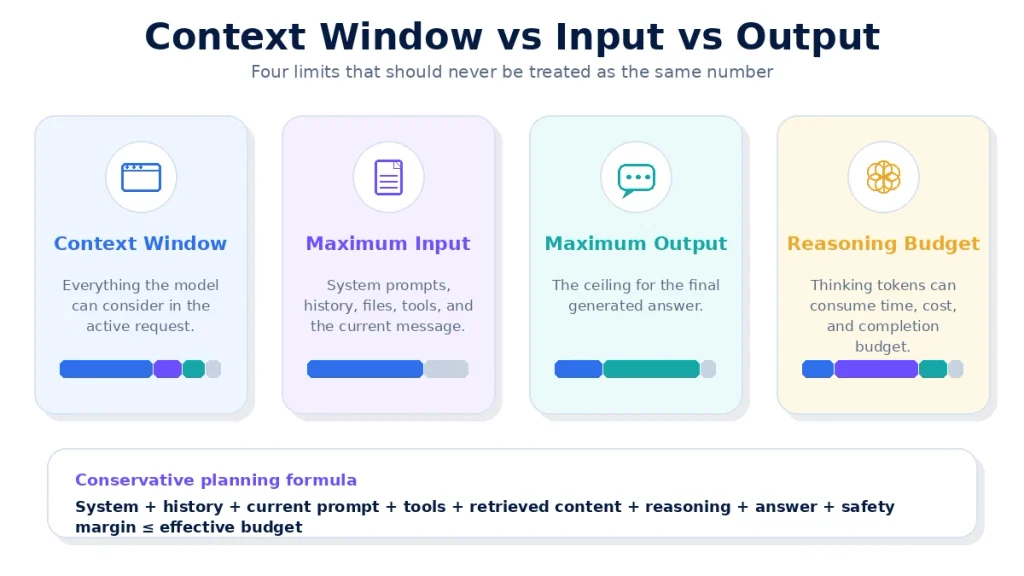
In many open-weight model cards, context length describes the total sequence capacity, including input and generated output. Hosted model pages can separately advertise:
- Context window.
- Maximum input.
- Maximum input in Thinking Mode.
- Maximum answer output.
- Maximum chain-of-thought length.
Do not assume that every published maximum can be reached simultaneously in one request. A service can publish the largest accepted input and largest possible output as separate ceilings for different request shapes.
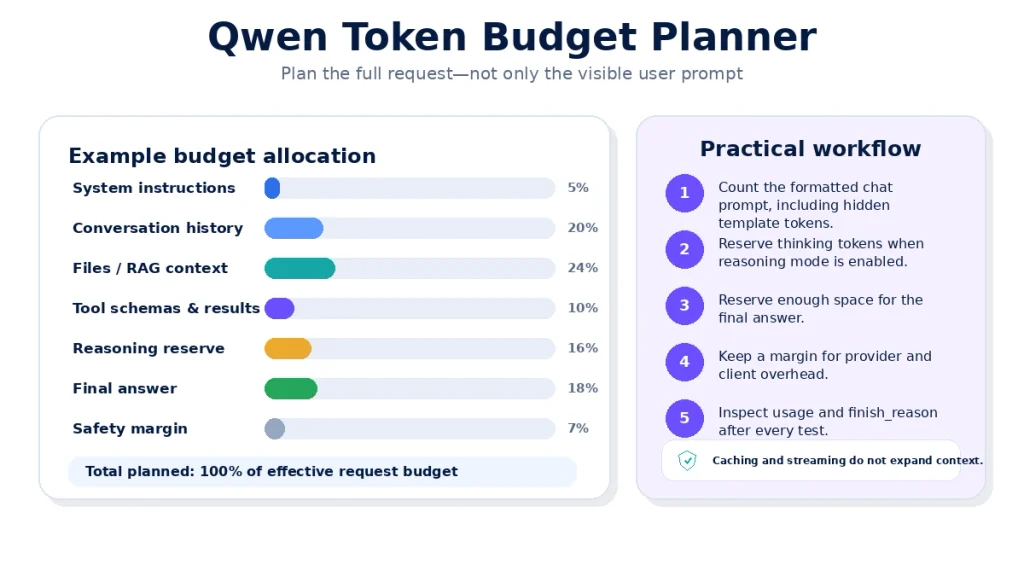
For conservative planning, use:
system instructions
+ conversation history
+ current user input
+ tool definitions
+ retrieved or uploaded content
+ expected reasoning
+ expected final answer
+ safety margin
≤ effective request budget
The provider’s actual validation rule remains authoritative.
What Counts Toward a Qwen Context Window?
The visible user message is only one part of the context.
- System and developer instructions.
- Previous user messages.
- Previous assistant answers retained in history.
- Preserved reasoning content when the API requires it.
- The current prompt.
- Role and message-boundary control tokens added by the chat template.
- Function and tool definitions.
- Structured-output or JSON schemas.
- Retrieved RAG chunks.
- Web search and extracted page content.
- File contents inserted into the prompt.
- Image, video, and audio tokens.
- Tool-call arguments and tool results returned to the model.
A long system prompt, large JSON schema, and several tools can consume thousands of tokens before the user submits any document.
Chat Templates Add Hidden Tokens
Qwen chat models wrap messages with special role and boundary markers.
QwenCloud’s current quickstart gives a useful example: the visible word Hi can be one raw text token, but the formatted chat input for qwen3.8-max becomes 11 tokens after role markers, message boundaries, the assistant-generation prompt, and the thinking marker are added.
This is why a generic text-token calculator can underestimate a real Qwen API request.
How Qwen Tokenization Works
Qwen uses byte-level Byte Pair Encoding to convert text into tokens. Official Qwen documentation gives these rough rules of thumb:
- Approximately 3–4 English characters per token.
- Approximately 1.5–1.8 Chinese characters per token.
These are estimates, not conversion guarantees. Arabic text, code, JSON, URLs, numbers, tables, and unusual formatting can tokenize very differently.
QwenCloud describes 1 million tokens as roughly 750,000 English words, but the exact number depends on the content and tokenizer.
For exact local counting, use the tokenizer associated with the specific checkpoint. For exact hosted billing counts, use the API response’s usage field.
Thinking Tokens and Reasoning Budgets
Thinking Mode creates a second output component before the visible answer.
QwenCloud can return reasoning through fields such as:
reasoning_contentin Chat Completions.reasoning_textevents in the Responses API.
Official QwenCloud token-counting documentation states that reasoning tokens count toward completion_tokens and are billed at the output-token rate.
Current model pages can therefore publish both:
- Maximum answer output.
- Maximum reasoning length.
For example, qwen3.8-max currently lists a maximum answer output of 131,072 and a maximum reasoning length of262,144 on its Model Studio page.
Use thinking_budget when the selected route supports it and you need to cap reasoning cost or latency. A lower budget can reduce cost but may also reduce quality on difficult tasks.
max_tokens vs max_completion_tokens vs max_new_tokens
| Parameter | Typical route | What it controls |
|---|---|---|
max_tokens | OpenAI-compatible APIs and some Anthropic-compatible clients | Usually the visible answer, but exact behavior can vary by model and protocol. |
max_completion_tokens | Supported QwenCloud OpenAI-compatible reasoning models | The combined completion budget, including chain-of-thought and final answer tokens. |
thinking_budget | Qwen thinking models | Maximum reasoning or chain-of-thought tokens. |
max_new_tokens | Hugging Face Transformers and local generation | Maximum number of newly generated tokens after the prompt. |
--max-model-len | vLLM | The serving engine’s assumed model context capacity, not the desired answer length. |
contextWindowSize | Qwen Code configuration | The context capacity Qwen Code assumes for the selected model. |
The parameter name alone is not sufficient. QwenCloud’s current OpenAI-compatible documentation says max_tokens controls the answer for most Qwen models, while max_completion_tokens includes both reasoning and final-answer tokens for supported recent Qwen Max, Plus, and Flash models.
On the Anthropic-compatible route, max_tokens for qwen3.8-max can represent the combined thinking and answer budget. Always read the protocol-specific API reference.
Maximum Output Is a Ceiling, Not a Target
Setting a high output limit does not force Qwen to use every available token.
Generation can end earlier because:
- The model reaches its natural end-of-sequence token.
- The answer is complete.
- A stop sequence is encountered.
- The model produces a tool call.
- A content-safety system interrupts generation.
- The client, proxy, or provider times out.
- The context budget becomes exhausted.
- The API’s configured output cap is reached.
When an OpenAI-compatible response reaches the configured completion limit, it commonly returns:
"finish_reason": "length"For detailed diagnosis, use Qwen API Errors, finish_reason, and Troubleshooting.
Qwen-Long and the 10-Million-Token Context
Qwen-Long is a specialized hosted model route for very large document collections. Current Alibaba Cloud documentation lists:
- Total context length up to 10 million tokens.
- Maximum output length of32,768 tokens.
- Up to100 file references in one request.
- Account-specific File IDs.
- Additional message-format restrictions in some configurations.
A 10M context does not mean Qwen-Long can return a 10M-token report. It means the model can receive and work across a very large input while the answer remains much smaller.
For many applications, retrieval and targeted document selection will be faster and less expensive than sending the maximum possible context on every request.
Images, Video, Audio, and Tools Consume Context
A multimodal Qwen context window is not reserved for text alone.
Images
Current QwenCloud vision documentation states that most recent vision-capable models estimate image tokens using:
image tokens ≈ height × width / (32 × 32) + 2Higher-resolution images therefore consume more input tokens. The actual image may also be resized according to the selected model and pixel settings.
Video and Audio
Video frames and audio duration are converted into model-specific token representations. Their limits depend on the Qwen vision or Omni model, frame-sampling strategy, duration, resolution, and API route.
Web and Tool Content
Web extractor results, search results, tool outputs, database rows, code-interpreter results, and RAG chunks can be appended to the conversation as input tokens.
A short user prompt can therefore produce a very large effective request after tools execute.
Does Context Cache Increase the Context Window?
No. Context caching can reuse computation for a repeated prompt prefix, reducing latency and cost. It does not increase the model’s logical context capacity.
Cached content still belongs to the context the model uses. The cache changes how the provider processes repeated tokens, not how many tokens the model can understand in one request.
The dedicated Qwen Context Caching Guide should own the detailed cache configuration, pricing, expiration, and provider-support matrix.
Does Streaming Increase the Qwen Output Limit?
No. Streaming changes how the answer is delivered. Tokens are sent incrementally instead of waiting for the complete response.
Streaming can improve perceived latency and reduce the risk of a client waiting for one very large response, but it does not override the model’s maximum output length.
Qwen Studio vs API vs Local Context Limits
| Access route | How the limit is determined | What the user controls |
|---|---|---|
| Qwen Studio | The product’s selected model, internal history management, files, tools, and account configuration | Usually limited control over raw token parameters |
| QwenCloud API | The model page, API protocol, account route, plan, and endpoint | Output parameters, thinking settings, message history, tools, and file strategy |
| Alibaba Cloud Model Studio | The Model ID, snapshot, region, workspace, protocol, and published context limits | Request parameters, region, logs, history, tools, and application architecture |
| Third-party provider | The provider’s own serving configuration | Depends on provider documentation and plan |
| Local model | Checkpoint configuration, inference engine, RoPE settings, KV cache, and available hardware | Potentially complete control, together with full operational responsibility |
Do not assume that a limit observed in Qwen Studio applies to an API, or that a third-party API exposes the complete native context of the underlying checkpoint.
Native Context vs Extended Context
A model’s native context is generally the safest baseline. Extended context uses a technique such as YaRN to extrapolate positional behavior beyond the native length.
Extended context can be valuable, but it introduces additional requirements:
- A compatible Transformers, vLLM, SGLang, or llama.cpp version.
- The correct RoPE-scaling configuration.
- A larger KV cache.
- More GPU or system memory.
- Longer prompt-processing latency.
- Quality and recall testing across the full intended length.
- Compatibility with the selected quantization and serving engine.
“Extensible to 1M” does not mean that every laptop, GGUF file, application, or API automatically enables a 1M-token window.
How YaRN Extends Qwen Context
YaRN is a RoPE-scaling method used by several Qwen releases to support longer sequences than their original native context.
For the original Qwen3-8B model, the official model card provides a vLLM example similar to:
vllm serve Qwen/Qwen3-8B \
  --rope-scaling '{"rope_type":"yarn","factor":4.0,"original_max_position_embeddings":32768}' \
  --max-model-len 131072
The correct factor depends on the native context and intended extended length. Do not reuse this exact command for every Qwen generation.
The official Qwen3 guidance also warns that static YaRN can reduce short-context performance. Enable it only when long contexts are genuinely required and test both short and long tasks.
Long Context Has a Hardware Cost
Increasing context length enlarges the KV cache used during inference. This can consume substantial GPU or system memory even when the model weights have been quantized.
A local runtime can therefore load the model successfully at 8K or32K context but fail or become extremely slow at262K or1M.
Common symptoms include:
- CUDA out-of-memory errors.
- KV-cache allocation failures.
- Very long time to first token.
- Heavy CPU or disk offloading.
- Reduced concurrent-request capacity.
- Lower generation speed as the active context grows.
The planned Qwen Hardware, VRAM, and Quantization Guide should contain the detailed KV-cache and hardware calculations.
A Large Context Window Does Not Guarantee Perfect Recall
A model can technically accept a long request while still missing information, confusing sections, or giving excessive attention to irrelevant text.
For important long-document work:
- Remove duplicate and irrelevant material.
- Preserve headings, page numbers, and document boundaries.
- Ask targeted questions rather than requesting one unrestricted summary.
- Use retrieval for large collections.
- Require citations to document sections.
- Test facts placed near the beginning, middle, and end.
- Compare the output with the original source.
- Measure accuracy instead of assuming that accepted input was fully understood.
Python Qwen Token Counter
The following example uses the exact tokenizer and chat template for a downloadable Qwen checkpoint.
from __future__ import annotations

from transformers import AutoTokenizer


MODEL_ID = "Qwen/Qwen3.8-27B"

messages = [
    {
        "role": "system",
        "content": "You are a concise technical assistant.",
    },
    {
        "role": "user",
        "content": "Explain the difference between a context window and an output limit.",
    },
]

tokenizer = AutoTokenizer.from_pretrained(MODEL_ID)

token_ids = tokenizer.apply_chat_template(
    messages,
    tokenize=True,
    add_generation_prompt=True,
)

print(f"Formatted prompt tokens: {len(token_ids):,}")
Install the dependency with:
pip install --upgrade transformersThis method counts the local chat-template representation. A hosted service can add different hidden instructions, tool definitions, or multimodal preprocessing, so use the API response’s usage.prompt_tokens for the provider’s final count.
Conservative Qwen Token Budget Calculator
This function provides a conservative planning estimate. It does not replace provider-side validation.
from dataclasses import dataclass


@dataclass(frozen=True)
class QwenTokenBudget:
    context_window: int
    provider_max_output: int
    prompt_tokens: int
    reasoning_reserve: int = 0
    safety_margin: int = 1024

    def available_output(self) -> int:
        remaining = (
            self.context_window
            - self.prompt_tokens
            - self.reasoning_reserve
            - self.safety_margin
        )
        return max(0, min(self.provider_max_output, remaining))


budget = QwenTokenBudget(
    context_window=1_000_000,
    provider_max_output=131_072,
    prompt_tokens=120_000,
    reasoning_reserve=16_384,
    safety_margin=2_048,
)

print(f"Conservative output cap: {budget.available_output():,} tokens")
The function assumes a shared conservative budget. Some hosted services publish maximum input and output values using a different internal accounting convention. Always keep the lower provider-approved result.
Qwen API Output-Limit Example
This OpenAI-compatible example caps the combined reasoning and answer output when the selected model and route support max_completion_tokens.
import os

from openai import OpenAI


client = OpenAI(
    api_key=os.environ["QWEN_API_KEY"],
    base_url=os.environ["QWEN_BASE_URL"],
)

response = client.chat.completions.create(
    model="qwen3.8-max",
    messages=[
        {
            "role": "user",
            "content": "Review this architecture and return a concise risk report.",
        }
    ],
    max_completion_tokens=8192,
    extra_body={
        "enable_thinking": True,
        "thinking_budget": 4096,
    },
)

message = response.choices[0].message

print(message.content)
print(response.usage)
Important points:
- Use environment variables for API credentials.
- Confirm that the selected route supports
max_completion_tokens. - Use
max_tokenswhen the exact provider documentation requires it. - Do not assume that setting 8,192 guarantees an 8,192-token answer.
- Inspect
usageandfinish_reason. - Stream very long responses when supported.
Local vLLM Context Configuration
The native Qwen3.8-27B context can be served through vLLM with an explicit maximum model length:
vllm serve Qwen/Qwen3.8-27B \
  --host 127.0.0.1 \
  --port 8000 \
  --max-model-len 262144 \
  --reasoning-parser qwen3
This command requests the native 262,144-token capacity. It does not guarantee that the available GPU memory can support that context with the desired concurrency.
Do not replace 262144 with 1000000 without following the exact Qwen3.8 model-card guidance, configuring the required context extension, confirming framework support, and testing memory usage and output quality.
Why a Qwen Response Gets Cut Off
| Symptom | Likely cause | Recommended action |
|---|---|---|
finish_reason: length | The configured completion limit or service output limit was reached | Increase the cap if supported, shorten the answer, or split the task. |
| Input-length range error | Prompt, history, files, or tool content exceeded the accepted input | Start a new session, summarize history, retrieve only relevant content, or choose a larger model. |
max_tokens exceeds supported range | The requested output cap is larger than the model allows | Use the maximum published for the exact provider route. |
| Answer stops without a length finish reason | Natural EOS, stop sequence, tool call, moderation, timeout, or provider interruption | Inspect the complete response metadata and logs. |
| Local server fails during a long prompt | Insufficient KV-cache memory or unsupported context setting | Reduce --max-model-len, concurrency, batch size, or use more memory. |
| Old conversation suddenly loses early details | The client truncated or summarized history | Inspect client compaction settings and start a controlled new session. |
| File content appears incomplete | Only part of the document was extracted, retrieved, or inserted | Inspect extraction, chunking, retrieval, and file-token counts. |
| Thinking consumes most of the output budget | The reasoning budget is too high or uncapped | Set thinking_budget or use a lower reasoning effort. |
How to Manage Long Qwen Conversations
Each new turn can resend most or all of the previous conversation. The input therefore grows even when the latest message is short.
Use one or more of these strategies:
- Truncation: Remove the oldest irrelevant turns.
- Summarization: Replace old turns with a verified compact summary.
- Retrieval: Store history externally and retrieve only relevant events.
- Session boundaries: Start a new conversation for a new task.
- State objects: Store structured facts separately from natural-language chat.
- Tool-result compression: Return only the fields the model needs.
- Output limits: Prevent unnecessarily long responses from expanding future turns.
Monitor usage.prompt_tokens rather than estimating conversation growth by the number of visible messages.
Qwen Code Context Window Problems
Qwen Code can apply its own model metadata and context-management logic. A provider may support a larger context than the client assumes, or the client may overestimate a local endpoint.
Current Qwen Code settings include:
contextWindowSizeto override the assumed model context.samplingParams.max_tokensto set a fixed output limit.QWEN_CODE_MAX_OUTPUT_TOKENSas an environment-based output cap.- Automatic context compaction for long sessions.
Do not set an override only because a model card advertises a larger number. The endpoint, runtime, and available KV-cache memory must support it.
For client-specific problems, read Qwen Code Troubleshooting.
Recommended Qwen Output Budgets by Task
The following values are editorial planning ranges, not official model limits.
| Task | Suggested answer budget | Reasoning reserve |
|---|---|---|
| Short factual answer | 512–2,048 tokens | Low or disabled unless needed |
| Article summary | 1,000–4,000 | Low to moderate |
| Detailed report | 4,000–12,000 | Moderate |
| Structured data extraction | Estimate from the expected number of records | Usually low |
| Code review | 4,000–16,000 | Moderate to high |
| Repository-scale coding task | 8,000–32,000 | High when the problem is complex |
| Long-form generation | Generate in sections rather than one maximum-length response | Task dependent |
| Complex mathematical or agentic task | Reserve sufficient answer space after the reasoning budget | Potentially high |
Using the largest possible output for every task increases cost, latency, and the amount of conversation history sent in later turns.
Long-Context Qwen Checklist
- Record the exact Model ID and snapshot.
- Record QwenCloud, Model Studio, third-party provider, or local runtime.
- Record the API protocol and Base URL.
- Verify the current context, input, output, and reasoning limits.
- Count the formatted chat prompt, not only raw user text.
- Include system instructions, tools, schemas, files, and RAG content.
- Reserve output and reasoning tokens.
- Keep a safety margin.
- Do not assume cached tokens disappear from context.
- Do not assume streaming increases the limit.
- Test information placed at the beginning, middle, and end.
- Use retrieval instead of sending irrelevant material.
- Monitor token usage, latency, output length, and cost.
- For local models, test KV-cache memory before production.
- Repeat the tests after changing the model, provider, runtime, or context configuration.
Frequently Asked Questions
What is the Qwen context window?
It depends on the exact model and route. Current Qwen models include 32K, 64K, 128K, 262K, 1M, and specialized 10M context options. Check the exact Model ID and provider rather than using one number for all Qwen models.
What is Qwen’s maximum output limit?
Current limits vary from approximately 8K to131K for commonly used Qwen models and hosted routes. Qwen3.8 Max currently supports up to131,072 answer tokens on its official Model Studio page, while Qwen-Long supports 32,768 output tokens despite its 10M context.
Which Qwen model has the largest context window?
Qwen-Long currently documents a total context length of up to10 million tokens. For current general-purpose Qwen models, Qwen3.8, Qwen3.7, and selected Plus orFlash routes commonly expose 1M-token contexts.
Does a 1M Qwen context allow a 1M-token answer?
No. Maximum answer output is a separate limit. Current 1M-context Qwen models commonly expose maximum outputs of64K or128K, depending on the route.
Does Qwen3.8 support a 1M context window?
Current Qwen3.8 open-weight model cards describe a native 262,144-token context with extension to approximately 1M. Current official hosted qwen3.8-max and qwen3.8-27b routes expose 1M context directly.
What does Qwen LM Output 248,320 mean?
It describes the model’s padded vocabulary-output dimension, not the maximum number of tokens in one response.
How many words are in 1 million Qwen tokens?
QwenCloud gives a rough estimate of approximately 750,000 English words. The true number depends on language, formatting, code, numbers, and the exact tokenizer.
Do Qwen thinking tokens count toward output usage?
Yes. Current QwenCloud documentation says reasoning tokens count toward completion_tokens and are billed at the output-token rate.
Should I use max_tokens or max_completion_tokens?
Use the parameter documented for the exact model and API protocol. For supported recent QwenCloud reasoning models, max_completion_tokens controls the combined reasoning and final-answer output, while max_tokens often controls only the answer.
Why does Qwen stop generating before the maximum?
The answer may be complete, reach an EOS or stop sequence, trigger a tool call or safety system, encounter a timeout, or hit a smaller client-side limit. Inspect finish_reason and the complete response metadata.
Can I extend a local Qwen model to 1M tokens?
Selected Qwen3.5, Qwen3.6, and Qwen3.8 model cards document extension from262,144 to approximately1M. Doing so requires the correct RoPE-scaling configuration, compatible software, substantial KV-cache memory, and quality testing.
Does quantization increase the context window?
Quantization can reduce model-weight memory, making more memory available for the KV cache, but it does not change the checkpoint’s trained context capability by itself. The runtime must still support the selected context and scaling configuration.
Does context caching increase Qwen’s token limit?
No. It reuses computation for repeated prefixes and can reduce latency and cost. It does not expand the logical context window.
Do Qwen images consume context tokens?
Yes. Images are converted into visual tokens. Higher resolution generally consumes more tokens, and multiple images share the model’s available context with text, history, tools, and output.
Why does Qwen Code report a different context limit?
Qwen Code can use built-in model metadata, a fallback value, or provider-specific settings. Verify the actual endpoint limit and use contextWindowSize only when an override is necessary and supported.
Conclusion
Qwen’s token limit cannot be summarized by one universal number.
- Current flagship hosted Qwen models can provide 1M-token context windows.
- Qwen3.8 Max can currently expose up to131,072 answer tokens.
- Qwen3.5 and Qwen3.6 open-weight models commonly support262,144 native context.
- Original Qwen3 checkpoints can use32,768 native context with YaRN extension.
- Qwen2.5 checkpoints commonly support128K context and8K generation.
- Qwen-Long supports up to10M context but only32,768 output tokens.
- Thinking, tools, files, conversation history, and multimodal inputs all affect token usage.
- QwenCloud, Model Studio, third-party providers, and local runtimes can expose different limits for similar model names.
- Extended context requires compatible software, memory, and testing.
- The advertised context window is a capacity ceiling, not proof of perfect recall or guaranteed output quality.
For production use, record the exact Model ID, provider, endpoint, plan, region, context window, output limit, reasoning limit, and client configuration. Count the formatted request, reserve room for reasoning and the answer, and verify the actual response through the API’s usage metadata.
Main Sources Used
- QwenCloud: qwen3.8-max
- QwenCloud: qwen3.8-27b
- QwenCloud: qwen3.7-plus
- QwenCloud: qwen3.6-27b
- QwenCloud: qwen3.5-397b-a17b
- QwenCloud: qwen3.5-omni-plus
- Alibaba Cloud Model Studio: qwen3.8-max
- Alibaba Cloud Model Studio: qwen3.7-max
- Alibaba Cloud Model Studio: qwen3.7-plus
- Alibaba Cloud Model Studio: qwen3.6-flash
- Alibaba Cloud Model Studio: Qwen-Long
- QwenCloud Token Counting
- QwenCloud OpenAI-Compatible Chat Reference
- QwenCloud Thinking Mode
- QwenCloud Vision Models and Multimodal Limits
- Official Qwen Tokenization Concepts
- Official Qwen3.8-27B Model Card
- Official Qwen3.8-2.4T-A95B Model Card
- Official Qwen3.6-27B Model Card
- Official Qwen3-8B Model Card
- Official Qwen2.5-7B-Instruct Model Card
- Official Qwen Code Configuration
Independence notice: Try-Qwen-AI.com is an independent Qwen resource and service. It is not affiliated with, endorsed by, or operated by Alibaba Group or the Qwen team.
“`html
Last verified: August 24, 2026
Evidence status: Documentation-Verified and Editorial Analysis
Qwen does not have one universal context window or output limit. Current Qwen models range from tens of thousands of tokens to 10 million tokens, depending on the exact Model ID, generation, provider, API route, region, and local runtime configuration.
Current hosted Qwen3.8 models can expose a 1-million-token context window with a maximum answer output of up to 131,072 tokens. Qwen3.5 and Qwen3.6 open-weight models commonly have a native context length of 262,144 tokens, while older Qwen3 and Qwen2.5 checkpoints may use 32K or128K context limits. The specialized Qwen-Long API supports a total context of up to 10 million tokens but limits output to 32,768 tokens.
Most important rule: Never infer a Qwen token limit from the family name alone. Verify the exact Model ID, provider, API protocol, plan, region, model page, and local serving configuration.
Terminology note: Context window, maximum input, maximum output, and maximum reasoning length are different values. A model can accept a very large input while allowing a much smaller final answer.
Qwen Context and Output Limits at a Glance
| Term | Meaning | Why it matters |
|---|---|---|
| Context window | The model or service’s advertised capacity for the current request or conversation state. | It limits how much text, history, files, tool content, and generated material can be considered. |
| Maximum input | The largest prompt and history accepted by a specific service route. | It can be smaller than the advertised context window. |
| Maximum output | The largest final answer the service permits the model to generate. | A 1M context window does not imply a 1M-token answer. |
| Maximum reasoning | The ceiling for hidden or returned thinking tokens when Thinking Mode is enabled. | Reasoning can consume substantial time and billable output tokens. |
| Native context | The context length directly supported or trained by the downloadable checkpoint. | It normally requires no RoPE-scaling extension. |
| Extended context | A longer context enabled through YaRN, another RoPE-scaling method, or a managed provider implementation. | It requires compatible software, sufficient memory, and quality testing. |
| Effective context | The amount of context that remains useful for a particular task. | A model can technically accept a long sequence without recalling every detail equally well. |
Current Hosted Qwen Context and Output Limits
The table below contains representative current values from official QwenCloud and Alibaba Cloud Model Studio pages. It is not a permanent catalog, and it does not cover every snapshot, region, plan, or specialist model.
| Model and route | Context | Maximum input | Maximum answer output | Maximum reasoning |
|---|---|---|---|---|
| qwen3.8-max — QwenCloud / Model Studio | 1,000,000 | 991K normal; 983K thinking | 131,072 | 262,144 |
| qwen3.8-27b — QwenCloud | 1,000,000 | 991K normal; 983K thinking | Approximately 131K | Approximately 262K |
| qwen3.7-plus — QwenCloud | 1,000,000 | 991K normal; 983K thinking | Approximately 131K | Approximately 262K |
| qwen3.7-plus — Alibaba Cloud Model Studio | 1,000,000 | 991,808 normal; 983,616 thinking | 65,536 | 262,144 |
| qwen3.7-max — Alibaba Cloud Model Studio | 1,000,000 | 991,808 normal; 983,616 thinking | 65,536 | 262,144 |
| qwen3.6-flash — Alibaba Cloud Model Studio | 1,000,000 | 991,808 normal; 983,616 thinking | 65,536 | 131,072 |
| qwen3.6-27b — QwenCloud model page | Approximately 262K | Approximately 260K normal; 258K thinking | Approximately 65K | Not listed on the checked model page |
| qwen3.5-397b-a17b — QwenCloud | Approximately 262K | Approximately 260K normal; 258K thinking | Approximately 65K | Approximately 81K |
| qwen3.5-omni-plus — QwenCloud | Approximately 262K | Approximately 196K | Approximately 65K | Not listed on the checked model page |
| qwen-long — Model Studio | Up to 10,000,000 | Subject to the Qwen-Long request and file rules | 32,768 | Not presented as a thinking model |
QwenCloud often displays rounded values such as 131K, 65K, and 262K. These commonly correspond to binary-style limits such as 131,072, 65,536, and 262,144 tokens.
Use these official pages to verify current values:
- QwenCloud qwen3.8-max model page
- QwenCloud qwen3.8-27b model page
- QwenCloud qwen3.7-plus model page
- Alibaba Cloud Model Studio qwen3.8-max model page
- Alibaba Cloud Model Studio qwen3.7-plus model page
- Alibaba Cloud Model Studio qwen3.7-max model page
- Alibaba Cloud Qwen-Long documentation
Why QwenCloud and Model Studio Limits Can Differ
A Model ID is only one part of the configuration. The effective limit can also depend on:
- The legal and technical provider serving the model.
- QwenCloud versus Alibaba Cloud Model Studio.
- Pay-as-you-go, Token Plan, Coding Plan, or another account route.
- OpenAI-compatible, Anthropic-compatible, Responses, or DashScope protocol.
- The region and service deployment scope.
- A rolling alias versus a dated snapshot.
- The provider’s dynamic context-extension configuration.
- The client application’s own context or output cap.
For example, QwenCloud’s current individual page for qwen3.7-plus displays an output ceiling of approximately 131K tokens, while the Alibaba Cloud Model Studio page for the same model label lists 65,536. This does not mean one number must be copied over the other. It means the route must be recorded with the Model ID.
What to Do When Official Qwen Pages Disagree
Official overview tables can lag behind individual model pages. At the time of this review, QwenCloud’s individual qwen3.6-27b page listed approximately 262K context and65K output, while a broader vision-model table listed 32K context and8K output for the same ID.
Use this priority order:
- The exact model page for the provider and region you are using.
- The current model details shown in your authenticated console.
- The endpoint-specific API reference.
- The dated snapshot documentation.
- A real test using synthetic data.
- General comparison or overview tables only as a secondary reference.
Record a screenshot or exported configuration for production systems because aliases and limits can change.
Open-Weight Qwen Context Lengths
Downloadable Qwen model cards describe the checkpoint’s native and extended context capabilities. These values do not automatically become the limits of every hosted API or local application.
| Open-weight checkpoint | Native context | Documented extension | Output guidance or limit |
|---|---|---|---|
| Qwen3.8-27B | 262,144 | Up to approximately 1,000,000 | The model card does not define one universal provider output cap; the current QwenCloud route lists approximately 131K. |
| Qwen3.8-2.4T-A95B | 262,144 | Up to 1,010,000 | The current managed Model Studio route lists 131,072 output tokens. |
| Qwen3.6-27B | 262,144 | Up to 1,010,000 | Local output is configured by the runtime within available context and memory; QwenCloud currently lists approximately 65K. |
| Qwen3.5-4B | 262,144 | Up to 1,010,000 | No single output cap applies to every local runtime and provider. |
| Qwen3-235B-A22B-Thinking-2507 | 262,144 | Check the exact model card and runtime | Thinking-only model; hosted routes can impose their own answer and reasoning ceilings. |
| Original Qwen3-8B | 32,768 | 131,072 with validated YaRN configuration | Official guidance recommends 32,768 output tokens for most queries and38,912 for complex benchmark tasks. |
| Qwen2.5-7B-Instruct | Full context up to131,072; default config prepared for32,768 | YaRN is required beyond the default local configuration | 8,192 generated tokens. |
Representative official model cards:
Do Not Confuse “LM Output” With Maximum Output Tokens
Current Qwen3.8 model cards contain architecture fields such as:
LM Output: 248,320 (Padded)This is not a claim that the model can generate 248,320 tokens in one answer. It describes the padded output vocabulary or language-model output-head dimension used by the architecture.
The maximum response length must be obtained from the model’s generation configuration, the provider’s model page, and the serving runtime—not from the LM Output architecture field.
Context Window vs Maximum Input vs Maximum Output
Different Qwen documents and providers use context terminology differently.
In many open-weight model cards, context length describes the total sequence capacity, including input and generated output. Hosted model pages can separately advertise:
- Context window.
- Maximum input.
- Maximum input in Thinking Mode.
- Maximum answer output.
- Maximum chain-of-thought length.
Do not assume that every published maximum can be reached simultaneously in one request. A service can publish the largest accepted input and largest possible output as separate ceilings for different request shapes.
For conservative planning, use:
system instructions
+ conversation history
+ current user input
+ tool definitions
+ retrieved or uploaded content
+ expected reasoning
+ expected final answer
+ safety margin
≤ effective request budget
The provider’s actual validation rule remains authoritative.
What Counts Toward a Qwen Context Window?
The visible user message is only one part of the context.
- System and developer instructions.
- Previous user messages.
- Previous assistant answers retained in history.
- Preserved reasoning content when the API requires it.
- The current prompt.
- Role and message-boundary control tokens added by the chat template.
- Function and tool definitions.
- Structured-output or JSON schemas.
- Retrieved RAG chunks.
- Web search and extracted page content.
- File contents inserted into the prompt.
- Image, video, and audio tokens.
- Tool-call arguments and tool results returned to the model.
A long system prompt, large JSON schema, and several tools can consume thousands of tokens before the user submits any document.
Chat Templates Add Hidden Tokens
Qwen chat models wrap messages with special role and boundary markers.
QwenCloud’s current quickstart gives a useful example: the visible word Hi can be one raw text token, but the formatted chat input for qwen3.8-max becomes 11 tokens after role markers, message boundaries, the assistant-generation prompt, and the thinking marker are added.
This is why a generic text-token calculator can underestimate a real Qwen API request.
How Qwen Tokenization Works
Qwen uses byte-level Byte Pair Encoding to convert text into tokens. Official Qwen documentation gives these rough rules of thumb:
- Approximately 3–4 English characters per token.
- Approximately 1.5–1.8 Chinese characters per token.
These are estimates, not conversion guarantees. Arabic text, code, JSON, URLs, numbers, tables, and unusual formatting can tokenize very differently.
QwenCloud describes 1 million tokens as roughly 750,000 English words, but the exact number depends on the content and tokenizer.
For exact local counting, use the tokenizer associated with the specific checkpoint. For exact hosted billing counts, use the API response’s usage field.
Thinking Tokens and Reasoning Budgets
Thinking Mode creates a second output component before the visible answer.
QwenCloud can return reasoning through fields such as:
reasoning_contentin Chat Completions.reasoning_textevents in the Responses API.
Official QwenCloud token-counting documentation states that reasoning tokens count toward completion_tokens and are billed at the output-token rate.
Current model pages can therefore publish both:
- Maximum answer output.
- Maximum reasoning length.
For example, qwen3.8-max currently lists a maximum answer output of 131,072 and a maximum reasoning length of262,144 on its Model Studio page.
Use thinking_budget when the selected route supports it and you need to cap reasoning cost or latency. A lower budget can reduce cost but may also reduce quality on difficult tasks.
max_tokens vs max_completion_tokens vs max_new_tokens
| Parameter | Typical route | What it controls |
|---|---|---|
max_tokens | OpenAI-compatible APIs and some Anthropic-compatible clients | Usually the visible answer, but exact behavior can vary by model and protocol. |
max_completion_tokens | Supported QwenCloud OpenAI-compatible reasoning models | The combined completion budget, including chain-of-thought and final answer tokens. |
thinking_budget | Qwen thinking models | Maximum reasoning or chain-of-thought tokens. |
max_new_tokens | Hugging Face Transformers and local generation | Maximum number of newly generated tokens after the prompt. |
--max-model-len | vLLM | The serving engine’s assumed model context capacity, not the desired answer length. |
contextWindowSize | Qwen Code configuration | The context capacity Qwen Code assumes for the selected model. |
The parameter name alone is not sufficient. QwenCloud’s current OpenAI-compatible documentation says max_tokens controls the answer for most Qwen models, while max_completion_tokens includes both reasoning and final-answer tokens for supported recent Qwen Max, Plus, and Flash models.
On the Anthropic-compatible route, max_tokens for qwen3.8-max can represent the combined thinking and answer budget. Always read the protocol-specific API reference.
Maximum Output Is a Ceiling, Not a Target
Setting a high output limit does not force Qwen to use every available token.
Generation can end earlier because:
- The model reaches its natural end-of-sequence token.
- The answer is complete.
- A stop sequence is encountered.
- The model produces a tool call.
- A content-safety system interrupts generation.
- The client, proxy, or provider times out.
- The context budget becomes exhausted.
- The API’s configured output cap is reached.
When an OpenAI-compatible response reaches the configured completion limit, it commonly returns:
"finish_reason": "length"For detailed diagnosis, use Qwen API Errors, finish_reason, and Troubleshooting.
Qwen-Long and the 10-Million-Token Context
Qwen-Long is a specialized hosted model route for very large document collections. Current Alibaba Cloud documentation lists:
- Total context length up to 10 million tokens.
- Maximum output length of32,768 tokens.
- Up to100 file references in one request.
- Account-specific File IDs.
- Additional message-format restrictions in some configurations.
A 10M context does not mean Qwen-Long can return a 10M-token report. It means the model can receive and work across a very large input while the answer remains much smaller.
For many applications, retrieval and targeted document selection will be faster and less expensive than sending the maximum possible context on every request.
Images, Video, Audio, and Tools Consume Context
A multimodal Qwen context window is not reserved for text alone.
Images
Current QwenCloud vision documentation states that most recent vision-capable models estimate image tokens using:
image tokens ≈ height × width / (32 × 32) + 2Higher-resolution images therefore consume more input tokens. The actual image may also be resized according to the selected model and pixel settings.
Video and Audio
Video frames and audio duration are converted into model-specific token representations. Their limits depend on the Qwen vision or Omni model, frame-sampling strategy, duration, resolution, and API route.
Web and Tool Content
Web extractor results, search results, tool outputs, database rows, code-interpreter results, and RAG chunks can be appended to the conversation as input tokens.
A short user prompt can therefore produce a very large effective request after tools execute.
Does Context Cache Increase the Context Window?
No. Context caching can reuse computation for a repeated prompt prefix, reducing latency and cost. It does not increase the model’s logical context capacity.
Cached content still belongs to the context the model uses. The cache changes how the provider processes repeated tokens, not how many tokens the model can understand in one request.
The dedicated Qwen Context Caching Guide should own the detailed cache configuration, pricing, expiration, and provider-support matrix.
Does Streaming Increase the Qwen Output Limit?
No. Streaming changes how the answer is delivered. Tokens are sent incrementally instead of waiting for the complete response.
Streaming can improve perceived latency and reduce the risk of a client waiting for one very large response, but it does not override the model’s maximum output length.
Qwen Studio vs API vs Local Context Limits
| Access route | How the limit is determined | What the user controls |
|---|---|---|
| Qwen Studio | The product’s selected model, internal history management, files, tools, and account configuration | Usually limited control over raw token parameters |
| QwenCloud API | The model page, API protocol, account route, plan, and endpoint | Output parameters, thinking settings, message history, tools, and file strategy |
| Alibaba Cloud Model Studio | The Model ID, snapshot, region, workspace, protocol, and published context limits | Request parameters, region, logs, history, tools, and application architecture |
| Third-party provider | The provider’s own serving configuration | Depends on provider documentation and plan |
| Local model | Checkpoint configuration, inference engine, RoPE settings, KV cache, and available hardware | Potentially complete control, together with full operational responsibility |
Do not assume that a limit observed in Qwen Studio applies to an API, or that a third-party API exposes the complete native context of the underlying checkpoint.
Native Context vs Extended Context
A model’s native context is generally the safest baseline. Extended context uses a technique such as YaRN to extrapolate positional behavior beyond the native length.
Extended context can be valuable, but it introduces additional requirements:
- A compatible Transformers, vLLM, SGLang, or llama.cpp version.
- The correct RoPE-scaling configuration.
- A larger KV cache.
- More GPU or system memory.
- Longer prompt-processing latency.
- Quality and recall testing across the full intended length.
- Compatibility with the selected quantization and serving engine.
“Extensible to 1M” does not mean that every laptop, GGUF file, application, or API automatically enables a 1M-token window.
How YaRN Extends Qwen Context
YaRN is a RoPE-scaling method used by several Qwen releases to support longer sequences than their original native context.
For the original Qwen3-8B model, the official model card provides a vLLM example similar to:
vllm serve Qwen/Qwen3-8B \
  --rope-scaling '{"rope_type":"yarn","factor":4.0,"original_max_position_embeddings":32768}' \
  --max-model-len 131072
The correct factor depends on the native context and intended extended length. Do not reuse this exact command for every Qwen generation.
The official Qwen3 guidance also warns that static YaRN can reduce short-context performance. Enable it only when long contexts are genuinely required and test both short and long tasks.
Long Context Has a Hardware Cost
Increasing context length enlarges the KV cache used during inference. This can consume substantial GPU or system memory even when the model weights have been quantized.
A local runtime can therefore load the model successfully at 8K or32K context but fail or become extremely slow at262K or1M.
Common symptoms include:
- CUDA out-of-memory errors.
- KV-cache allocation failures.
- Very long time to first token.
- Heavy CPU or disk offloading.
- Reduced concurrent-request capacity.
- Lower generation speed as the active context grows.
The planned Qwen Hardware, VRAM, and Quantization Guide should contain the detailed KV-cache and hardware calculations.
A Large Context Window Does Not Guarantee Perfect Recall
A model can technically accept a long request while still missing information, confusing sections, or giving excessive attention to irrelevant text.
For important long-document work:
- Remove duplicate and irrelevant material.
- Preserve headings, page numbers, and document boundaries.
- Ask targeted questions rather than requesting one unrestricted summary.
- Use retrieval for large collections.
- Require citations to document sections.
- Test facts placed near the beginning, middle, and end.
- Compare the output with the original source.
- Measure accuracy instead of assuming that accepted input was fully understood.
Python Qwen Token Counter
The following example uses the exact tokenizer and chat template for a downloadable Qwen checkpoint.
from __future__ import annotations

from transformers import AutoTokenizer


MODEL_ID = "Qwen/Qwen3.8-27B"

messages = [
    {
        "role": "system",
        "content": "You are a concise technical assistant.",
    },
    {
        "role": "user",
        "content": "Explain the difference between a context window and an output limit.",
    },
]

tokenizer = AutoTokenizer.from_pretrained(MODEL_ID)

token_ids = tokenizer.apply_chat_template(
    messages,
    tokenize=True,
    add_generation_prompt=True,
)

print(f"Formatted prompt tokens: {len(token_ids):,}")
Install the dependency with:
pip install --upgrade transformersThis method counts the local chat-template representation. A hosted service can add different hidden instructions, tool definitions, or multimodal preprocessing, so use the API response’s usage.prompt_tokens for the provider’s final count.
Conservative Qwen Token Budget Calculator
This function provides a conservative planning estimate. It does not replace provider-side validation.
from dataclasses import dataclass


@dataclass(frozen=True)
class QwenTokenBudget:
    context_window: int
    provider_max_output: int
    prompt_tokens: int
    reasoning_reserve: int = 0
    safety_margin: int = 1024

    def available_output(self) -> int:
        remaining = (
            self.context_window
            - self.prompt_tokens
            - self.reasoning_reserve
            - self.safety_margin
        )
        return max(0, min(self.provider_max_output, remaining))


budget = QwenTokenBudget(
    context_window=1_000_000,
    provider_max_output=131_072,
    prompt_tokens=120_000,
    reasoning_reserve=16_384,
    safety_margin=2_048,
)

print(f"Conservative output cap: {budget.available_output():,} tokens")
The function assumes a shared conservative budget. Some hosted services publish maximum input and output values using a different internal accounting convention. Always keep the lower provider-approved result.
Qwen API Output-Limit Example
This OpenAI-compatible example caps the combined reasoning and answer output when the selected model and route support max_completion_tokens.
import os

from openai import OpenAI


client = OpenAI(
    api_key=os.environ["QWEN_API_KEY"],
    base_url=os.environ["QWEN_BASE_URL"],
)

response = client.chat.completions.create(
    model="qwen3.8-max",
    messages=[
        {
            "role": "user",
            "content": "Review this architecture and return a concise risk report.",
        }
    ],
    max_completion_tokens=8192,
    extra_body={
        "enable_thinking": True,
        "thinking_budget": 4096,
    },
)

message = response.choices[0].message

print(message.content)
print(response.usage)
Important points:
- Use environment variables for API credentials.
- Confirm that the selected route supports
max_completion_tokens. - Use
max_tokenswhen the exact provider documentation requires it. - Do not assume that setting 8,192 guarantees an 8,192-token answer.
- Inspect
usageandfinish_reason. - Stream very long responses when supported.
Local vLLM Context Configuration
The native Qwen3.8-27B context can be served through vLLM with an explicit maximum model length:
vllm serve Qwen/Qwen3.8-27B \
  --host 127.0.0.1 \
  --port 8000 \
  --max-model-len 262144 \
  --reasoning-parser qwen3
This command requests the native 262,144-token capacity. It does not guarantee that the available GPU memory can support that context with the desired concurrency.
Do not replace 262144 with 1000000 without following the exact Qwen3.8 model-card guidance, configuring the required context extension, confirming framework support, and testing memory usage and output quality.
Why a Qwen Response Gets Cut Off
| Symptom | Likely cause | Recommended action |
|---|---|---|
finish_reason: length | The configured completion limit or service output limit was reached | Increase the cap if supported, shorten the answer, or split the task. |
| Input-length range error | Prompt, history, files, or tool content exceeded the accepted input | Start a new session, summarize history, retrieve only relevant content, or choose a larger model. |
max_tokens exceeds supported range | The requested output cap is larger than the model allows | Use the maximum published for the exact provider route. |
| Answer stops without a length finish reason | Natural EOS, stop sequence, tool call, moderation, timeout, or provider interruption | Inspect the complete response metadata and logs. |
| Local server fails during a long prompt | Insufficient KV-cache memory or unsupported context setting | Reduce --max-model-len, concurrency, batch size, or use more memory. |
| Old conversation suddenly loses early details | The client truncated or summarized history | Inspect client compaction settings and start a controlled new session. |
| File content appears incomplete | Only part of the document was extracted, retrieved, or inserted | Inspect extraction, chunking, retrieval, and file-token counts. |
| Thinking consumes most of the output budget | The reasoning budget is too high or uncapped | Set thinking_budget or use a lower reasoning effort. |
How to Manage Long Qwen Conversations
Each new turn can resend most or all of the previous conversation. The input therefore grows even when the latest message is short.
Use one or more of these strategies:
- Truncation: Remove the oldest irrelevant turns.
- Summarization: Replace old turns with a verified compact summary.
- Retrieval: Store history externally and retrieve only relevant events.
- Session boundaries: Start a new conversation for a new task.
- State objects: Store structured facts separately from natural-language chat.
- Tool-result compression: Return only the fields the model needs.
- Output limits: Prevent unnecessarily long responses from expanding future turns.
Monitor usage.prompt_tokens rather than estimating conversation growth by the number of visible messages.
Qwen Code Context Window Problems
Qwen Code can apply its own model metadata and context-management logic. A provider may support a larger context than the client assumes, or the client may overestimate a local endpoint.
Current Qwen Code settings include:
contextWindowSizeto override the assumed model context.samplingParams.max_tokensto set a fixed output limit.QWEN_CODE_MAX_OUTPUT_TOKENSas an environment-based output cap.- Automatic context compaction for long sessions.
Do not set an override only because a model card advertises a larger number. The endpoint, runtime, and available KV-cache memory must support it.
For client-specific problems, read Qwen Code Troubleshooting.
Recommended Qwen Output Budgets by Task
The following values are editorial planning ranges, not official model limits.
| Task | Suggested answer budget | Reasoning reserve |
|---|---|---|
| Short factual answer | 512–2,048 tokens | Low or disabled unless needed |
| Article summary | 1,000–4,000 | Low to moderate |
| Detailed report | 4,000–12,000 | Moderate |
| Structured data extraction | Estimate from the expected number of records | Usually low |
| Code review | 4,000–16,000 | Moderate to high |
| Repository-scale coding task | 8,000–32,000 | High when the problem is complex |
| Long-form generation | Generate in sections rather than one maximum-length response | Task dependent |
| Complex mathematical or agentic task | Reserve sufficient answer space after the reasoning budget | Potentially high |
Using the largest possible output for every task increases cost, latency, and the amount of conversation history sent in later turns.
Long-Context Qwen Checklist
- Record the exact Model ID and snapshot.
- Record QwenCloud, Model Studio, third-party provider, or local runtime.
- Record the API protocol and Base URL.
- Verify the current context, input, output, and reasoning limits.
- Count the formatted chat prompt, not only raw user text.
- Include system instructions, tools, schemas, files, and RAG content.
- Reserve output and reasoning tokens.
- Keep a safety margin.
- Do not assume cached tokens disappear from context.
- Do not assume streaming increases the limit.
- Test information placed at the beginning, middle, and end.
- Use retrieval instead of sending irrelevant material.
- Monitor token usage, latency, output length, and cost.
- For local models, test KV-cache memory before production.
- Repeat the tests after changing the model, provider, runtime, or context configuration.
Frequently Asked Questions
What is the Qwen context window?
It depends on the exact model and route. Current Qwen models include 32K, 64K, 128K, 262K, 1M, and specialized 10M context options. Check the exact Model ID and provider rather than using one number for all Qwen models.
What is Qwen’s maximum output limit?
Current limits vary from approximately 8K to131K for commonly used Qwen models and hosted routes. Qwen3.8 Max currently supports up to131,072 answer tokens on its official Model Studio page, while Qwen-Long supports 32,768 output tokens despite its 10M context.
Which Qwen model has the largest context window?
Qwen-Long currently documents a total context length of up to10 million tokens. For current general-purpose Qwen models, Qwen3.8, Qwen3.7, and selected Plus orFlash routes commonly expose 1M-token contexts.
Does a 1M Qwen context allow a 1M-token answer?
No. Maximum answer output is a separate limit. Current 1M-context Qwen models commonly expose maximum outputs of64K or128K, depending on the route.
Does Qwen3.8 support a 1M context window?
Current Qwen3.8 open-weight model cards describe a native 262,144-token context with extension to approximately 1M. Current official hosted qwen3.8-max and qwen3.8-27b routes expose 1M context directly.
What does Qwen LM Output 248,320 mean?
It describes the model’s padded vocabulary-output dimension, not the maximum number of tokens in one response.
How many words are in 1 million Qwen tokens?
QwenCloud gives a rough estimate of approximately 750,000 English words. The true number depends on language, formatting, code, numbers, and the exact tokenizer.
Do Qwen thinking tokens count toward output usage?
Yes. Current QwenCloud documentation says reasoning tokens count toward completion_tokens and are billed at the output-token rate.
Should I use max_tokens or max_completion_tokens?
Use the parameter documented for the exact model and API protocol. For supported recent QwenCloud reasoning models, max_completion_tokens controls the combined reasoning and final-answer output, while max_tokens often controls only the answer.
Why does Qwen stop generating before the maximum?
The answer may be complete, reach an EOS or stop sequence, trigger a tool call or safety system, encounter a timeout, or hit a smaller client-side limit. Inspect finish_reason and the complete response metadata.
Can I extend a local Qwen model to 1M tokens?
Selected Qwen3.5, Qwen3.6, and Qwen3.8 model cards document extension from262,144 to approximately1M. Doing so requires the correct RoPE-scaling configuration, compatible software, substantial KV-cache memory, and quality testing.
Does quantization increase the context window?
Quantization can reduce model-weight memory, making more memory available for the KV cache, but it does not change the checkpoint’s trained context capability by itself. The runtime must still support the selected context and scaling configuration.
Does context caching increase Qwen’s token limit?
No. It reuses computation for repeated prefixes and can reduce latency and cost. It does not expand the logical context window.
Do Qwen images consume context tokens?
Yes. Images are converted into visual tokens. Higher resolution generally consumes more tokens, and multiple images share the model’s available context with text, history, tools, and output.
Why does Qwen Code report a different context limit?
Qwen Code can use built-in model metadata, a fallback value, or provider-specific settings. Verify the actual endpoint limit and use contextWindowSize only when an override is necessary and supported.
Conclusion
Qwen’s token limit cannot be summarized by one universal number.
- Current flagship hosted Qwen models can provide 1M-token context windows.
- Qwen3.8 Max can currently expose up to131,072 answer tokens.
- Qwen3.5 and Qwen3.6 open-weight models commonly support262,144 native context.
- Original Qwen3 checkpoints can use32,768 native context with YaRN extension.
- Qwen2.5 checkpoints commonly support128K context and8K generation.
- Qwen-Long supports up to10M context but only32,768 output tokens.
- Thinking, tools, files, conversation history, and multimodal inputs all affect token usage.
- QwenCloud, Model Studio, third-party providers, and local runtimes can expose different limits for similar model names.
- Extended context requires compatible software, memory, and testing.
- The advertised context window is a capacity ceiling, not proof of perfect recall or guaranteed output quality.
For production use, record the exact Model ID, provider, endpoint, plan, region, context window, output limit, reasoning limit, and client configuration. Count the formatted request, reserve room for reasoning and the answer, and verify the actual response through the API’s usage metadata.
Main Sources Used
- QwenCloud: qwen3.8-max
- QwenCloud: qwen3.8-27b
- QwenCloud: qwen3.7-plus
- QwenCloud: qwen3.6-27b
- QwenCloud: qwen3.5-397b-a17b
- QwenCloud: qwen3.5-omni-plus
- Alibaba Cloud Model Studio: qwen3.8-max
- Alibaba Cloud Model Studio: qwen3.7-max
- Alibaba Cloud Model Studio: qwen3.7-plus
- Alibaba Cloud Model Studio: qwen3.6-flash
- Alibaba Cloud Model Studio: Qwen-Long
- QwenCloud Token Counting
- QwenCloud OpenAI-Compatible Chat Reference
- QwenCloud Thinking Mode
- QwenCloud Vision Models and Multimodal Limits
- Official Qwen Tokenization Concepts
- Official Qwen3.8-27B Model Card
- Official Qwen3.8-2.4T-A95B Model Card
- Official Qwen3.6-27B Model Card
- Official Qwen3-8B Model Card
- Official Qwen2.5-7B-Instruct Model Card
- Official Qwen Code Configuration
Last verified: August 24, 2026
Evidence status: Documentation-Verified and Editorial Analysis