
If Qwen Code is not working, avoid reinstalling or deleting ~/.qwen immediately. The visible error may come from the installation, Node.js, authentication, Model Provider, Base URL, network, TLS, streaming timeout, local-model template, MCP server, sandbox, project configuration, IDE integration, or terminal interface.
Quick answer: Preserve your Git state and settings, run
qwen --versionandnode --version, then start Qwen Code withqwen --safe-mode. Inside the CLI, run/statusand/doctor. If Safe Mode works, an extension, hook, skill, MCP server, memory file, permission rule, project setting, or sandbox configuration is causing the failure. If it still fails, test the API key, Base URL, Model ID, and provider directly.
This guide covers the official Qwen Code terminal application and its VS Code Companion. It does not cover crashes in the consumer Qwen Studio app or general Qwen API integrations that do not use Qwen Code.
Independent verification note: Try-Qwen-AI.com is an independent resource. Qwen Code changes rapidly, and behavior can differ by version, operating system, provider, model, runtime, and project configuration. Record your exact version and reproduction steps before changing several layers at once.
What This Guide Covers
| Layer | Typical symptom | Primary check |
|---|---|---|
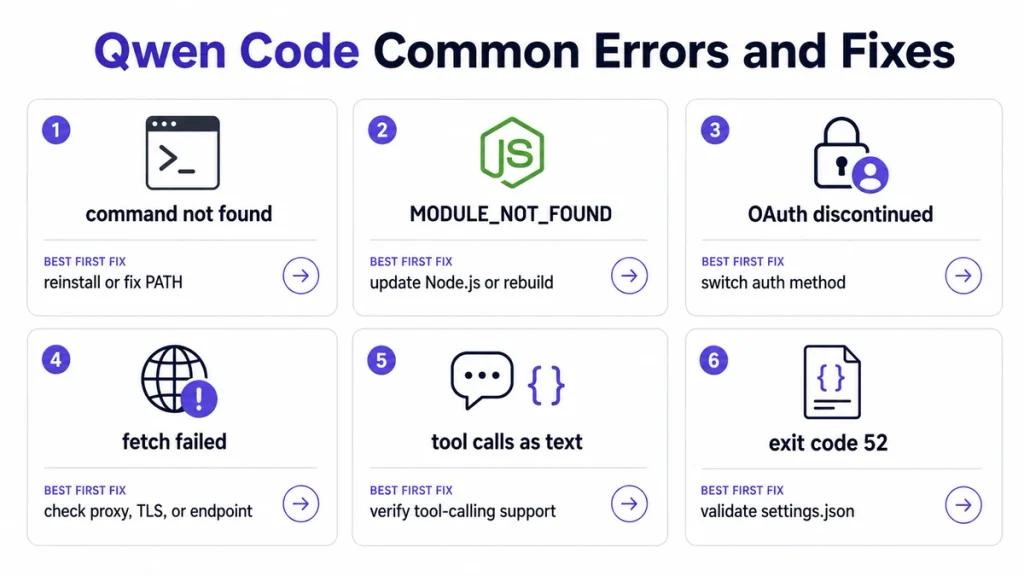
| Installation | qwen: command not found | PATH, installation method, and terminal restart |
| Runtime | MODULE_NOT_FOUND or startup crash | Node.js version, dependencies, and build |
| Authentication | OAuth discontinued, invalid key, or blank startup UI | /auth, /doctor, and security.auth.selectedType |
| Provider | Model not found or 401/404 response | API key, Base URL, region, protocol, and Model ID |
| Network | fetch failed, certificate, or proxy error | Proxy, corporate CA, TLS, DNS, and firewall |
| Streaming | Body timeout or no final finish reason | Request timeout, stream idle timeout, and maximum lifetime |
| Tool calling | Tool syntax appears as text or no file is modified | Model capability, runtime template, and structured tool metadata |
| MCP | Disconnected server or missing tools | /mcp, command or URL, environment, and timeout |
| Permissions | Operation not permitted or repeated confirmation | Sandbox, folder trust, approval mode, and file permissions |
| Context | Qwen forgets instructions or becomes slow | /memory, QWEN.md, compaction, and conversation size |
| IDE | VS Code panel is disconnected | CLI test, workspace count, extension version, and IDE environment variables |
| Automation | No prompt in CI or non-zero exit code | Headless mode, CI variables, authentication, and run budgets |
Preserve Your Work Before Troubleshooting
Qwen Code can modify files, maintain project-scoped sessions, load project settings, and keep durable memory. Preserve the current project state before resetting anything.
- Stop the current agent turn if it is repeatedly failing.
- Run
git status. - Review
git diffand save a patch when necessary. - Record the current objective and the last verified result.
- Copy the exact error message.
- Record the Qwen Code, Node.js, provider, model, and operating-system versions.
- Back up the user and project
settings.jsonfiles. - Do not publish or copy API keys from
.envor settings files.
A simple Git backup is:
git status
git diff > qwen-code-before-troubleshooting.patch
Qwen Code uses both user-level and project-level configuration:
~/.qwen/settings.json
./.qwen/settings.json
Do not delete the entire ~/.qwen directory as a first fix. It can contain settings, sessions, memory, OAuth data for MCP servers, logs, and project history.
60-Second Qwen Code Diagnosis
- Check the executable: run
qwen --version. - Check Node.js when using npm: run
node --version. Qwen Code’s current npm installation requires Node.js 22 or later. - Start from the project directory: run
qwen. - Inside Qwen Code, run
/statusand/doctor. - Test Safe Mode: exit and run
qwen --safe-mode. - Start a clean session and send one short request.
- Use
/authand/modelto verify the active provider and model. - Use
/status pathsto locate the session and debug files. - If only the IDE fails, test the same task in a normal terminal.
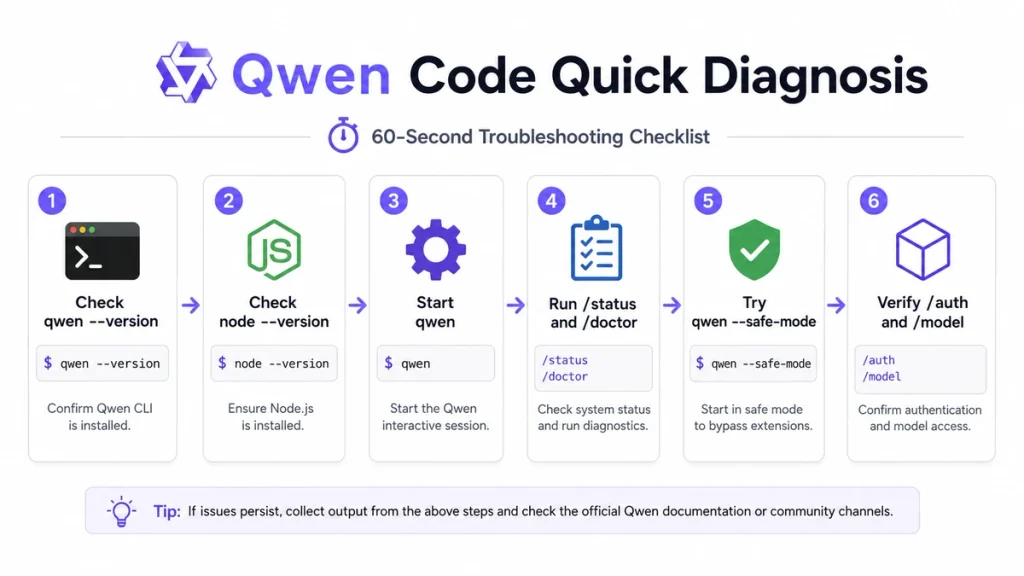
Safe Mode disables ambient customizations such as project context files, hooks, extensions, skills, configured MCP servers, custom subagents, memory features, permission rules, and sandbox settings for that session. If the error disappears, restore those components one at a time.
Identify the Failing Layer
| Symptom | Most likely layer | Best first action |
|---|---|---|
qwen is not recognized | Installation or PATH | Verify the install method and open a new terminal. |
| The CLI opens but cannot authenticate | Authentication or provider | Run /doctor and reconfigure with /auth. |
| Authentication failed and the UI no longer appears | Persisted auth selection | Remove security.auth.selectedType from settings. |
fetch failed | Network, proxy, TLS, or endpoint | Test the endpoint and inspect the underlying Node.js error. |
| Model responds but tools do not run | Model, runtime template, or tool metadata | Run a harmless tool test and inspect structured tool calls. |
| Only one MCP tool fails | MCP server or tool implementation | Open /mcp and run the underlying operation directly. |
| All custom features fail | Settings, project trust, or Safe Mode | Check folder trust and configuration scope. |
| Qwen becomes slow in one repository | File crawling, context, LSP, or tools | Add a .qwenignore and test a small project. |
| VS Code fails but terminal works | IDE Companion | Check /ide status and restart the integrated terminal. |
| No interactive prompt appears in CI | CI detection | Use headless mode or remove an unnecessary CI_* variable. |
Qwen Command Not Found
The error can appear as:
qwen: command not found
'qwen' is not recognized as an internal or external command
First identify how Qwen Code was installed.
Standalone installation
Rerun the official standalone installer, then close and reopen the terminal so PATH changes take effect.
Linux or macOS:
curl -fsSL https://qwen-code-assets.oss-cn-hangzhou.aliyuncs.com/installation/install-qwen-standalone.sh | bashWindows PowerShell:
irm https://qwen-code-assets.oss-cn-hangzhou.aliyuncs.com/installation/install-qwen-standalone.ps1 | iexGlobal npm installation
node --version
npm install -g @qwen-code/qwen-code@latest
npm prefix -g
Ensure the npm global binary directory is included in PATH. Then open a new terminal and run:
qwen --versionFind conflicting installations
macOS or Linux:
which -a qwenWindows:
where.exe qwenMultiple returned paths can mean that an older standalone or npm installation runs before the version you just installed.
Node.js, MODULE_NOT_FOUND, and Build Errors
The standalone installer includes its managed runtime. A manual npm installation currently requires Node.js 22 or later.
node --version
npm --version
qwen --version
If Node.js is too old, update it through the official Node.js installer or your version manager, then reinstall Qwen Code.
When running Qwen Code from source, an error such as MODULE_NOT_FOUND normally means dependencies are missing or the project has not been built:
npm install
npm run build
npm run start
Do not run source-build commands inside a normal globally installed package directory. Use them only in a cloned Qwen Code repository.
How to Update Qwen Code
| Installation method | Update method |
|---|---|
| Standalone | Rerun the official standalone installer. |
| npm global | npm install -g @qwen-code/qwen-code@latest |
| Homebrew | brew update && brew upgrade qwen-code |
| Source build | Pull the latest repository changes, install dependencies, and rebuild. |
After updating:
- Restart the terminal.
- Run
qwen --version. - Start with
qwen --safe-mode. - Run
/doctor. - Test one short request before restoring a long session.
Qwen Code Broke After an Update
An update can expose an obsolete configuration, change a provider template, add a timeout guard, or conflict with an extension.
- Save the old and new version numbers.
- Run the new version in Safe Mode.
- Check both user and project settings.
- Review provider entries under
modelProviders. - Check whether Coding Plan offered a model-configuration update.
- Disable extensions, hooks, MCP servers, and custom memory files one at a time.
- For a standalone installation, use
/doctor rollbackwhen an immediate rollback is necessary.
/doctor rollback applies to standalone installs. It is not a conversation-history rollback; use session and rewind commands for chat state.
Authentication Errors
Current Qwen Code authentication is configured through /auth. The main choices are:
- Alibaba ModelStudio: Coding Plan, Token Plan, or Standard API Key.
- Third-party Providers.
- Custom Provider for a local server, proxy, or unsupported provider.
Start Qwen Code and run:
/doctor
/auth
/model
Record:
- Authentication type.
- Provider.
- Region.
- Model ID.
- Base URL.
- The environment-variable name used for the key.
Do not print the full API key into screenshots or public logs.
Qwen OAuth Was Discontinued
The former Qwen OAuth free tier was discontinued on April 15, 2026 and is no longer a selectable option in the current /auth dialog.
If Qwen Code displays:
Qwen OAuth free tier was discontinued on 2026-04-15Switch to one of the current authentication routes:
- Alibaba Cloud Coding Plan.
- Alibaba Cloud Token Plan.
- Alibaba Cloud Model Studio Standard API Key.
- A supported third-party provider.
- A custom or self-hosted provider.
Do not keep debugging a legacy OAuth browser flow after the service has been retired.
API Key, Base URL, and Region Errors
A valid key can fail when paired with the wrong endpoint or plan.
| Configuration | China endpoint | International endpoint |
|---|---|---|
| Coding Plan | https://coding.dashscope.aliyuncs.com/v1 | https://coding-intl.dashscope.aliyuncs.com/v1 |
Coding Plan uses a dedicated endpoint that differs from the standard DashScope-compatible endpoint.
Check the following pairings:
- The key belongs to the selected plan.
- The endpoint belongs to the same region.
- The Model ID is supported by that plan and region.
- The provider protocol matches the endpoint.
- The environment variable is available to the process that launches Qwen Code.
Use the dedicated Qwen Code authentication guide for the full provider-specific setup.
Qwen Code UI Does Not Appear After Failed Authentication
Qwen Code may persist the failed authentication type in settings.json. On restart, the CLI can retry that broken configuration before displaying the normal UI.
- Close Qwen Code.
- Back up
~/.qwen/settings.json. - Also inspect
./.qwen/settings.jsonin the current project. - Remove the
security.auth.selectedTypeproperty. - Restart Qwen Code.
- Use
/authto configure a valid provider.
Do not remove the entire settings file when one field is responsible for the startup loop.
Model Provider Configuration Errors
Qwen Code currently expects each modelProviders entry to be an array of model definitions.
The current shape is:
{
  "modelProviders": {
    "openai": [
      {
        "id": "model-id",
        "name": "Display Name",
        "baseUrl": "https://provider.example.com/v1",
        "envKey": "PROVIDER_API_KEY"
      }
    ]
  }
}
An older Preview configuration could wrap models inside an object containing protocol and models. In a migrated version-4 settings file, that old shape can be skipped. Convert it to the current bare array form.
Other common configuration errors include:
- A missing
id. - An incorrect provider key such as using a custom name without
providerProtocol. - An
envKeythat does not exist. - A Base URL containing the full Chat Completions path rather than the provider’s
/v1base. - A model selected in
model.namethat is absent from the provider list. - A project-level setting overriding the user-level configuration.
A Known-Good Provider Configuration
The following example configures the international Alibaba Cloud Coding Plan without storing the key directly inside settings.json:
{
  "modelProviders": {
    "openai": [
      {
        "id": "qwen3-coder-plus",
        "name": "Qwen3-Coder Plus",
        "description": "Qwen3-Coder through Alibaba Cloud Coding Plan",
        "baseUrl": "https://coding-intl.dashscope.aliyuncs.com/v1",
        "envKey": "BAILIAN_CODING_PLAN_API_KEY",
        "generationConfig": {
          "timeout": 300000
        }
      }
    ]
  },
  "security": {
    "auth": {
      "selectedType": "openai"
    }
  },
  "model": {
    "name": "qwen3-coder-plus"
  }
}
Store the secret in:
# ~/.qwen/.env
BAILIAN_CODING_PLAN_API_KEY=replace-with-your-real-key
When using a project-level .qwen/.env, add it to .gitignore. Change the endpoint when using the China region or another provider.
Connection, Proxy, and TLS Errors
Common certificate errors include:
UNABLE_TO_GET_ISSUER_CERT_LOCALLY
UNABLE_TO_VERIFY_LEAF_SIGNATURE
unable to get local issuer certificate
A corporate proxy may inspect TLS and replace the server certificate with one signed by the organization’s root CA. Node.js must trust that CA.
export NODE_EXTRA_CA_CERTS=/absolute/path/to/corporate-root-ca.crt
qwen
For a proxy:
qwen --proxy http://proxy.example.com:8080You can also configure the root proxy setting in settings.json.
For a trusted self-hosted laboratory endpoint with a self-signed certificate, Qwen Code supports --insecure or QWEN_TLS_INSECURE=1. This disables certificate verification and should not be used with public networks or production credentials.
Prefer importing the correct CA certificate over disabling TLS verification.
Request Timeout and Streaming Errors
Qwen Code currently applies several separate timeout layers for OpenAI-compatible providers:
| Timeout | Default | Purpose |
|---|---|---|
| Request timeout | 120,000 ms | Per model request; configured in generationConfig.timeout or QWEN_CODE_API_TIMEOUT_MS. |
| Stream idle timeout | 240,000 ms | Maximum silence between streamed chunks; configured with QWEN_STREAM_IDLE_TIMEOUT_MS. |
| Stream maximum lifetime | 900,000 ms | Total upstream waiting time for one stream; configured with QWEN_STREAM_MAX_LIFETIME_MS. |
| Foreground shell timeout | 120,000 ms when not configured | Maximum time for a foreground shell command. |
| MCP request timeout | 600,000 ms | Per MCP server request unless overridden. |
A reasonable environment configuration for slow coding tasks is:
QWEN_CODE_API_TIMEOUT_MS=300000
QWEN_STREAM_IDLE_TIMEOUT_MS=300000
QWEN_STREAM_MAX_LIFETIME_MS=1200000
Do not write streamMaxLifetimeMs into settings.json; the current implementation reads the two stream guards from environment variables.
A longer timeout does not correct a dead server, unsupported Model ID, malformed stream, or broken proxy. Increase it only after confirming that the endpoint is still making progress.
Model Stream Ended Without a Finish Reason
This message means Qwen Code received part of a streamed response but did not receive the expected terminal completion state.
Possible causes include:
- The provider closed the stream early.
- A reverse proxy or VPN interrupted SSE.
- The stream idle or lifetime timeout fired.
- A local OpenAI-compatible server emitted a non-standard final chunk.
- The model runtime failed during Tool Calling.
- A client or framework modified the stream.
- Test the provider directly with a minimal streaming request.
- Disable the proxy or gateway temporarily.
- Increase the timeout only when chunks are genuinely slow.
- Test a current official hosted model.
- Update the local server and its chat template.
- Start a clean Qwen Code session.
- Preserve the partial response as diagnostic evidence, not as completed work.
429, 503, and Model Fallbacks
Qwen Code can use an ordered fallback list when the main model encounters capacity errors such as 429, 503, or 529.
{
  "model": {
    "modelFallbacks": "supported-model-a,supported-model-b"
  }
}
The list currently accepts up to three fallback Model IDs and requires a restart after configuration.
Fallbacks do not fix:
- An invalid API key.
- A wrong Base URL.
- An invalid request.
- A model without Tool Calling.
- A broken local template.
- A permission or billing error.
Test each fallback for tool use, context, output, modalities, latency, and cost before production use.
Local Model and Self-Hosted Endpoint Problems
Connecting successfully to Ollama, vLLM, SGLang, llama.cpp, LM Studio, MLX, or another OpenAI-compatible server proves only that the endpoint is reachable. It does not prove that the model and runtime support Qwen Code’s agent workflow.
Verify:
- The model supports structured Tool Calling.
- The server exposes OpenAI-compatible tool metadata.
- The correct chat template is loaded.
- The context window is configured correctly.
- The server returns a terminal streaming response.
- The quantized model retains acceptable tool-use behavior.
- The selected reasoning mode is compatible with tools.
Start with a harmless test:
Read package.json and tell me only the package name. Do not edit anything.If Qwen prints XML-like or JSON-like Tool Call text without executing the read operation, the server probably returned text rather than structured tool_calls.
Tool Calls Appear as Text
Examples include output resembling:
<tool_call>
{"name":"read_file","arguments":{"path":"package.json"}}
</tool_call>
Qwen Code cannot execute text merely because it resembles a tool request. The provider must return the tool call through the structured API field expected by the client.
- Verify Tool Calling support in the model card.
- Update the local inference runtime.
- Use the model’s correct tool-capable chat template.
- Test the raw API response outside Qwen Code.
- Disable custom ReAct or stop-word templates that conflict with Qwen reasoning.
- Test a supported hosted Qwen Coder model as a control.
Do not ask Qwen Code to parse arbitrary tool-shaped text and execute it automatically. That bypasses structured validation and creates a security risk.
Qwen Code Says It Changed Files but Did Not
This can happen when the model describes an edit but no file-edit tool was executed, the edit was rejected, the workspace is untrusted, or the provider does not support Tool Calling correctly.
- Run
git statusandgit diff. - Open
/toolsand confirm edit tools are available. - Check the active approval mode.
- Check whether the folder is trusted.
- Review the transcript for a rejected or failed tool call.
- Test a one-line edit in a disposable file.
- Inspect the raw provider response when using a local model.
Use the filesystem and Git as the source of truth. A model statement such as “I updated the file” is not evidence that a write reached disk.
Tool Result and tool_call_id Errors
An OpenAI-compatible provider can reject history when a Tool Call is not followed by a matching Tool Result.
Typical causes include:
- A stream disconnected after the assistant requested a tool.
- A framework removed the assistant Tool Call message.
- The Tool Result uses the wrong
tool_call_id. - A local runtime emitted malformed arguments.
- A resumed session contains orphaned tool history.
Preserve the project state, then test the same task in a clean session. Do not manually invent a Tool Result for an action that may or may not have executed.
For legacy OpenAI-compatible runtimes whose Tool Result template does not understand content-part arrays, the advanced toolResultContentFormat setting can be changed from parts to string. Use this only after verifying that the runtime requires the legacy string format.
Shell Commands and Permission Errors
Errors such as Permission denied or Operation not permitted can come from the operating system, the sandbox, folder trust, or the approval policy.
- Run the harmless command directly in the same shell.
- Check file and directory ownership.
- Check whether the target is outside the workspace.
- Check the current Sandbox configuration.
- Check the approval mode and permission rules.
- Grant the smallest required permission.
Do not solve a routine file-permission problem by launching the entire agent as root or Administrator. Qwen Code would inherit access to system files, credentials, services, and destructive commands.
Sandbox and Trusted Folder Problems
A Sandbox can block writes outside the project, access to temporary directories, network calls, or unsupported operations. Exit code 44 indicates a fatal Sandbox failure.
When Folder Trust is enabled, an untrusted workspace runs in a restricted mode:
- Project
.qwen/settings.jsonis ignored. - Project
.envfiles are ignored. - Extension management is restricted.
- Tool auto-acceptance is disabled.
- Automatic memory loading from local settings is disabled.
Use /trust or /permissions to inspect the current workspace decision. Trust only repositories you have reviewed; project configuration can define tools, hooks, MCP servers, environment values, and instructions.
Approval Modes and Unsafe Automation
| Mode | Behavior | Best troubleshooting use |
|---|---|---|
| Plan | Read-only analysis | Inspect a new or damaged project without making changes. |
| Ask Permissions | Requires approval for edits and shell commands | Safest normal mode while reproducing a problem. |
| Auto-Edit | Automatically applies edits but asks before shell commands | Useful after file-edit behavior has been verified. |
| Auto | A classifier evaluates risky operations | Controlled autonomous work in a trusted project. |
| YOLO | Automatically approves all actions | Only isolated and fully trusted automation. |
During troubleshooting, use Plan or Ask Permissions mode. Do not enable YOLO merely to hide repeated permission prompts; those prompts may be revealing a wrong path, untrusted repository, or unsafe command.
MCP Server Troubleshooting
Open the MCP management dialog:
/mcpCheck the server’s connection state, tools, prompts, and logs.
| Symptom | Likely cause | Fix |
|---|---|---|
| Disconnected | Wrong URL, command, transport, or timeout | Verify the endpoint or executable and increase the server timeout. |
| Stdio server will not start | Relative command, wrong cwd, missing dependency, or environment | Use an absolute command path and test it outside Qwen Code. |
EADDRINUSE | Another process already uses the server port | Stop the process or choose another port. |
| No tools discovered | Server did not expose tools or filters excluded them | Inspect includeTools, excludeTools, and the server schema. |
| Tool hangs | Remote server, network, or tool process stopped responding | Set a finite timeout and test the operation directly. |
| Environment variable missing | GUI and shell environments differ | Expose the variable to the process that launches Qwen Code. |
| OAuth callback fails | Redirect URL is not reachable | Configure the correct callback and reverse proxy when remote. |
Restart Qwen Code after adding an MCP server if the current session was already running.
MCP Tools Are Missing or Not Executing
- Open
/mcpand confirm the server is connected. - Open
/toolsand confirm the tool is registered. - Check global
mcp.allowedandmcp.excludedrules. - Check server-specific
includeToolsandexcludeTools. - Check permission and trust settings.
- Run the server’s underlying operation manually.
- Start Qwen Code in Safe Mode to confirm whether another customization causes a conflict.
MCP OAuth tokens are stored in a protected local file by default but are not encrypted unless encrypted storage is enabled. On shared machines, set:
QWEN_CODE_FORCE_ENCRYPTED_FILE_STORAGE=trueDo not paste MCP bearer tokens directly into a repository-tracked settings file.
Qwen Code Is Slow in a Large Project
Slow startup, file completion, or @ search can be caused by scanning build directories, dependencies, generated files, logs, or large monorepos.
- Create a
.qwenignorefile. - Exclude
node_modules, build outputs, caches, logs, coverage, and generated assets. - Check whether Git ignore rules are being respected.
- Disable fuzzy file search if basic exclusions are insufficient.
- Disable recursive file search only as a last resort.
- Test without LSP and MCP servers.
- Use
/doctor memoryto inspect process memory.
A basic .qwenignore might include:
node_modules/
dist/
build/
coverage/
.cache/
.next/
vendor/
*.log
tmp/
Do not exclude source directories simply to improve speed. Confirm which files Qwen must understand for the task.
Qwen Code Forgets Context or Instructions
“Forgetting” can refer to several different systems:
| System | Purpose | Troubleshooting command |
|---|---|---|
| Conversation history | Current session messages and tool results | /compress, /compress-fast, or a new session |
| QWEN.md | Durable project or personal instructions | /memory |
| Auto-memory | Best-effort facts saved across sessions | /memory, /remember, and /dream |
| Project session | Stored conversation state scoped to a directory | --continue or --resume |
| Model context | Maximum tokens the provider can process | Check the provider model’s contextWindowSize |
If Qwen does not follow QWEN.md:
- Open
/memoryand verify the file is loaded. - Place the file in the project root or
~/.qwen/. - Remove conflicting instructions from multiple QWEN.md files.
- Use clear and testable rules.
- Use
/rememberfor durable facts and/dreamto run memory consolidation.
Auto-memory is best-effort. Put requirements that must always apply in QWEN.md and version-control the project file when appropriate.
Session History and Resume Problems
Qwen Code sessions are project-scoped. Running the CLI from another directory can show a different session history.
Resume the most recent session for the current project:
qwen --continueResume a specific session:
qwen --resume SESSION_IDHeadless session data is stored under a project-specific path inside:
~/.qwen/projects/<sanitized-project-path>/chatsWhen a session appears missing:
- Return to the original project directory.
- Check the current path with
pwdorGet-Location. - Use the session-listing commands available in your current version.
- Check whether chat recording was disabled.
- Do not delete project chat files before backing them up.
VS Code Companion Not Connecting
The current VS Code extension requires VS Code 1.96.0 or later.
- Test Qwen Code in a normal terminal.
- Ensure one workspace folder is open in VS Code.
- Update VS Code and the Qwen Code extension.
- Restart the integrated terminal after installing the extension.
- Inside Qwen Code, run
/ide status. - Run
/ide installwhen the Companion needs reinstalling. - Use “Qwen Code: Run” from the Command Palette.
- If using a container, confirm that
host.docker.internalresolves or map the host correctly.
The integrated terminal needs to inherit:
QWEN_CODE_IDE_WORKSPACE_PATH
QWEN_CODE_IDE_SERVER_PORT
If the terminal version works but the extension does not, avoid changing the model or API key until the IDE connection layer has been isolated.
LSP Problems
Language Server Protocol support is experimental and must be enabled when launching Qwen Code.
qwen --experimental-lspIf the LSP server does not start:
- Run the server binary manually, such as
clangd --version. - Ensure the binary is in PATH or use an absolute path.
- Trust the workspace.
- Check that the file language matches the configured server.
- Allow time for project indexing.
- Increase the startup timeout for a slow server.
- Start Qwen Code with
--experimental-lsp --debug.
Search the current debug log:
rg "LSP|Native LSP|clangd|connection closed" ~/.qwen/debug/latestQwen Code Not Interactive in CI
Qwen Code can detect a CI environment when variables such as CI, CONTINUOUS_INTEGRATION, or a variable beginning with CI_ are present. It then avoids the interactive UI.
If a non-CI variable happens to begin with CI_, temporarily remove it:
env -u CI_TOKEN qwenFor real CI and automation, use Headless Mode instead of forcing an interactive terminal:
qwen -p "Review the current changes and report blocking issues"Headless environments should use an API key or Coding Plan configuration rather than a browser-dependent authentication flow.
Headless Mode and Exit Codes
Useful Headless Mode controls include:
--continueto resume the most recent project session.--resume SESSION_IDto resume a specific session.--max-session-turnsto cap turns.--max-wall-timeto cap total runtime.--max-tool-callsto cap tool activity.--output-format jsonorstream-jsonfor automation.
| Exit code | Error type | Meaning |
|---|---|---|
| 41 | FatalAuthenticationError | Authentication failed. |
| 42 | FatalInputError | Input is missing or invalid in non-interactive mode. |
| 44 | FatalSandboxError | Docker, Podman, Seatbelt, or Sandbox failed. |
| 52 | FatalConfigError | A configuration file is invalid. |
| 53 | FatalTurnLimitedError | The maximum session-turn limit was reached. |
Use these codes in scripts rather than parsing human-readable terminal text.
Terminal, tmux, Mouse, and Link Problems
Trackpad scroll changes prompt history
tmux can convert wheel input into Up and Down arrow sequences. Qwen Code then interprets the movement as prompt-history navigation.
Use the terminal-buffer settings and supported keyboard scrolling, or adjust tmux mouse bindings.
Right-click, links, or native text selection do not work
Qwen Code’s mouse tracking captures terminal mouse events. To restore native terminal handling, set:
{
  "ui": {
    "mouseTracking": false
  }
}
Restart Qwen Code after changing the setting. Disabling mouse tracking also disables the associated in-app mouse interactions.
Use Safe Mode to Isolate Customizations
Safe Mode is the fastest way to determine whether the core CLI works without project and user customizations.
qwen --safe-modeOr:
QWEN_CODE_SAFE_MODE=true qwenSafe Mode disables ambient:
- Context files.
- Hooks.
- Extensions.
- Skills.
- Configured MCP servers.
- Custom subagents.
- Permission rules.
- Memory features.
- Sandbox settings.
If Qwen Code works in Safe Mode:
- Re-enable the project QWEN.md.
- Re-enable project settings.
- Re-enable MCP servers one at a time.
- Re-enable extensions, skills, and hooks individually.
- Repeat the same minimal request after each change.
Do not combine Safe Mode with --yolo while diagnosing an untrusted project. CLI approval flags can still take effect.
Invalid settings.json and Configuration Conflicts
An invalid configuration can terminate Qwen Code with exit code 52.
- Check braces, commas, quotes, and value types.
- Compare user and project settings.
- Remove obsolete fields copied from old Preview documentation.
- Confirm that arrays and objects use the current structure.
- Move API keys to environment variables.
- Use Safe Mode to bypass the broken project configuration temporarily.
Use /settings for the interactive editor and /config for supported scalar settings. Arrays and objects still require direct editing of settings.json.
Reinstall Qwen Code Safely
Reinstall only after PATH, authentication, configuration, Safe Mode, and provider tests have been completed.

npm reinstall
npm uninstall -g @qwen-code/qwen-code
npm cache verify
npm install -g @qwen-code/qwen-code@latest
qwen --version
Standalone uninstall
Linux or macOS:
curl -fsSL https://qwen-code-assets.oss-cn-hangzhou.aliyuncs.com/installation/uninstall-qwen-standalone.sh | bashWindows:
irm https://qwen-code-assets.oss-cn-hangzhou.aliyuncs.com/installation/uninstall-qwen-standalone.ps1 | iexThe standalone uninstaller preserves ~/.qwen by default. This allows a clean binary reinstall without automatically deleting configuration and sessions.
Debugging and Log Collection
Inside Qwen Code, run:
/status
/status paths
/doctor
/stats
/stats tools
For general debug logging:
qwen --debugDebug output is available under the runtime debug directory, commonly:
~/.qwen/debug/latestOpenAI-compatible request and response logging can be enabled temporarily:
{
  "model": {
    "enableOpenAILogging": true,
    "openAILoggingDir": "~/qwen-logs",
    "openAILogRetentionDays": 1
  }
}
Security warning: API logs can contain prompts, source code, tool arguments, Tool Results, model responses, and headers. Store them securely, use the shortest necessary retention, redact before sharing, and disable logging after the investigation.
/doctor memory --snapshot writes a V8 Heap Snapshot that may contain prompts, file contents, API keys, and Tool Results. Never upload it publicly without inspecting and sanitizing it.
What Not to Do
- Do not delete
~/.qwenbefore backing it up. - Do not change the model, provider, runtime, template, and Qwen Code version simultaneously.
- Do not run Qwen Code as root or Administrator as a general fix.
- Do not disable TLS verification for a public or production endpoint.
- Do not store API keys in a tracked project file.
- Do not use YOLO Mode in an unreviewed repository.
- Do not trust Tool Call text that was not returned as structured metadata.
- Do not assume a model statement proves that a file was edited.
- Do not increase every timeout to zero or unlimited without monitoring.
- Do not publish raw logs, Heap Snapshots, settings, tokens, or private repository content.
How to Report a Qwen Code Bug
Search the official Qwen Code issue tracker before opening a duplicate report. Inside Qwen Code, /bug can begin the reporting workflow.
Include:
- Qwen Code version.
- Installation method.
- Node.js and npm versions when applicable.
- Operating system and architecture.
- Terminal, IDE, or CI environment.
- Authentication type.
- Provider, region, Base URL category, and Model ID.
- Whether Safe Mode fixes the problem.
- Whether a direct provider request works.
- Exact error and exit code.
- Request ID when available.
- Timeout configuration.
- MCP, LSP, Sandbox, and extension state.
- Minimal reproduction steps.
- Redacted debug log.
A useful report looks like:
1. Start Qwen Code 0.x.x in macOS arm64.
2. Authenticate with the international Coding Plan.
3. Select qwen3-coder-plus.
4. Open a clean repository with no project settings.
5. Ask: "Read package.json and return the package name."
6. The stream stops after 240 seconds with ETIMEDOUT.
7. The direct provider request succeeds.
8. qwen --safe-mode produces the same failure.
9. Request timeout: 300000 ms.
10. Stream idle timeout: 240000 ms.
Never include the actual API key, private source files, environment secrets, authentication tokens, or unredacted company data.
Frequently Asked Questions
Why is Qwen Code not working?
The problem may be the installation, Node.js, authentication, provider, Base URL, Model ID, network, TLS, timeout, Tool Calling, MCP, Sandbox, project configuration, IDE, or local model runtime. Start with /doctor and qwen --safe-mode.
Why does the qwen command not exist?
The CLI may not be installed, the PATH change may not have reached the current terminal, or another Node.js environment may contain the package. Reinstall through the original method, open a new terminal, and inspect which -a qwen or where.exe qwen.
What Node.js version does Qwen Code require?
The current npm installation requires Node.js 22 or later. The official standalone installer manages its own runtime.
How do I update Qwen Code?
Rerun the standalone installer, use npm install -g @qwen-code/qwen-code@latest, run brew upgrade qwen-code, or pull and rebuild when running from source.
Why does Qwen Code say OAuth was discontinued?
The previous Qwen OAuth free tier ended on April 15, 2026. Run /auth and select Alibaba ModelStudio, a third-party provider, or a custom provider.
Why does my Qwen Code API key fail?
The key may be invalid, unavailable to the process, tied to another plan or region, or paired with the wrong Base URL. Run /doctor and confirm the environment-variable name rather than printing the key.
Why does Qwen Code show fetch failed?
Node.js could not reach or trust the endpoint. Check the URL, proxy, DNS, firewall, corporate CA, self-signed certificate, and the underlying TLS error.
What does Model stream ended without a finish reason mean?
The streamed response ended before Qwen Code received its terminal completion state. Check the provider, proxy, stream timeouts, local runtime, and chat template. Treat the partial result as incomplete.
Why does Qwen Code print tool calls instead of running them?
The local model or serving template may be returning Tool Call syntax as text rather than structured API metadata. Verify model Tool Calling support and inspect the raw provider response.
Why does Qwen Code say it changed files when nothing changed?
The model may have described an edit without executing the edit tool, or the tool was blocked or failed. Check git diff, /tools, approval mode, folder trust, and the transcript.
How do I fix a disconnected MCP server?
Open /mcp, verify the command or URL, use an absolute executable path for Stdio, check cwd and environment variables, and increase the finite timeout when the server is merely slow.
Why does Qwen Code forget my project instructions?
Open /memory and confirm QWEN.md is loaded. Remove conflicting memory files, make instructions specific, and use /remember or /dream for auto-memory issues.
How do I resume a Qwen Code session?
Run Qwen Code from the original project directory and use qwen --continue for the latest session or qwen --resume SESSION_ID for a specific session.
Why is Qwen Code slow in a large repository?
It may be scanning dependencies, build files, logs, generated assets, LSP indexes, or large Tool Results. Add a .qwenignore, reduce irrelevant context, and test without LSP or MCP.
How do I run Qwen Code in Safe Mode?
Run qwen --safe-mode or launch it with QWEN_CODE_SAFE_MODE=true. If the problem disappears, re-enable custom components individually.
Why does Qwen Code not show an interactive prompt in CI?
Qwen Code detects CI, CONTINUOUS_INTEGRATION, and variables beginning with CI_. Use Headless Mode or temporarily unset a misleading non-CI variable.
What does Qwen Code exit code 41 mean?
Exit code 41 is FatalAuthenticationError. Check the authentication method, key, endpoint, plan, and region.
What does exit code 44 mean?
Exit code 44 is FatalSandboxError. Inspect Docker, Podman, Seatbelt, Sandbox configuration, and host permissions.
What does exit code 52 mean?
Exit code 52 is FatalConfigError. Validate user and project settings.json files and remove obsolete or malformed configuration.
Can I reinstall Qwen Code without deleting sessions?
Yes. The official standalone uninstaller preserves ~/.qwen by default. Back up that directory before making manual changes.
Official Sources and Verification
- Official Qwen Code repository
- Qwen Code Quickstart and installation
- Official Qwen Code Troubleshooting guide
- Qwen Code authentication
- Qwen Code settings and timeout reference
- Qwen Code Model Providers
- Qwen Code commands, Doctor, Status, and Exit Codes
- Qwen Code MCP configuration and troubleshooting
- Qwen Code Approval Modes
- Qwen Code Trusted Folders
- Qwen Code memory and QWEN.md troubleshooting
- Qwen Code Headless Mode
- Qwen Code LSP support and debugging
- Qwen Code VS Code Companion
- Official Qwen Code uninstall instructions
- Official Qwen function-calling guidance for self-hosted models
Verification status: Installation requirements, authentication options, Qwen OAuth retirement, configuration locations, Safe Mode, timeout defaults, stream guards, Model Provider structure, MCP behavior, Folder Trust, Approval Modes, session paths, IDE requirements, CI detection, Exit Codes, and uninstall behavior were checked against current official Qwen Code documentation on August 23, 2026. Local-model Tool Calling symptoms are runtime-dependent; the model, quantization, API server, chat template, and Qwen Code version must be evaluated together.
Last verified: August 23, 2026.
[…] For client-specific problems, read Qwen Code Troubleshooting. […]